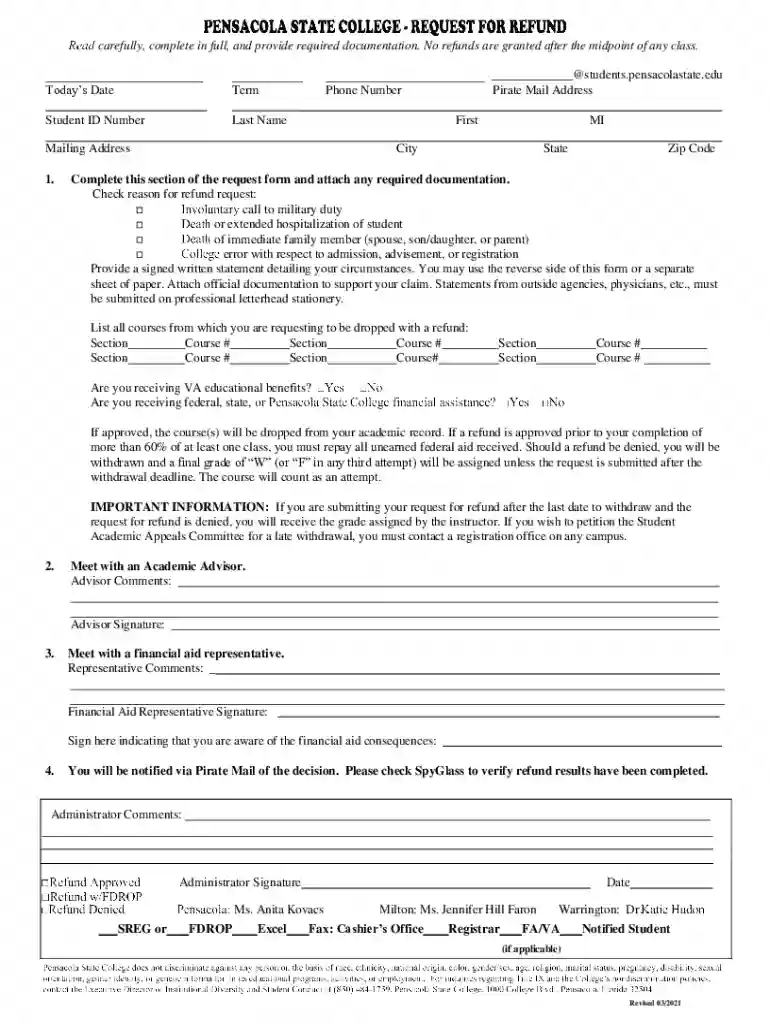
psc piratemail Preview on Page 1

Psc piratemail 2026

Here's how it works

  • 01. Edit your psc piratemail online

    Type text, add images, blackout confidential details, add comments, highlights and more.

  • 02. Sign it in a few clicks

    Draw your signature, type it, upload its image, or use your mobile device as a signature pad.

  • 03. Share your form with others

    Send piratemail via email, link, or fax. You can also download it, export it or print it out.

How to use or fill out psc piratemail with our platform

Form edit decoration
9.5
Ease of Setup
DocHub User Ratings on G2
9.0
Ease of Use
DocHub User Ratings on G2
  1. Click ‘Get Form’ to open the psc piratemail in the editor.
  2. Begin by entering today's date and your term at the top of the form. This helps establish the context for your request.
  3. Fill in your Student ID Number, Last Name, First Name, Mailing Address, and Pirate Mail Address. Ensure all information is accurate to avoid delays.
  4. Provide your phone number and complete the City, State, and Zip Code fields.
  5. In the 'Check reason for refund request' section, select one of the options that apply to your situation. Be sure to attach any required documentation.
  6. Write a detailed statement explaining your circumstances. You can use the reverse side of this form or attach a separate sheet if needed.
  7. List all courses from which you are requesting a drop with a refund by filling in each corresponding section and course number.
  8. Indicate whether you are receiving VA educational benefits or federal/state aid as applicable.
  9. Sign where indicated to acknowledge understanding of financial aid consequences and submit your completed form through our platform.

Start using our platform today for free to streamline your psc piratemail completion!

See more psc piratemail versions

We've got more versions of the psc piratemail form. Select the right psc piratemail version from the list and start editing it straight away!

VersionsForm popularityFillable & printable
20214.9 Satisfied (60 Votes)
20124.2 Satisfied (70 Votes)

be ready to get more

Complete this form in 5 minutes or less

Got questions?

We have answers to the most popular questions from our customers. If you can't find an answer to your question, please contact us.

Log in to your DocHub account and import your piratemail psc to our editor using one of its upload methods - from your device, cloud storage, secure URL, or your DocHub folders if you have already managed your form before. Open our editor, click the Sign key in the top toolbar, and decide on your signing method. You can use an image of your handwritten signature, draw it, type in your name, or use a QR code as an alternative.

If you are looking for a state-specific psc piratemail sample, you can find it in our DocHub Forms & Templates catalog. Use the search field, enter your form’s name, and search through the results for your state. You may also filter out irrelevant results while browsing our catalog by categories.

Security and compliance

At DocHub, your data security is our priority. We follow HIPAA, SOC2, GDPR, and other standards, so you can work on your documents with confidence.

Related links

PirateMail | Pensacola State College | (850) 484-1000

PirateMail is Pensacola State Colleges student email system. It is the primary means of communication between the college and our students.

Learn more
If you believe that this page should be taken down, please follow our DMCA take down process here