Co jdf1335 2026

Get Form
jdf 1335 form Preview on Page 1

Here's how it works

01. Edit your jdf 1335 form online
Type text, add images, blackout confidential details, add comments, highlights and more.
02. Sign it in a few clicks
Draw your signature, type it, upload its image, or use your mobile device as a signature pad.
03. Share your form with others
Send colorado limited appearance attorney via email, link, or fax. You can also download it, export it or print it out.

How to use or fill out co jdf1335 with our platform

Form edit decoration
9.5
Ease of Setup
DocHub User Ratings on G2
9.0
Ease of Use
DocHub User Ratings on G2
  1. Click ‘Get Form’ to open the co jdf1335 in the editor.
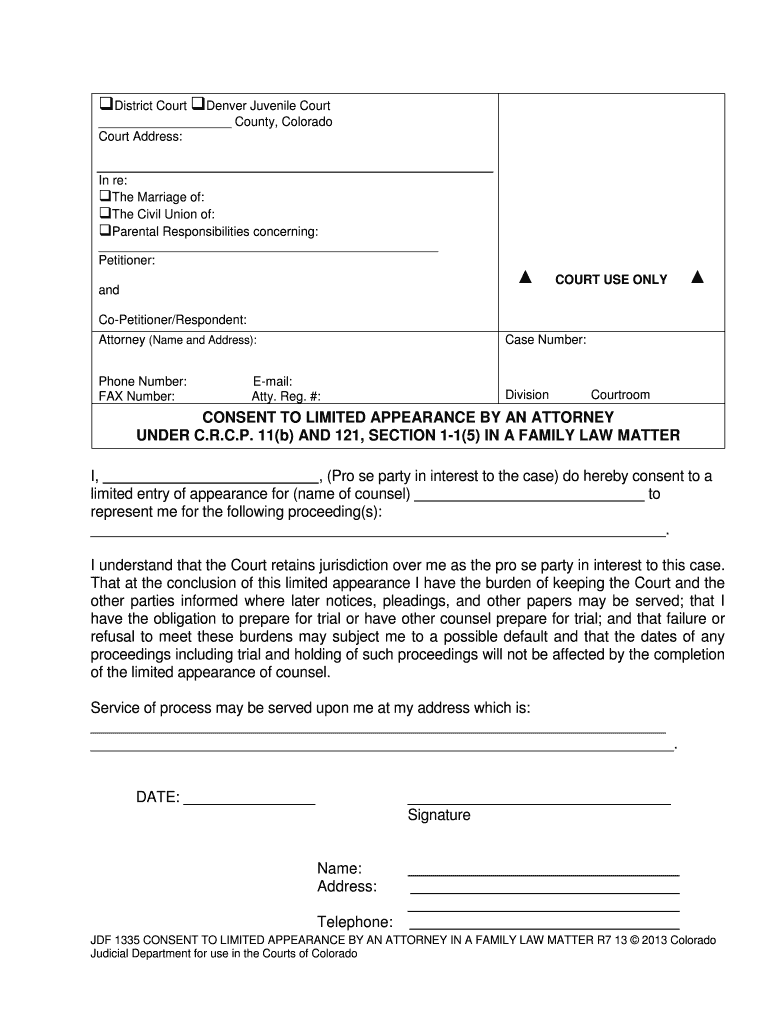
  2. Begin by entering the court address and case details at the top of the form. Ensure you specify whether it pertains to marriage, civil union, or parental responsibilities.
  3. Fill in your name as the Petitioner and provide details for the Co-Petitioner/Respondent. Include any attorney information if applicable.
  4. In the section for consent to limited appearance, clearly state your name and the name of your counsel. Specify which proceedings they will represent you in.
  5. Complete your contact information, including address, phone number, and email. This ensures that all parties can reach you regarding court matters.
  6. Finally, sign and date the form at the bottom to validate your consent and ensure compliance with court requirements.

Start using our platform today to fill out your co jdf1335 form online for free!

See more co jdf1335 versions

We've got more versions of the co jdf1335 form. Select the right co jdf1335 version from the list and start editing it straight away!
Versions Form popularity Fillable & printable
2013 4.8 Satisfied (141 Votes)
be ready to get more

Complete this form in 5 minutes or less

Get form

Got questions?

We have answers to the most popular questions from our customers. If you can't find an answer to your question, please contact us.
Contact us

Most eSignature solutions require users to have a paid subscription. With DocHub, there are two ways for you to create an electronic signature to your jdf 1335 free of charge:

  • You can do it during a 7-day trial period;
  • You can subscribe to a free plan.

The second option, however, has restrictions on the number of signatures, sign requests, emails, and documents for adjusting available per month. You can check for full information here.

If you go for analog methods of completing your jdf 1335, it is simple to download your file for printing. Search DocHub’s Forms & Templates catalog to locate the exact document template you need and open it for editing or download it on your device in the format of your liking. It is possible to complete your form electronically and put your handwritten signature on it after printing or eSign your document with DocHub.

An order to show cause (O.S.C.), is a court order or the demand of a judge requiring a party to justify or explain why the court should or should not grant a motion or a relief.
Rule 21 - Change of Venue or Judge (a) Change of Venue. (1) For Fair or Expeditious Trial. The place of trial may be changed when the court in its sound discretion determines that a fair or expeditious trial cannot take place in the county or district in which the trial is pending. (2) The Motion for Change of Venue.
At a show-cause hearing, the complaining party must produce evidence demonstrating probable cause that the defendant committed the crime. The hearing has three possible outcomes: 1) the complaint is dismissed, 2) the complaint is issued, or 3) the complaint is continued.

Security and compliance

At DocHub, your data security is our priority. We follow HIPAA, SOC2, GDPR, and other standards, so you can work on your documents with confidence.

Learn more
ccpa2
pci-dss
gdpr-compliance
hipaa
soc-compliance

People also ask

A judicial officer may issue an order to show cause why a case should not be dismissed for failure to prosecute or failure to comply with these rules, the Federal Rules of Civil Procedure, or a court order.
Simply fill out the response form, telling the court why you disagree with the other partys position. When you file the response, you will be asked to pay a filing fee. You do not need to prove your case in the response; you simply need to tell the court what you believe to be true.
On motion and upon such terms as are just, the court may relieve a party or his legal representative from a final judgment, order, or proceeding for the following reasons: (1) Mistake, inadvertence, surprise, or excusable neglect; (2) fraud (whether heretofore denominated intrinsic or extrinsic), misrepresentation, or
An entry of appearance shall state (a) the identity of the party for whom the appearance is made; (b) the attorneys office address; (c) the attorneys telephone number; (d) the attorneys E-Mail address; and (e) the attorneys registration number. (2)Withdrawal From an Active Case.
Lastly, after service is performed by your chosen process server, you need to make sure that they fill out a form called a Return of Service or Affidavit of Service. This form must be signed in front of a notary unless the process server is a peace officer.

jdf1335