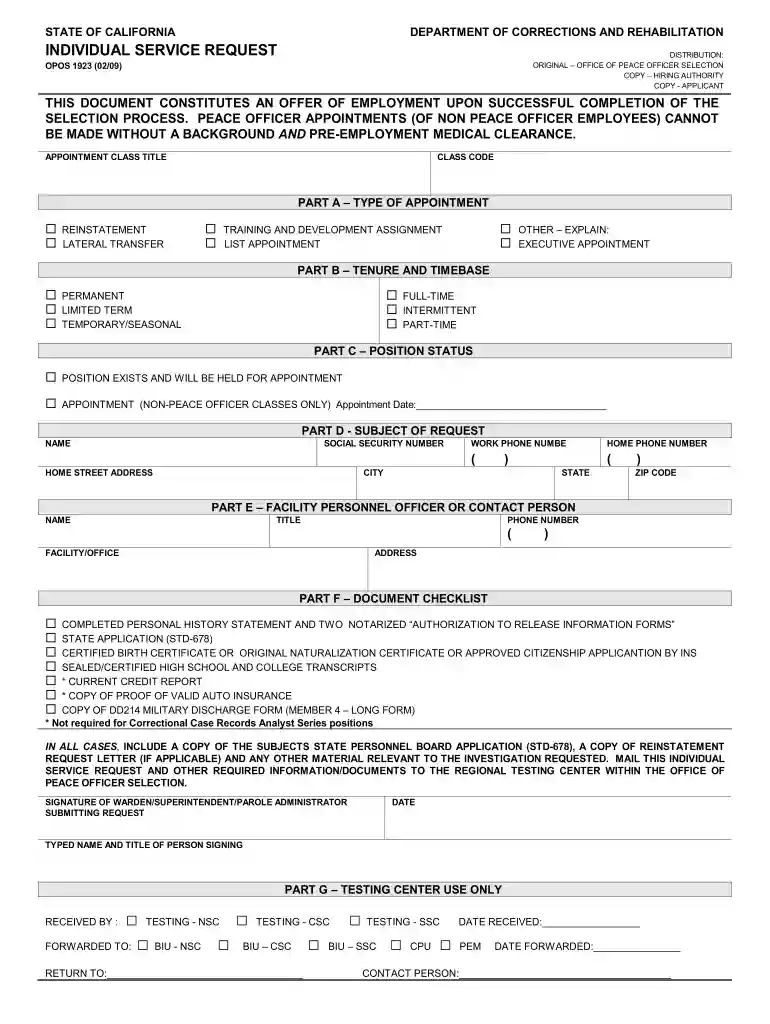
Individual service request 2026

Get Form
individual service request form Preview on Page 1

Here's how it works

01. Edit your individual service request form online
Type text, add images, blackout confidential details, add comments, highlights and more.

02. Sign it in a few clicks
Draw your signature, type it, upload its image, or use your mobile device as a signature pad.

03. Share your form with others
Send it via email, link, or fax. You can also download it, export it or print it out.

How to use or fill out individual service request with our platform

Form edit decoration
9.5
Ease of Setup
DocHub User Ratings on G2
9.0
Ease of Use
DocHub User Ratings on G2
  1. Click ‘Get Form’ to open the individual service request in the editor.
  2. Begin with Part A, selecting the type of appointment. Choose from options like Reinstatement, Lateral Transfer, or Executive Appointment by clicking the appropriate checkbox.
  3. In Part B, indicate the tenure and timebase of the position. Select whether it is Permanent, Limited Term, or Temporary/Seasonal and specify if it is Full-time, Intermittent, or Part-time.
  4. Fill out Part D with your personal information including your name, social security number, home address, and contact numbers. Ensure all fields are completed accurately.
  5. In Part E, provide details for the facility personnel officer or contact person. Include their name, title, phone number, and address.
  6. Review Part F’s document checklist to ensure you have included all necessary documents such as a completed personal history statement and certified transcripts.
  7. Finally, sign and date the form in the designated area before submitting it to the regional testing center.

Start filling out your individual service request today for free using our platform!

See more individual service request versions

We've got more versions of the individual service request form. Select the right individual service request version from the list and start editing it straight away!
Versions Form popularity Fillable & printable
2009 4.8 Satisfied (215 Votes)
be ready to get more

Complete this form in 5 minutes or less

Get form

Got questions?

We have answers to the most popular questions from our customers. If you can't find an answer to your question, please contact us.
Contact us
What do great customer service examples look like? Responsiveness. Timely and efficient responses to customer inquiries can greatly boost satisfaction and build trust. Proactive support. Quick resolution. Kind and professional communication. Accessibility. Knowledgeable staff. Consistency. Feedback loops.
Service request - A formal user request for something new to be provided. Example: I need a new Macbook. Incident - An unplanned event that disrupts or reduces the quality of a service and requires an emergency response. Example: The website is down!
A service request in the IT area consists of a formal request made by the client (user) to obtain one of the services offered by the department. Once the customer sends a service request, the IT department receives it in the form of a ticket and proceeds to provide it.
Of these nine HTTP methods, the five most commonly used ones are as follows: GET. POST. PUT. DELETE. PATCH.
What Are Some Types of Service Requests? Product information requests may ask for pricing, features, updates, and details about benefits. Technical support requests focus on troubleshooting technical issues. Billing requests have to do with financial matters like invoices and payments.

Security and compliance

At DocHub, your data security is our priority. We follow HIPAA, SOC2, GDPR, and other standards, so you can work on your documents with confidence.

Learn more
ccpa2
pci-dss
gdpr-compliance
hipaa
soc-compliance

People also ask

What is a service request? A service request may be defined as a formal request for service from an employee, customer, or vendor. These requests are necessary for initiating a pre-defined and agreed-upon service action as a normal part of service delivery.

Related links