227 courts ca form 2026

Get Form
california 227 consent create Preview on Page 1

Here's how it works

01. Edit your california 227 consent create online
Type text, add images, blackout confidential details, add comments, highlights and more.
02. Sign it in a few clicks
Draw your signature, type it, upload its image, or use your mobile device as a signature pad.
03. Share your form with others
Send ca 227 consent information form via email, link, or fax. You can also download it, export it or print it out.

How to use or fill out 227 courts ca form with our platform

Form edit decoration
9.5
Ease of Setup
DocHub User Ratings on G2
9.0
Ease of Use
DocHub User Ratings on G2
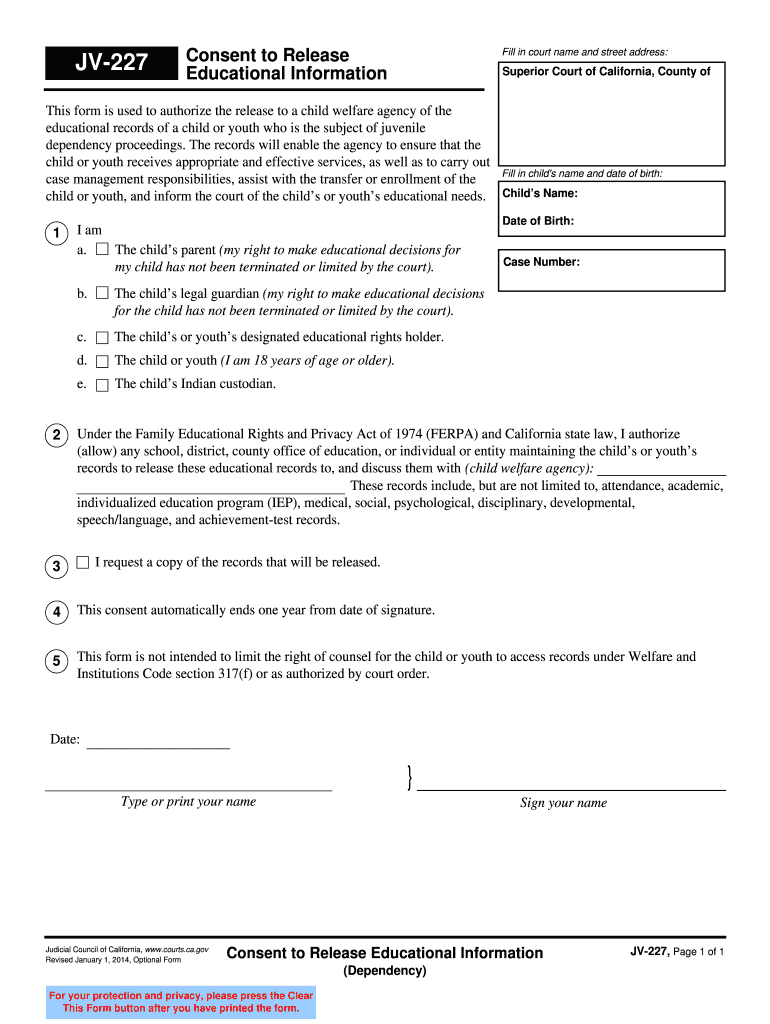
  1. Click ‘Get Form’ to open the JV-227 form in the editor.
  2. Begin by filling in the court name and street address at the top of the form. This identifies where your request is being submitted.
  3. Next, enter the child's name and date of birth. This information is crucial for identifying the educational records you wish to release.
  4. Indicate your relationship to the child by selecting one of the options provided (parent, legal guardian, etc.). Ensure that your rights to make educational decisions have not been limited by a court.
  5. In the section regarding authorization, specify which school or agency will be releasing the educational records. This includes attendance, academic performance, and other relevant documents.
  6. Finally, sign and date the form at the bottom. Remember that this consent automatically expires one year from your signature date.

Start using our platform today to easily fill out and manage your forms online for free!

See more 227 courts ca form versions

We've got more versions of the 227 courts ca form form. Select the right 227 courts ca form version from the list and start editing it straight away!
Versions Form popularity Fillable & printable
2014 4.8 Satisfied (122 Votes)
2013 4.3 Satisfied (189 Votes)
be ready to get more

Complete this form in 5 minutes or less

Get form

Got questions?

We have answers to the most popular questions from our customers. If you can't find an answer to your question, please contact us.
Contact us

You need to use only reliable software solutions with strong security compliance to sign your paperwork electronically. DocHub is just the type of service you need! It stores data on Amazon Web Servers and complies with all required security standards and eSignature regulations, so it’s a trustworthy way to eSign your california 227 educational information form or other paperwork using this tool.

You need only an internet connection and a browser to complete your form jv consent release form by using an iOS phone. Open the DocHub website and authenticate. Then, add your file or choose it from the list in your dashboard. Then use our editing instruments to complete your form and save all your adjustments. You can also send it to a specified recipient straight away.

(a) Except as provided in subdivision (b), when an action is called for trial by jury, the clerk shall randomly select the names of the jurors for voir dire, until the jury is selected or the panel is exhausted.
You can get copies of a court order, decree, judgment, or other records filed in your case from the court where the case was filed. You can ask for a copy in person, by mail, and, in many courts, online. There is generally a fee to get a copy of a record unless you have a fee waiver.
You can always file in person or by mail. In many courts, you can also file online (called e-filing), by fax, or by drop box. You can check on the courts website whether or not it allows e-filing or fax filing.

Security and compliance

At DocHub, your data security is our priority. We follow HIPAA, SOC2, GDPR, and other standards, so you can work on your documents with confidence.

Learn more
ccpa2
pci-dss
gdpr-compliance
hipaa
soc-compliance
be ready to get more

Complete this form in 5 minutes or less

Get form

People also ask

On the day of the MSC, the parties will either docHub a settlement agreement and begin the process of filing a Judgment with the Court to finalize their case, or, if no agreement can be docHubed, the Court will determine if another MSC is needed, or set the matter for a Trial Readiness Conference (TRC).
The two-dismissal rule is a legal principle stating that if a plaintiff voluntarily dismisses a claim in one court, they cannot dismiss the same claim again in another court without it being treated as a final judgment on the merits. This means that the claim is effectively resolved and cannot be refiled.
Papers to be served on cross-defendants. A cross-complainant must serve a copy of the complaint or, if it has been amended, the most recently amended complaint and any answers thereto on cross-defendants who have not previously appeared.
227. The challenges of either party for cause need not all be taken at once, but they may be taken separately, in the following order, including in each challenge all the causes of challenge belonging to the same class and type: (a) To the panel. (b) To an individual juror, for a general disqualification.
Section 222.5(f): A judge shall not arbitrarily or unreasonably refuse to submit reasonable written questionnaires, the contents of which are determined by the court in its sound discretion, when requested by counsel.

ca 227 consent create