Doh 4397-2026

Get Form
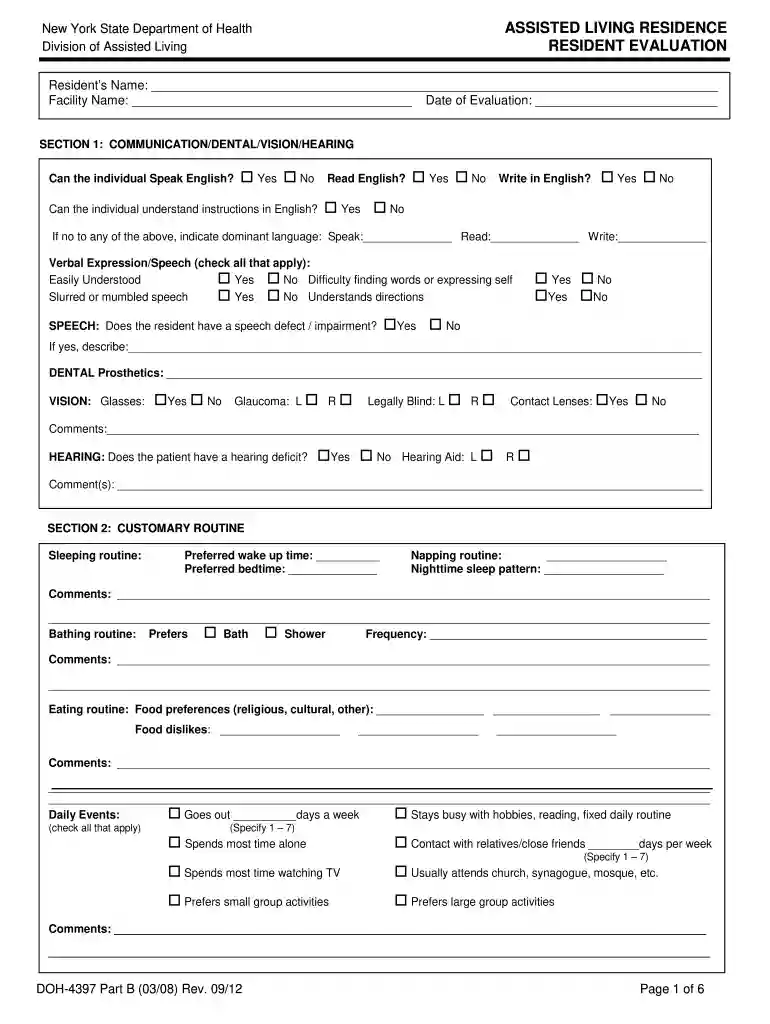
doh 4397 Preview on Page 1

Here's how it works

01. Edit your doh 4397 online
Type text, add images, blackout confidential details, add comments, highlights and more.

02. Sign it in a few clicks
Draw your signature, type it, upload its image, or use your mobile device as a signature pad.

03. Share your form with others
Send ny tenant via email, link, or fax. You can also download it, export it or print it out.

How to use or fill out doh 4397 with our platform

Form edit decoration
9.5
Ease of Setup
DocHub User Ratings on G2
9.0
Ease of Use
DocHub User Ratings on G2
  1. Click ‘Get Form’ to open the doh 4397 in the editor.
  2. Begin by entering the resident's name, facility name, and date of evaluation at the top of the form.
  3. In Section 1, assess communication abilities. Check 'Yes' or 'No' for each question regarding English proficiency and provide details for any language needs.
  4. Proceed to Section 2 to document the resident's customary routine. Fill in preferred wake-up and bedtime, napping habits, and daily activities.
  5. In Section 3, evaluate continence status. Answer questions about urinary and bowel function and describe management techniques if applicable.
  6. For Section 4, assess physical functions such as eating, bathing, dressing, and grooming. Indicate levels of assistance required for each task.
  7. Complete Section 5 by evaluating cognitive impairment through alertness and orientation questions. Note any behaviors of concern.
  8. Finally, in Section 6, indicate admission decisions and ensure all signatures are collected before submission.

Start using our platform today to streamline your form completion process for free!

See more doh 4397 versions

We've got more versions of the doh 4397 form. Select the right doh 4397 version from the list and start editing it straight away!
Versions Form popularity Fillable & printable
2008 4.8 Satisfied (161 Votes)
2006 4.4 Satisfied (59 Votes)
be ready to get more

Complete this form in 5 minutes or less

Get form

Got questions?

We have answers to the most popular questions from our customers. If you can't find an answer to your question, please contact us.
Contact us

A lot of software solutions are available out there for document modifying and signing. DocHub is one of the most in-demand online solutions that comply with all data protection and compliance standards and guarantees your electronically signed documentation is legally enforceable. All you need to give it a try is to register an account, upload your living ny, provide the requested information, and click Sign. Create your eSignature by typing, drawing it, uploading its image to your template, or scanning a unique QR code.

If you are using Chrome, there are two simple methods to edit your doh 4397 part b online. First, visit the DocHub site, add your file, and edit it using our toolbar. You can also set up our Chrome extension and edit any document by dragging and dropping it in your web browser tab.

Security and compliance

At DocHub, your data security is our priority. We follow HIPAA, SOC2, GDPR, and other standards, so you can work on your documents with confidence.

Learn more
ccpa2
pci-dss
gdpr-compliance
hipaa
soc-compliance