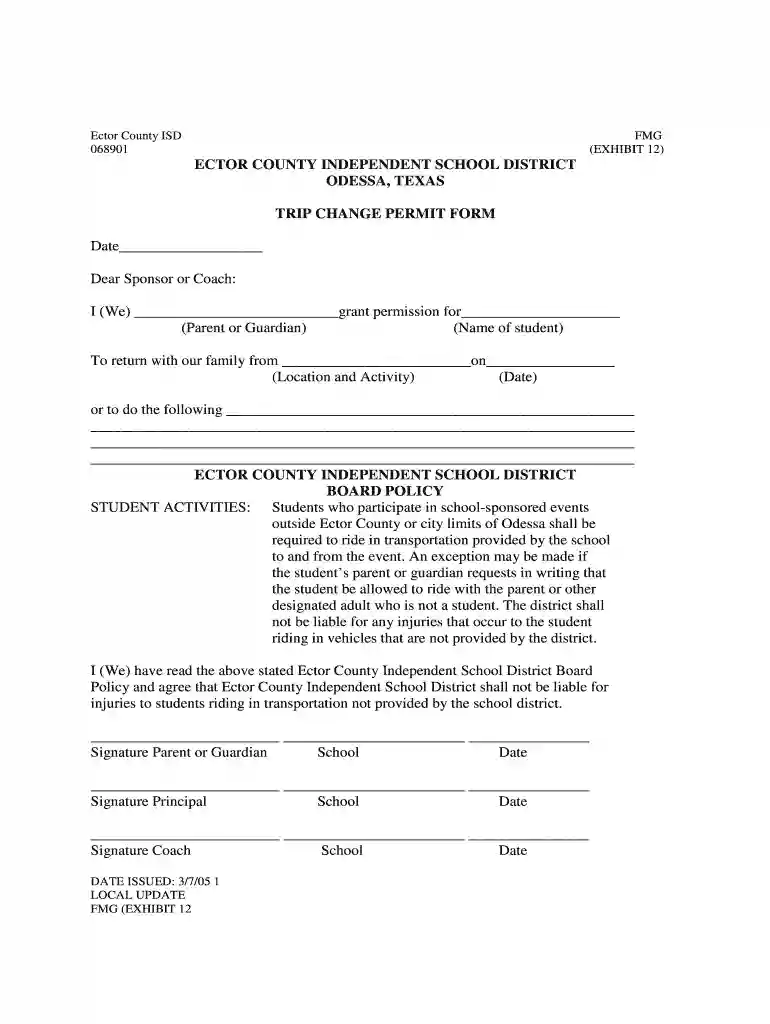
Trip change form 2026

Get Form
trip change form Preview on Page 1

Here's how it works

01. Edit your trip change form online
Type text, add images, blackout confidential details, add comments, highlights and more.

02. Sign it in a few clicks
Draw your signature, type it, upload its image, or use your mobile device as a signature pad.

03. Share your form with others
Send it via email, link, or fax. You can also download it, export it or print it out.

How to use or fill out trip change form with our platform

Form edit decoration
9.5
Ease of Setup
DocHub User Ratings on G2
9.0
Ease of Use
DocHub User Ratings on G2
  1. Click ‘Get Form’ to open the trip change form in the editor.
  2. Begin by entering the date at the top of the form. This helps establish when the request is being made.
  3. In the section labeled 'I (We) grant permission for', fill in your name as the parent or guardian, followed by the name of the student who will be traveling.
  4. Next, specify the location and activity from which your child will return with your family. Ensure this is clear and accurate.
  5. Indicate the date of return to provide context for your request.
  6. If there are any additional instructions or requests, detail them in the provided space to ensure clarity.
  7. Finally, sign and date where indicated as both parent/guardian and have necessary signatures from school officials like principal and coach.

Start using our platform today to easily complete your trip change form online for free!

See more trip change form versions

We've got more versions of the trip change form form. Select the right trip change form version from the list and start editing it straight away!
Versions Form popularity Fillable & printable
2005 4.8 Satisfied (144 Votes)
be ready to get more

Complete this form in 5 minutes or less

Get form

Got questions?

We have answers to the most popular questions from our customers. If you can't find an answer to your question, please contact us.
Contact us

Signing paperwork on a mobile device is fast, easy, and doesn’t require software installation when you have an account with DocHub. Sign in from any browser, fill in your empty fields with your information, and click on Sign → Create your signature. You can draw your eSignature the same way you usually do on paper, add its image to your trip change form, or type in your name and stylize its look. Whatever option you choose, your documentation will be valid.

In case your go-to email service is Gmail, you can easily integrate your DocHub editor in your work. Modify your trip change form with DocHub tools and connect it to your drafts in Gmail. See how easy it is to exchange papers and collaborate having a swift PDF editing solution at hand.

Founded in 1983, the Presidents Education Awards Program (PEAP) honors graduating elementary, middle, and high school students for their achievement and hard work.
If a school does not have letter grades, a student must meet the requirements in Category B and either 1 or 2 of Category C. Grade Point Average: Students are to earn a grade point average of 90 on a 100 point scale, (an A on a letter scale or a 3.5 on a 4.0 scale).
Presidents Award Recognizes a service unit team or group who surpasses team goals to result in a docHub, measurable impact toward docHubing the councils overall goals.

Security and compliance

At DocHub, your data security is our priority. We follow HIPAA, SOC2, GDPR, and other standards, so you can work on your documents with confidence.

Learn more
ccpa2
pci-dss
gdpr-compliance
hipaa
soc-compliance
be ready to get more

Complete this form in 5 minutes or less

Get form

People also ask

The Presidential Citizens Medal is an award bestowed by the president of the United States. It is the second-highest civilian award in the United States and is second only to the Presidential Medal of Freedom.
Medal of Honor with Crossed Palms: Awarded for saving or attempting to save a life at extreme risk to self, demonstrating both unusual heroism and extraordinary skill. Since 1938 only 277 have been awarded.
Guide on How to Write a Field Trip Permission Form Include all the essential information. Be sure to include all relevant details, such as the date of the trip, destination, purpose, estimated time of return, and a list of activities (if applicable). Provide adequate preparation time. Encourage communication.

Related links