




Here's how it works



How to use or fill out agreement deere & company - US Department of Labor

- Click ‘Get Form’ to open it in the editor.
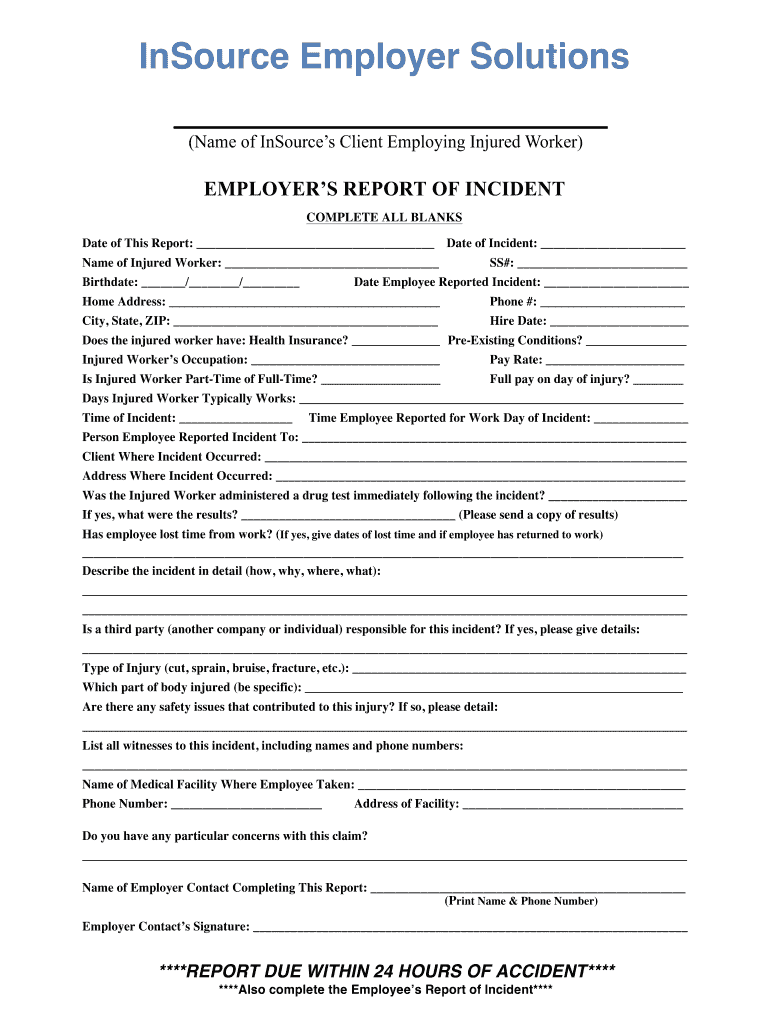
- Begin by entering the date of the report and the date of the incident at the top of the form. This establishes a timeline for your report.
- Fill in the injured worker's name, birthdate, and social security number. Accurate personal information is crucial for processing claims.
- Provide details about the incident, including when it was reported, home address, and contact information. This helps in reaching out if further information is needed.
- Indicate whether the injured worker has health insurance and any pre-existing conditions. This section is important for understanding potential complications.
- Describe the incident in detail, including type of injury and any safety issues that contributed. Clear descriptions aid in assessing liability.
- List all witnesses with their contact information to support your report. Witness accounts can be vital during investigations.
- Complete the employer contact section at the end, ensuring that all signatures are obtained before submission.
Utilize our platform today to streamline your document editing and ensure a smooth completion of your forms for free!
It's free
See more agreement deere & company - US Department of Labor versions
| Versions | Form popularity | Fillable & printable |
|---|---|---|
| 2020 | 4.8 Satisfied (245 Votes) |
Got questions?
How do I sign my agreement deere & company - US Department of Labor on iOS?
With DocHub, you can rapidly sign your agreement deere & company - US Department of Labor or any other document on iOS, even without installing extra programs. You can access your DocHub account from any internet-connected browser and fill out and sign your document in any preferred method with just a few clicks.
Can I edit agreement deere & company - US Department of Labor on my phone?
As a comprehensive document modifying platform, DocHub is available on mobile phones. Open DocHub in your choice of mobile internet browser and use our smart mobile-friendly toolset to complete your agreement deere & company - US Department of Labor.
What are John Deere employees asking for?
What is the new contract offer for John Deere?
What is the John Deere pay deal?
Security and compliance
At DocHub, your data security is our priority. We follow HIPAA, SOC2, GDPR, and other standards, so you can work on your documents with confidence.
Learn more




