




Here's how it works



How to use or fill out Curbs Plus, Inc Online Cataloge with DocHub

- Click ‘Get Form’ to open the Curbs Plus, Inc Online Cataloge in our editor.
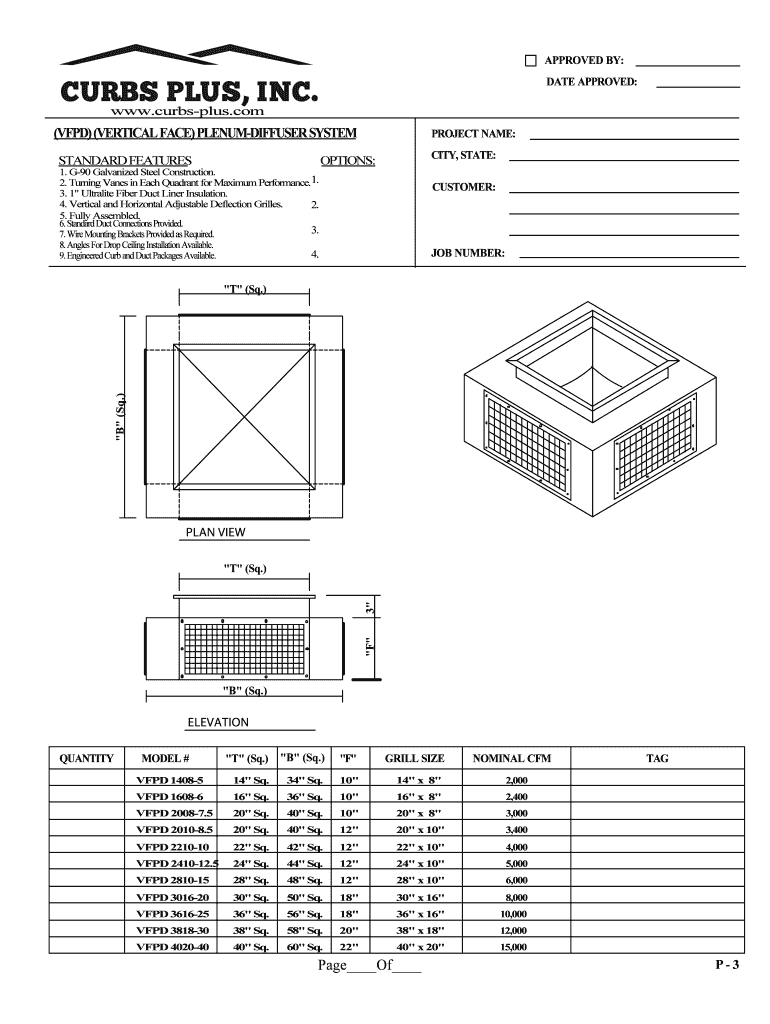
- Begin by entering the 'PROJECT NAME' and 'CITY, STATE' in the designated fields at the top of the form. This information is essential for identifying your project.
- Next, fill in the 'CUSTOMER' and 'JOB NUMBER' fields to ensure accurate tracking of your order.
- Review the options available under the 'OPTIONS' section. Here, you can select specific features or configurations that suit your project needs.
- In the table provided, input quantities for each model listed. Make sure to check dimensions and specifications like 'GRILL SIZE' and 'NOMINAL CFM' for accuracy.
- Finally, review all entries for completeness before saving or exporting your filled-out catalog for submission.
Start using our platform today to effortlessly complete your Curbs Plus, Inc Online Cataloge!
It's free
See more Curbs Plus, Inc Online Cataloge versions
| Versions | Form popularity | Fillable & printable |
|---|---|---|
| 2006 | 4.8 Satisfied (251 Votes) |
Got questions?
Can I sign my Curbs Plus, Inc Online Cataloge on a mobile?
Yes, you’ll find numerous apps for this on the web. However, if you need to eSign your Curbs Plus, Inc Online Cataloge without installing extra software, DocHub is the best choice you can make. This powerful editor works on mobile devices just as on desktops. Open our editor in your preferred internet browser, register or log in to your account, and start processing your forms.
How do you create an e-signature for the Curbs Plus, Inc Online Cataloge on iOS?
Apart from a comprehensive toolset for editing PDFs on mobile devices, DocHub allows you to sign your Curbs Plus, Inc Online Cataloge along the way. Open our editor in your browser, make modifications using DocHub’s toolset, and finish your editing by eSigning the finished form.
Security and compliance
At DocHub, your data security is our priority. We follow HIPAA, SOC2, GDPR, and other standards, so you can work on your documents with confidence.
Learn more




