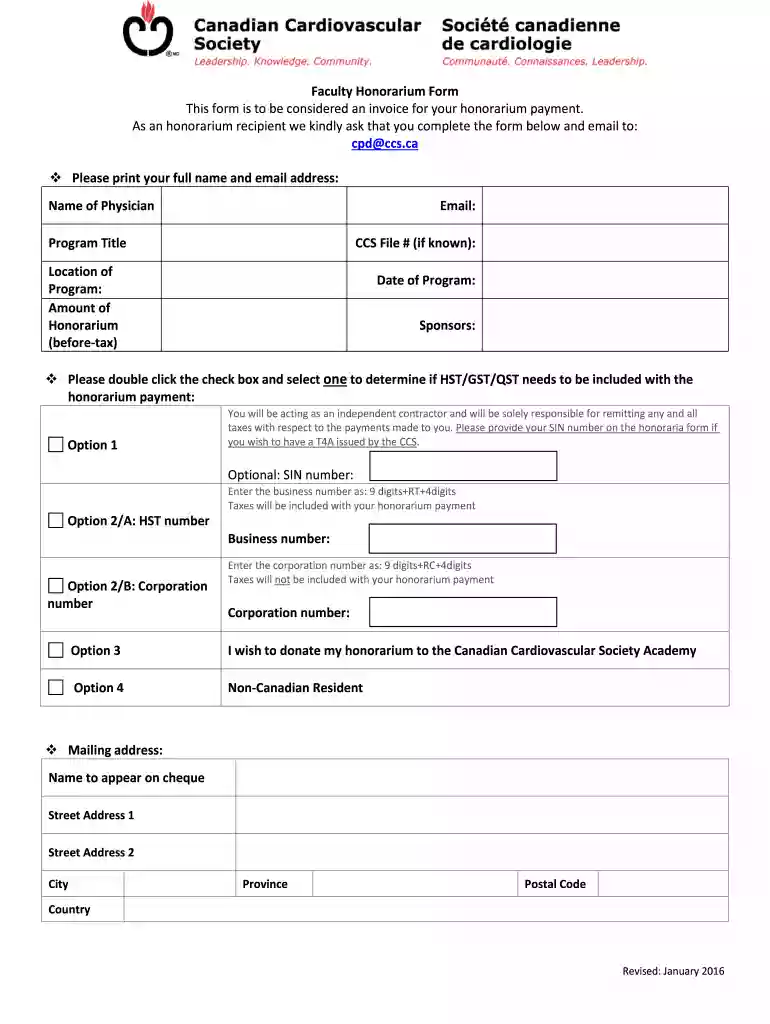
Fillable Online You will be receiving an honorarium from the Preview on Page 1

Fillable Online You will be receiving an honorarium from the 2026

Here's how it works

  • 01. Edit your form online

    Type text, add images, blackout confidential details, add comments, highlights and more.

  • 02. Sign it in a few clicks

    Draw your signature, type it, upload its image, or use your mobile device as a signature pad.

  • 03. Share your form with others

    Send it via email, link, or fax. You can also download it, export it or print it out.

How to use or fill out Fillable Online You will be receiving an honorarium from the

Form edit decoration
9.5
Ease of Setup
DocHub User Ratings on G2
9.0
Ease of Use
DocHub User Ratings on G2
  1. Click ‘Get Form’ to open it in the editor.
  2. Begin by entering your full name and email address in the designated fields at the top of the form.
  3. Fill in the Program Title, CCS File # (if known), Location of Program, Amount of Honorarium (before-tax), Date of Program, and Sponsors.
  4. Double-click the checkbox to select one option regarding HST/GST/QST inclusion based on how you wish to receive your honorarium.
  5. If applicable, provide your SIN number for T4A issuance or enter your Business HST number or Corporation number as required.
  6. Complete your mailing address details, ensuring accuracy for cheque issuance.
  7. Review all entered information for completeness and accuracy before submitting the form via email to cpd@ccs.ca.

Start using our platform today to easily complete your honorarium form online for free!

See more Fillable Online You will be receiving an honorarium from the versions

We've got more versions of the Fillable Online You will be receiving an honorarium from the form. Select the right Fillable Online You will be receiving an honorarium from the version from the list and start editing it straight away!

VersionsForm popularityFillable & printable
20164.8 Satisfied (200 Votes)

be ready to get more

Complete this form in 5 minutes or less

Security and compliance

At DocHub, your data security is our priority. We follow HIPAA, SOC2, GDPR, and other standards, so you can work on your documents with confidence.

Related links

Publication 525 (2025), Taxable and Nontaxable Income

Qualified wildfire relief payments are not taxable. If you received a qualified wildfire relief payment, those payments may be nontaxable.Read more

Learn more
Bread Loaf Translators Faculty Page

Required for Honorarium. These three forms are fillable online. select fill and sign Email: blt@middlebury.edu Fax: 802-443-2087 submit this online form so

Learn more
If you believe that this page should be taken down, please follow our DMCA take down process here