




Here's how it works



How to use or fill out MOBILE FOOD FACILITY (MFF) APPLICATION - San Mateo County with our platform

- Click ‘Get Form’ to open the MOBILE FOOD FACILITY (MFF) APPLICATION in the editor.
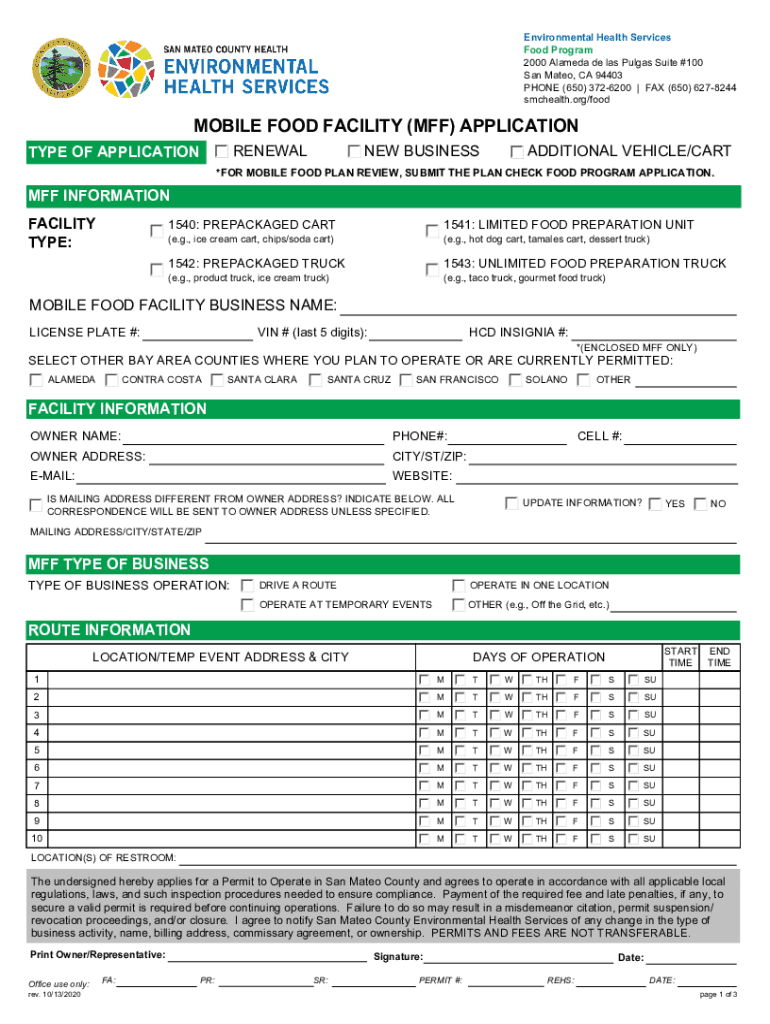
- Begin by selecting the type of application: New Business, Renewal, or Additional Vehicle/Cart. This helps categorize your request appropriately.
- Fill in the MFF Information section, including your business name, license plate number, and VIN. Ensure accuracy as this information is crucial for your permit.
- Provide details about your facility type by selecting from options like Prepackaged Cart or Unlimited Food Preparation Truck. This defines the scope of your operations.
- Complete the Facility Information section with owner details and contact information. If your mailing address differs from your owner address, indicate that clearly.
- In the MFF Type of Business section, specify how you plan to operate—whether driving a route or operating at temporary events.
- Lastly, review all entries for accuracy before submitting. Use our platform’s features to save and share your completed application easily.
Start filling out your MOBILE FOOD FACILITY (MFF) APPLICATION today for free using our platform!
It's free
See more MOBILE FOOD FACILITY (MFF) APPLICATION - San Mateo County versions
Got questions?
How can I sign my ca mobile food facility on iOS?
With DocHub, you can easily approve your ca mobile food facility or any other document on iOS, even without installing extra applications. You can access your DocHub account from any web-connected browser and complete and sign your document in any preferred method with just a couple of clicks.
How do you modify MOBILE FOOD FACILITY (MFF) APPLICATION - San Mateo County from Google Drive?
If you store your papers in Google Drive, there is no need to download your MOBILE FOOD FACILITY (MFF) APPLICATION - San Mateo County on your computer and upload it back to our editor. A significantly easier way is to install a browser extension created by DocHub to simplify this flow. The extension allows editing PDFs right in your browser. Alternatively, you may integrate your DocHub and Gmail accounts for more efficient editing.
How much is a food truck permit in San Francisco?
How much is a cottage food permit in San Mateo County?
How to get a food permit in MS?
Security and compliance
At DocHub, your data security is our priority. We follow HIPAA, SOC2, GDPR, and other standards, so you can work on your documents with confidence.
Learn more




