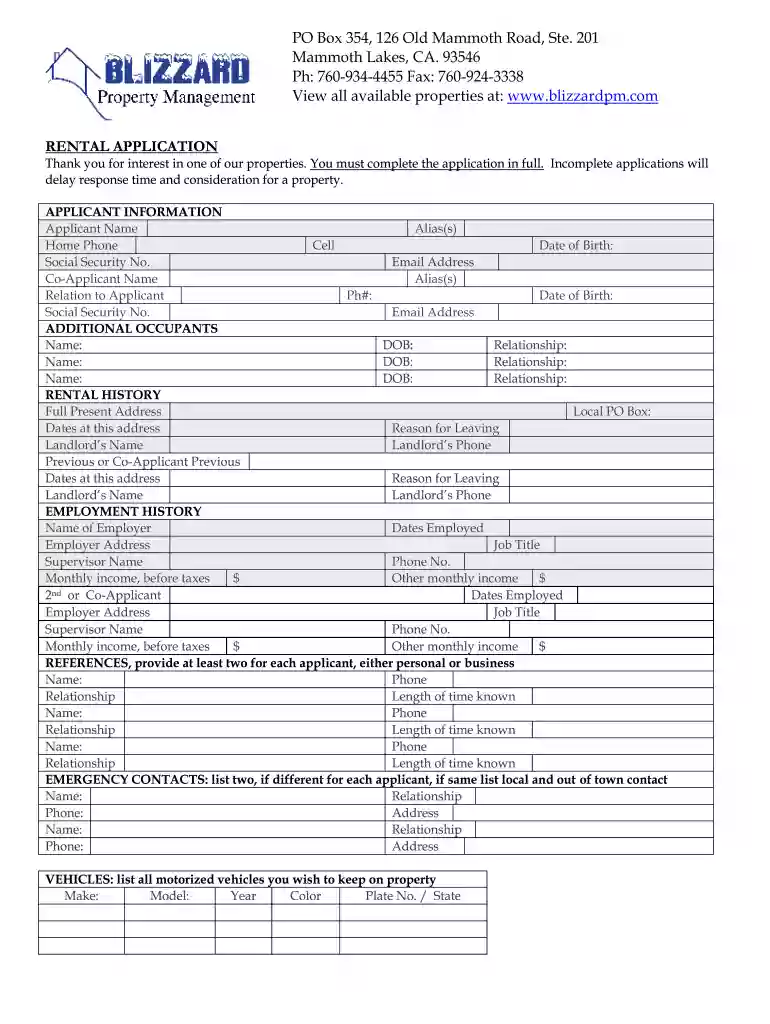
Rental Application - Blizzard Property Management 2026

Get Form
property rental application form Preview on Page 1

Here's how it works

01. Edit your property rental application form online
Type text, add images, blackout confidential details, add comments, highlights and more.

02. Sign it in a few clicks
Draw your signature, type it, upload its image, or use your mobile device as a signature pad.

03. Share your form with others
Send property rental application online via email, link, or fax. You can also download it, export it or print it out.

How to use or fill out Rental Application - Blizzard Property Management with our platform

Form edit decoration
9.5
Ease of Setup
DocHub User Ratings on G2
9.0
Ease of Use
DocHub User Ratings on G2
  1. Click ‘Get Form’ to open the Rental Application in the editor.
  2. Begin by filling out the 'APPLICANT INFORMATION' section. Enter your name, contact details, and date of birth. If applicable, include co-applicant information as well.
  3. Proceed to 'ADDITIONAL OCCUPANTS' and list any additional individuals who will be living with you, including their relationship to you and dates of birth.
  4. In the 'RENTAL HISTORY' section, provide your current address along with landlord details and reasons for leaving previous residences.
  5. Next, complete the 'EMPLOYMENT HISTORY' section by detailing your current employer's information and monthly income. Repeat for any co-applicants.
  6. Fill in the 'REFERENCES' section with at least two personal or business references for each applicant.
  7. List emergency contacts under 'EMERGENCY CONTACTS', ensuring to provide both local and out-of-town contacts if necessary.
  8. Complete the 'VEHICLES' section by listing all vehicles you plan to keep on the property.
  9. Answer questions regarding past rental issues and any pets or special items you may have.
  10. Finally, review your application for accuracy before signing and submitting it through our platform.

Start filling out your Rental Application today for free using our editor!

See more Rental Application - Blizzard Property Management versions

We've got more versions of the Rental Application - Blizzard Property Management form. Select the right Rental Application - Blizzard Property Management version from the list and start editing it straight away!
Versions Form popularity Fillable & printable
2013 4 Satisfied (57 Votes)
be ready to get more

Complete this form in 5 minutes or less

Get form

Got questions?

We have answers to the most popular questions from our customers. If you can't find an answer to your question, please contact us.
Contact us

Yes, you can use DocHub for signing any business and personal paperwork, including your Rental Application - Blizzard Property Management. All electronic signatures you create with our tool are legally binding and court-admissible, as DocHub complies with criteria required by ESIGN and UETA. Save your completed paperwork with a detailed Audit Trail if needed.

You need only a web connection and a browser to fill out your Rental Application - Blizzard Property Management by using an iOS phone. Open the DocHub website and authenticate. Then, add your document or choose it from the list in your dashboard. Then use our editing tools to fill out your form and save all your modifications. You may also send it to a specified recipient straight away.

Generally, landlords and property managers are looking at factors like: Income and employment stability. Rental history. Creditworthiness. Background checks. Pets and additional factors. Consistency and long-term plans. Complete and accurate application. Meets lease requirements.
Offer Above Asking Price or Negotiate on Terms. In competitive rental markets, offering to pay above the asking price can make your application more attractive to landlords. While it may stretch your budget, it could ultimately be the deciding factor in securing the rental property.
Rent collection: Property managers usually handle rent invoicing, payment processing and any necessary follow-ups for late payments with tenants. Property maintenance: This means scheduling inspections, addressing any emergency issues that may arise and coordinating repairs and routine maintenance work.

Security and compliance

At DocHub, your data security is our priority. We follow HIPAA, SOC2, GDPR, and other standards, so you can work on your documents with confidence.

Learn more
ccpa2
pci-dss
gdpr-compliance
hipaa
soc-compliance
be ready to get more

Complete this form in 5 minutes or less

Get form

People also ask

Yardi, TurboTenant, and Avail are all solid picks, especially if youre looking for something with decent task tracking and tenant features. Ive used Avail before and liked the rent collection and screening tools, but it felt a bit limited once we started growing.

Related links