Type text, add images, blackout confidential details, add comments, highlights and more.
02. Sign it in a few clicks
Draw your signature, type it, upload its image, or use your mobile device as a signature pad.
03. Share your form with others
Send it via email, link, or fax. You can also download it, export it or print it out.
How to use or fill out travel renewal with our platform
Ease of Setup
DocHub User Ratings on G2
Ease of Use
DocHub User Ratings on G2
Click ‘Get Form’ to open the travel renewal document in the editor.
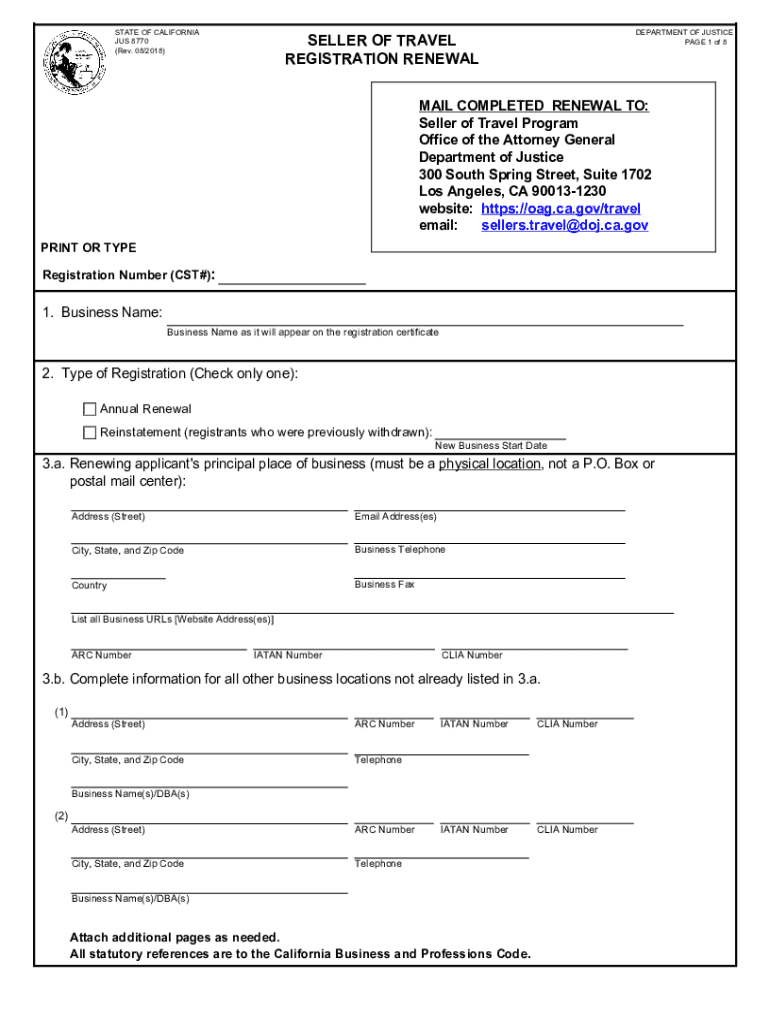
Begin by entering your Registration Number (CST#) at the top of the form. This is essential for identifying your application.
In Section 1, provide your Business Name as it will appear on the registration certificate. Ensure accuracy for official records.
For Section 2, select the type of registration you are applying for: Annual Renewal or Reinstatement. Only check one option.
Complete Section 3.a by filling in your principal place of business address, including email, phone number, and any relevant URLs.
If applicable, list additional business locations in Section 3.b. Attach extra pages if necessary to include all locations.
Continue through each section carefully, providing all requested information about ownership, management, and financial requirements as outlined in the form.
Finally, review all entries for accuracy before submitting your completed renewal to ensure a smooth processing experience.
Start using our platform today to fill out your travel renewal form easily and for free!
Yes, MyTravelGov uses the highest standards of security to keep your information safe, including identity verification and multifactor authentication.
How long does it take to renew a passport to?
You should allow a minimum of 6 weeks to get a passport. While most passports are being processed well within 6 weeks, some can take longer.
How long does it take to get a passport renewed?
Current Processing Times Routine4 to 6 weeks Expedited 2 to 3 weeks Urgent Must make an appointment and have international travel within 14 calendar days
How long does passport renewal take?
The average processing time for the issue of a passport is 4 weeks. Passports can be renewed at any time (before or after the expiry date).
Can a travel document be renewed?
You can file a renewal application as early as 120 days before your current travel document expires, and its a good idea to submit the renewal as early as possible. The renewal travel document is usually processed within the same timeframe as that for the initial application: 150 days or longer.
Related Searches
Global Entry loginWhat is the official site to renew passportU.S. government passport renewal onlineHow to renew a U.S. passport that has not expiredPay for U.S. passport renewal onlineRenew passport online government websiteTSA renewalGlobal Entry renewal
Security and compliance
At DocHub, your data security is our priority. We follow HIPAA, SOC2, GDPR, and other standards, so you can work on your documents with confidence.
Is it faster to renew a passport online or by mail?
Routine times are the same for customers who renew online and by mail.
Related links
Travel and Visa Renewal
Documentation Needed for Re-entry to the U.S. Passport Printed Form I-20 (F-1) or Form DS-2019 (J-1) with current travel signature F-1 or J-1 entry visaRead more
The only official, authorized place to renew your U.S. passport online is opr.travel.state.gov(opens in a new tab) . Other websites or companies claimingRead more
Cookie consent notice
This site uses cookies to enhance site navigation and personalize your experience.
By using this site you agree to our use of cookies as described in our Privacy Notice.
You can modify your selections by visiting our Cookie and Advertising Notice.