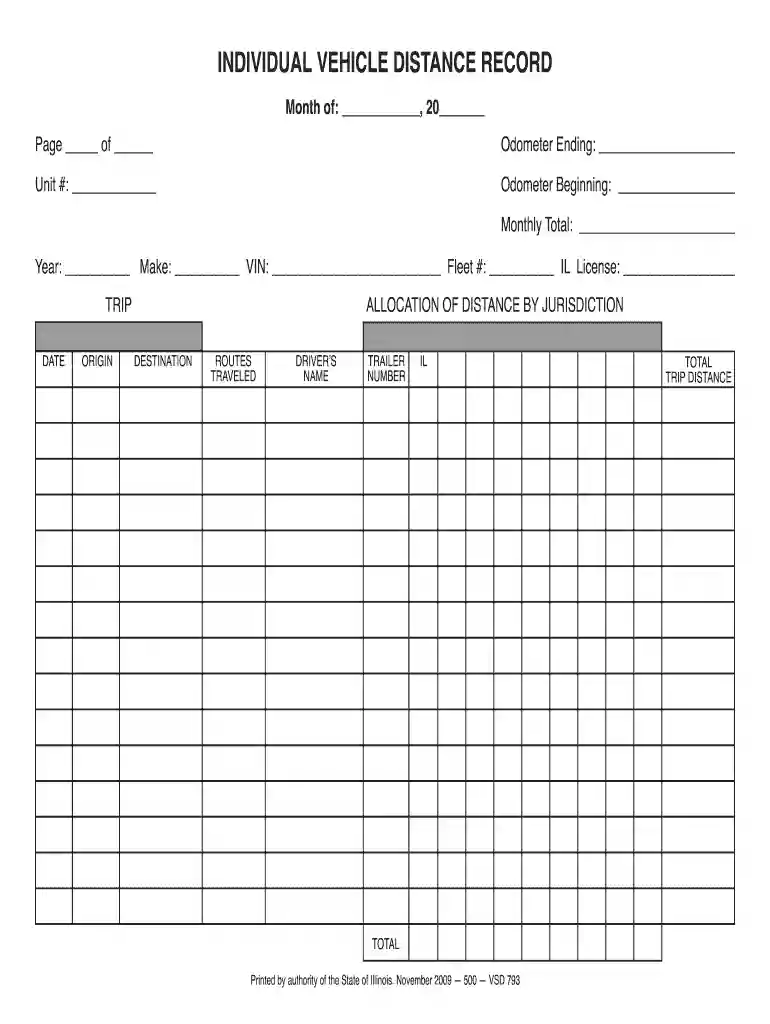
individual vehicle distance record Preview on Page 1

Il traveled authority 2026

Here's how it works

  • 01. Edit your individual vehicle distance record online

    Type text, add images, blackout confidential details, add comments, highlights and more.

  • 02. Sign it in a few clicks

    Draw your signature, type it, upload its image, or use your mobile device as a signature pad.

  • 03. Share your form with others

    Send it via email, link, or fax. You can also download it, export it or print it out.

How to use or fill out il traveled authority with our platform

Form edit decoration
9.5
Ease of Setup
DocHub User Ratings on G2
9.0
Ease of Use
DocHub User Ratings on G2
  1. Click ‘Get Form’ to open the il traveled authority in the editor.
  2. Begin by entering the 'Month' and 'Year' at the top of the form. This sets the timeframe for your vehicle distance record.
  3. Fill in the 'Odometer Beginning' and 'Odometer Ending' fields to track your vehicle's mileage accurately. The 'Monthly Total' will automatically calculate based on these entries.
  4. Complete the vehicle details by entering the 'Make', 'VIN', and 'IL License' number, along with your unit number and fleet number if applicable.
  5. For each trip, document the 'Date', 'Origin', and 'Destination'. Specify routes traveled and include the driver's name and trailer number as needed.
  6. Finally, ensure that you total all trip distances at the bottom of the form for a comprehensive overview of your travels.

Start using our platform today to easily fill out your il traveled authority form online for free!

See more individual vehicle distance record versions

We've got more versions of the individual vehicle distance record form. Select the right individual vehicle distance record version from the list and start editing it straight away!

VersionsForm popularityFillable & printable
20094.8 Satisfied (193 Votes)

be ready to get more

Complete this form in 5 minutes or less

Security and compliance

At DocHub, your data security is our priority. We follow HIPAA, SOC2, GDPR, and other standards, so you can work on your documents with confidence.

Related links

FAQs for State of Illinois Travel

The Governors Office of Management and Budget must approve all out of State travel requests, even if there is no cost to the State of Illinois. The eTravelRead more

Learn more
International Travel - Business Finance

University of Illinois System international business travel must be authorized by the department head or authorized delegate. It is the employeesRead more

Learn more
If you believe that this page should be taken down, please follow our DMCA take down process here