




Here's how it works



How to use or fill out camping campgroundsminnesotaCity of Spring Lake Park - Parks & Recreation Department

- Click ‘Get Form’ to open it in the editor.
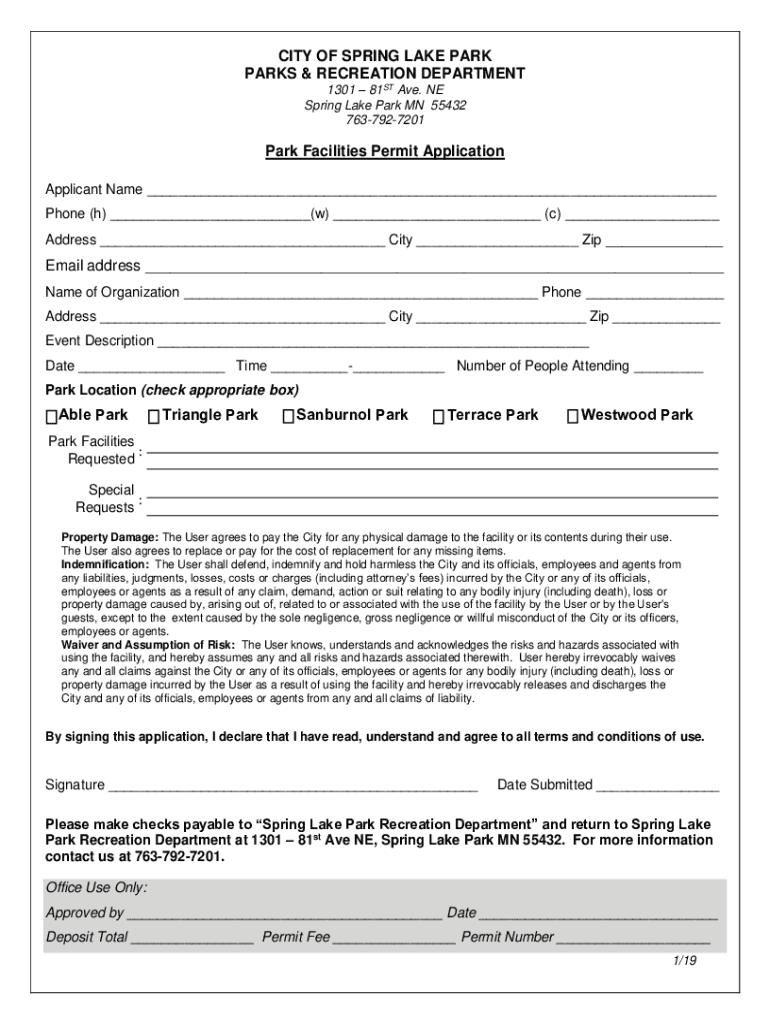
- Begin by entering your name and contact information in the Applicant Name and Phone fields. Ensure all phone numbers are accurate for effective communication.
- Fill in your address, including city and zip code, followed by your email address for correspondence regarding your application.
- If applicable, provide the name of your organization and its contact number. This is essential for group events.
- Describe your event clearly in the Event Description field, then specify the date, time, and expected number of attendees.
- Select the park location by checking the appropriate box. Review available facilities to ensure they meet your needs.
- Read through the terms regarding property damage and indemnification carefully before signing at the bottom of the form.
- Submit your completed form along with any required fees to the Spring Lake Park Recreation Department as instructed.
Start using our platform today to streamline your application process for free!
It's free
See more camping campgroundsminnesotaCity of Spring Lake Park - Parks & Recreation Department versions
Got questions?
How can I eSign my camping campgroundsminnesotaCity of Spring Lake Park - Parks & Recreation Department in Word?
Microsoft Word doesn’t have signing tools to create legitimate electronic signatures and enforceable forms. Fortunately, DocHub is an online eSignature-compliant editor that supports various document formats, including .doc files. Log in to your account and add the Word edition of your camping campgroundsminnesotaCity of Spring Lake Park - Parks & Recreation Department from your device and cloud, or URL - our editor will automatically turn it into an editable PDF. Make all essential changes in your document and click Sign to create your own legally-binding eSignature. There are four signing methods from which to choose.
What internet browser do I need to edit camping campgroundsminnesotaCity of Spring Lake Park - Parks & Recreation Department online?
If you want to edit your camping campgroundsminnesotaCity of Spring Lake Park - Parks & Recreation Department on the internet swiftly, it does not matter what internet browser you use. DocHub’s simple editing tools are available using any internet browser. Just open the appropriate tab in the editor, add your file, and fill it out without stress.
Security and compliance
At DocHub, your data security is our priority. We follow HIPAA, SOC2, GDPR, and other standards, so you can work on your documents with confidence.
Learn more


