Y Office of the Registrar - cnsu 2026

Get Form
y Office of the Registrar - cnsu Preview on Page 1

Here's how it works

01. Edit your form online
Type text, add images, blackout confidential details, add comments, highlights and more.
02. Sign it in a few clicks
Draw your signature, type it, upload its image, or use your mobile device as a signature pad.
03. Share your form with others
Send it via email, link, or fax. You can also download it, export it or print it out.

How to use or fill out y Office of the Registrar - cnsu with our platform

Form edit decoration
9.5
Ease of Setup
DocHub User Ratings on G2
9.0
Ease of Use
DocHub User Ratings on G2
  1. Click ‘Get Form’ to open it in the editor.
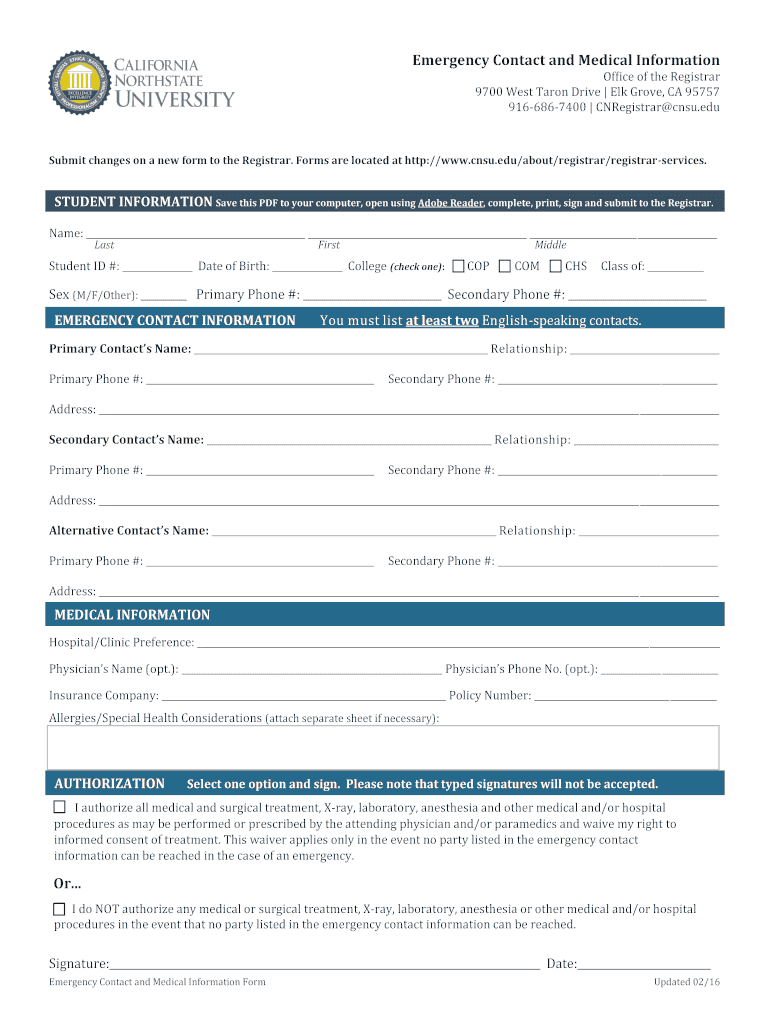
  2. Begin by entering your personal information in the 'STUDENT INFORMATION' section. Fill in your name, student ID, date of birth, and select your college.
  3. Provide your primary and secondary phone numbers, along with your sex and class year.
  4. In the 'EMERGENCY CONTACT INFORMATION' section, list at least two English-speaking contacts. Include their names, relationships to you, and phone numbers.
  5. Fill out the 'MEDICAL INFORMATION' section with your hospital preference, physician's name (if applicable), insurance details, and any allergies or health considerations.
  6. Finally, choose one option under 'AUTHORIZATION', sign the form (note that typed signatures are not accepted), and include the date.

Start using our platform today for free to complete your Emergency Contact and Medical Information form effortlessly!

See more y Office of the Registrar - cnsu versions

We've got more versions of the y Office of the Registrar - cnsu form. Select the right y Office of the Registrar - cnsu version from the list and start editing it straight away!
Versions Form popularity Fillable & printable
2016 4.8 Satisfied (131 Votes)
be ready to get more

Complete this form in 5 minutes or less

Get form

Got questions?

We have answers to the most popular questions from our customers. If you can't find an answer to your question, please contact us.
Contact us
The Office of the Registrar produces official transcripts, and verifies dates of attendance, enrollment, degrees, graduation dates, academic and disciplinary standing and other information as requested and authorized by current and former students on behalf of all schools and programs within the institution, or as
Typically, a registrar processes registration requests, schedules classes and maintains class lists, enforces the rules for entering or leaving classes, and keeps a permanent record of grades and marks.
Registrars. Plan, organize, direct, control and evaluate the registration activities and academic records system of a college or university. Review registration statistics and consult with faculty officials to develop registration policies.
About UNCW Registrars Office We provide transcripts and diplomas, oversee course registration and grading, maintain records, and implement academic policies. We are open Monday-Friday, with most staff working 8:00-5:00. We are located on the College Road side of campus in James Hall 110.

Security and compliance

At DocHub, your data security is our priority. We follow HIPAA, SOC2, GDPR, and other standards, so you can work on your documents with confidence.

Learn more
ccpa2
pci-dss
gdpr-compliance
hipaa
soc-compliance
be ready to get more

Complete this form in 5 minutes or less

Get form