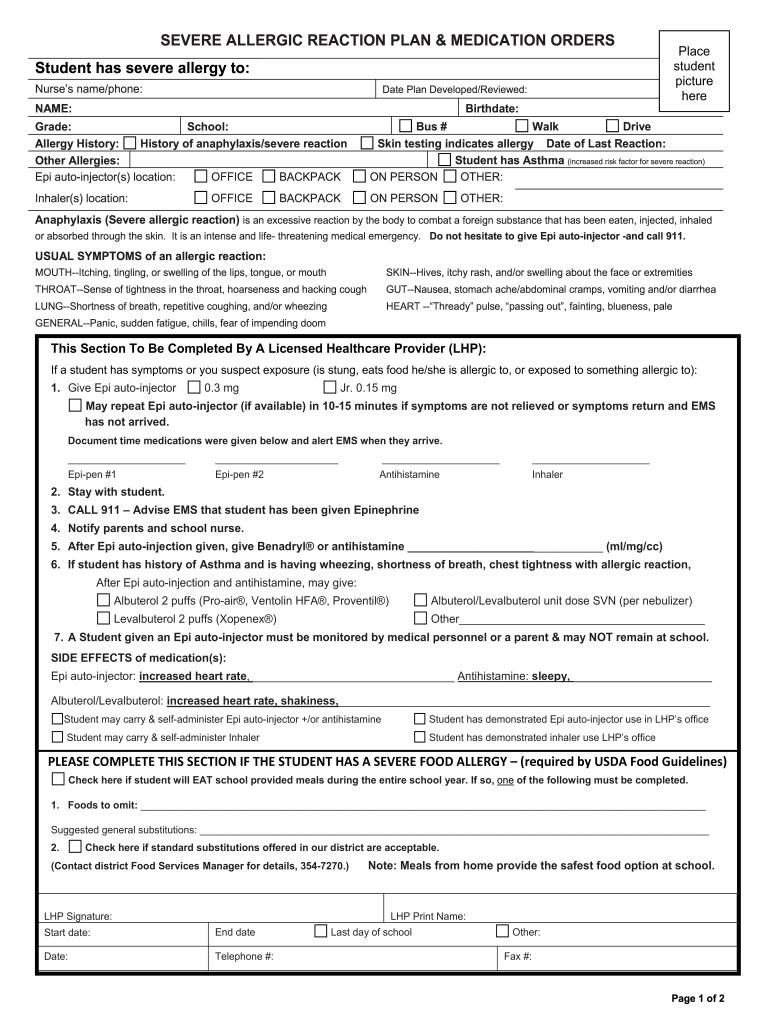
Allergy form - Signal Hill Elementary School - Prince William 2026

Get Form
allergy form - Signal Hill Elementary School - Prince William Preview on Page 1

Here's how it works

01. Edit your form online
Type text, add images, blackout confidential details, add comments, highlights and more.
02. Sign it in a few clicks
Draw your signature, type it, upload its image, or use your mobile device as a signature pad.
03. Share your form with others
Send it via email, link, or fax. You can also download it, export it or print it out.

How to use or fill out allergy form - Signal Hill Elementary School - Prince William with our platform

Form edit decoration
9.5
Ease of Setup
DocHub User Ratings on G2
9.0
Ease of Use
DocHub User Ratings on G2
  1. Click ‘Get Form’ to open the allergy form in the editor.
  2. Begin by uploading a recent picture of the student in the designated area at the top of the form.
  3. Fill in the student's name, birthdate, grade, and school information accurately to ensure proper identification.
  4. Detail any severe allergies and previous allergic reactions in the Allergy History section. Indicate if an Epi auto-injector is required and its location (e.g., office, backpack).
  5. Complete the healthcare provider section with necessary medical details, including medication orders and emergency procedures.
  6. In the Food Allergy Accommodations section, specify any foods to omit and suggested substitutions for school meals.
  7. Ensure all emergency contacts are filled out correctly for quick access during emergencies.
  8. Review all entries for accuracy before saving or submitting your completed form.

Start using our platform today to easily complete your allergy form online for free!

See more allergy form - Signal Hill Elementary School - Prince William versions

We've got more versions of the allergy form - Signal Hill Elementary School - Prince William form. Select the right allergy form - Signal Hill Elementary School - Prince William version from the list and start editing it straight away!
Versions Form popularity Fillable & printable
2012 4.8 Satisfied (160 Votes)
be ready to get more

Complete this form in 5 minutes or less

Get form

Got questions?

We have answers to the most popular questions from our customers. If you can't find an answer to your question, please contact us.
Contact us

Yes, you can utilize DocHub for signing any business and personal documentation, including your allergy form - Signal Hill Elementary School - Prince William. All eSignatures you generate with our service are legally binding and court-admissible, as DocHub complies with standards required by ESIGN and UETA. Save your completed paperwork with a detailed Audit Trail if necessary.

When you edit your allergy form - Signal Hill Elementary School - Prince William with DocHub, you merely require a stable internet connection and virtually any web browser installed on your device. No need to install any third-party applications or research guides. Just open a tab with DocHub, drag and drop your file, and edit it immediately.

Academic records show that 42% of students achieve proficiency in math, and 52% are proficient in reading. Signal Hill Elementary School has received feedback and ratings, with a Niche grade of B+ and a GreatSchools Rating of 8 out of 10.
Despite this growth, Brentsville is the smallest high school in Prince William County.
Schools may require a doctors note when a student misses three consecutive days or a total of 10 days during the school year due to illness. Family trips or absences related to travel are unexcused absences. Students are considered chronically absent if they miss 10% or more school days in a school year.

Security and compliance

At DocHub, your data security is our priority. We follow HIPAA, SOC2, GDPR, and other standards, so you can work on your documents with confidence.

Learn more
ccpa2
pci-dss
gdpr-compliance
hipaa
soc-compliance
be ready to get more

Complete this form in 5 minutes or less

Get form