Id 140 form 2026

Get Form
ca interlock removal Preview on Page 1

Here's how it works

01. Edit your ca interlock removal online
Type text, add images, blackout confidential details, add comments, highlights and more.
02. Sign it in a few clicks
Draw your signature, type it, upload its image, or use your mobile device as a signature pad.
03. Share your form with others
Send id 140 form via email, link, or fax. You can also download it, export it or print it out.

How to use or fill out id 140 form with our platform

Form edit decoration
9.5
Ease of Setup
DocHub User Ratings on G2
9.0
Ease of Use
DocHub User Ratings on G2
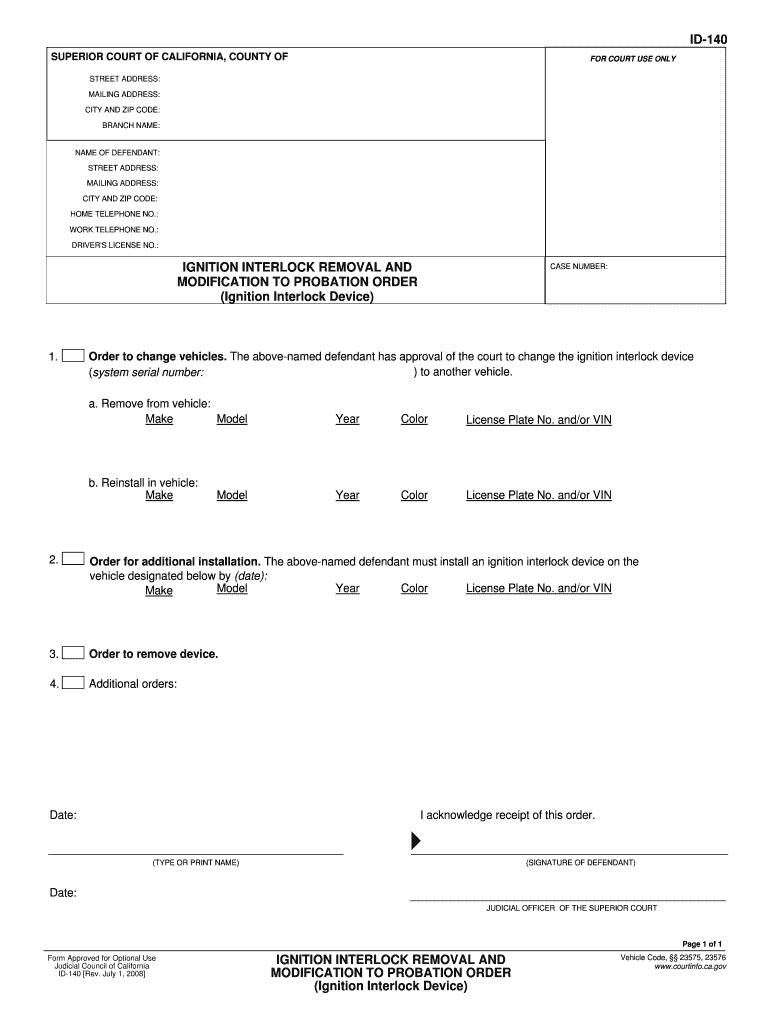
  1. Click ‘Get Form’ to open the ID-140 form in the editor.
  2. Begin by filling in your STREET ADDRESS, MAILING ADDRESS, CITY AND ZIP CODE at the top of the form. Ensure accuracy for proper communication.
  3. Next, enter the NAME OF DEFENDANT and their contact details including HOME TELEPHONE NO., WORK TELEPHONE NO., and DRIVER'S LICENSE NO. This information is crucial for identification purposes.
  4. In the section regarding ignition interlock removal and modification, specify details about the vehicle from which the device will be removed. Fill in fields such as Model, Make, Year, Color, and License Plate No. or VIN.
  5. If applicable, provide information for additional installations by entering the required vehicle details in the designated fields.
  6. Finally, acknowledge receipt of this order by typing or printing your name and signing where indicated. Don’t forget to date your signature.

Start using our platform today to fill out your ID-140 form easily and for free!

See more id 140 form versions

We've got more versions of the id 140 form form. Select the right id 140 form version from the list and start editing it straight away!
Versions Form popularity Fillable & printable
2008 4.8 Satisfied (230 Votes)
be ready to get more

Complete this form in 5 minutes or less

Get form

Got questions?

We have answers to the most popular questions from our customers. If you can't find an answer to your question, please contact us.
Contact us

You need to use only trustworthy software solutions with strong security compliance to sign your documents electronically. DocHub is just the type of service you need! It stores data on Amazon Web Servers and complies with all required security criteria and eSignature laws, so it’s a trustworthy way to eSign your id modification form or other forms using this tool.

With DocHub, there are several convenient methods to edit your interlock removal probation online. You can drag and drop the form and modify it straight at the DocHub site or use our browser extension to fill out your form right away. Additionally, you can modify your PDF on your phone, as DocHub is compatible with all the accessible mobile platforms.

USCIS will send you notification of a biometrics appointment and process your I-765 (work document) and/or I-131 (travel document). Afterward, you would be scheduled for an interview with a USCIS officer, and after a successful interview, your green card should be approved, printed and mailed.
If you are a citizen or national of Iran, Syria, Yemen, Libya, Somalia, Chad, North Korea, Venezuela, Nigeria, Burma, Eritrea, Kyrgyzstan, Sudan, or Tanzania, you can still file your I-140 petition while you are outside the U.S., and your nationality or location should not affect your chances of I-140 approval.
Form I-140, officially known as the Immigrant Petition for Alien Workers, is a document in the United States employment-based green card process.

Security and compliance

At DocHub, your data security is our priority. We follow HIPAA, SOC2, GDPR, and other standards, so you can work on your documents with confidence.

Learn more
ccpa2
pci-dss
gdpr-compliance
hipaa
soc-compliance

People also ask

On average, processing can take 4.5 to 14.5 months. The i140 approval time may vary docHubly depending on the USCIS service center, case backlog, and the complexity of the petition. The average processing time can be affected by factors such as case volume and policy changes.
Petition Filing and Processing Procedures for Form I-140, Immigrant Petition for Alien Workers. You may use Form I-140, Immigrant Petition for Alien Workers, to ask USCIS to classify an alien as someone who is eligible for an immigrant visa based on employment.
The I-140 is the document that qualifies an applicant for permanent residency based on the specific employment-based preference category requested.

Related links