Fl679s 2026

Get Form
por se comparecencia Preview on Page 1

Here's how it works

01. Edit your por se comparecencia online
Type text, add images, blackout confidential details, add comments, highlights and more.
02. Sign it in a few clicks
Draw your signature, type it, upload its image, or use your mobile device as a signature pad.
03. Share your form with others
Send it via email, link, or fax. You can also download it, export it or print it out.

How to use or fill out fl679s with our platform

Form edit decoration
9.5
Ease of Setup
DocHub User Ratings on G2
9.0
Ease of Use
DocHub User Ratings on G2
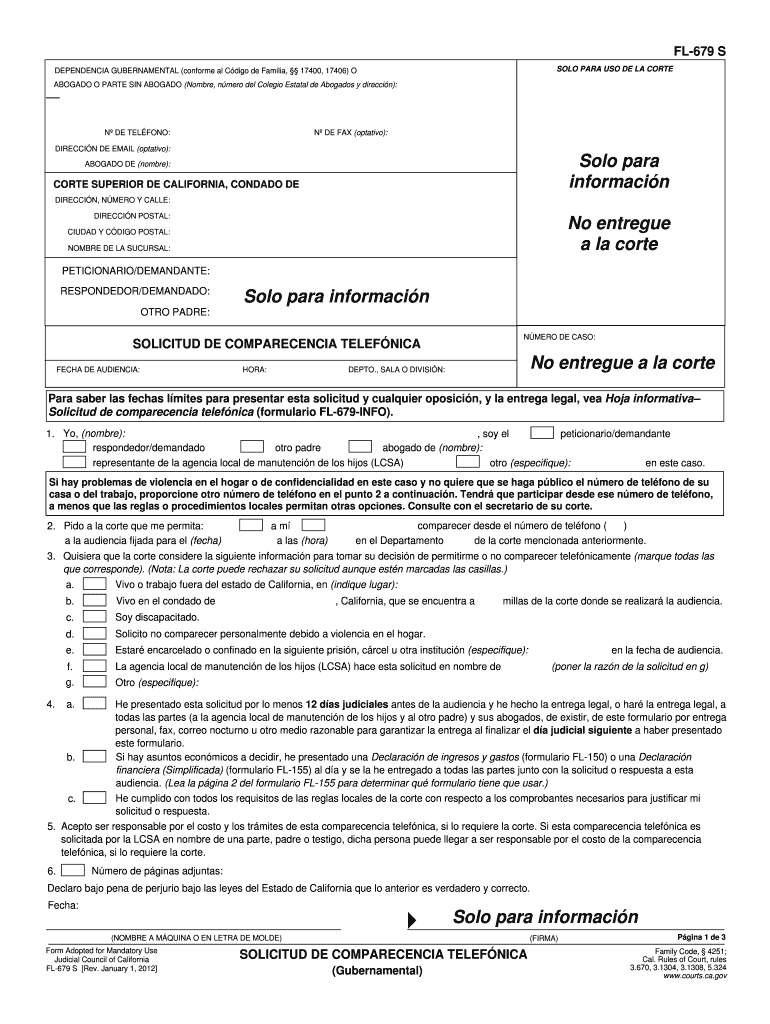
  1. Click ‘Get Form’ to open the FL-679 S in the editor.
  2. Begin by entering your name and contact information in the designated fields. This includes your phone number, fax (optional), and email address (optional).
  3. Fill in the court details, including the Superior Court of California, county, and address. Ensure that you provide accurate information for a smooth process.
  4. Identify yourself as either the petitioner or respondent by selecting the appropriate option. Include any additional parent’s information if applicable.
  5. Specify your request for a telephonic appearance by providing the date and time of the hearing along with your preferred phone number.
  6. Indicate any reasons for requesting a telephonic appearance by checking relevant boxes. Be sure to include any necessary explanations.
  7. Review all entries for accuracy before submitting. Ensure that you have completed all required sections and attached any necessary documents.

Start using our platform today to fill out your FL-679 S form easily and efficiently!

See more fl679s versions

We've got more versions of the fl679s form. Select the right fl679s version from the list and start editing it straight away!
Versions Form popularity Fillable & printable
2012 4.8 Satisfied (287 Votes)
be ready to get more

Complete this form in 5 minutes or less

Get form

Got questions?

We have answers to the most popular questions from our customers. If you can't find an answer to your question, please contact us.
Contact us

Sure, a typed name is accepted as a valid electronic signature when you create it on your paperwork utilizing a compliant solution like DocHub. Simply add your fl679s to our editor, click Sign in the top tool pane → Create your signature → Type your name in the proper tab, and decide how it will appear on your document.

If you are looking for a state-specific fl679s sample, you can find it in our DocHub Forms & Templates catalog. Use the search field, key in your form’s name, and search through the results for your state. You may also filter out irrelevant results while browsing our catalog by categories.

Some court hearings are remote. That means some or all of the people participating appear in court by video or by phone. There may be a fee to appear by video or by phone. Your court may send you a notice that your hearing will be remote. If they didnt and you need to appear remotely, you can ask for a remote hearing.
If you would like to appear by phone, you must ask the courts permission using the Request for Remote Appearance form along with the Cover Sheet and register on LACourtConnect. The request for telephone appearance should be filed with the court at least 12 court days before the hearing.
To appear telephonically: You must call (213) 306-3065 or (844) 621-3956 (toll free) fifteen (15) minutes prior to the scheduled hearing time to check in or there may be a delay in the case being heard.

Security and compliance

At DocHub, your data security is our priority. We follow HIPAA, SOC2, GDPR, and other standards, so you can work on your documents with confidence.

Learn more
ccpa2
pci-dss
gdpr-compliance
hipaa
soc-compliance
be ready to get more

Complete this form in 5 minutes or less

Get form

People also ask

Under Cal. Rules of Court, rule, 3.672, a party may choose to appear remotely for a non-evidentiary hearing in unlawful detainers. If a party receives notice to attend a hearing at least three business days before the date of the hearing, a party can give notice of their intent to appear remotely.
Tells the court that you or a witness intends to appear at a court proceeding remotely, either by telephone or video, rather than in person.
At least 20 minutes prior to your hearing start time, dial 1(833)568-8864 (toll free phone) OR 1(669)254-5252 (phone).

Related links