




Here's how it works



How to use or fill out safety quali pro with our platform

- Click ‘Get Form’ to open the safety quali pro document in the editor.
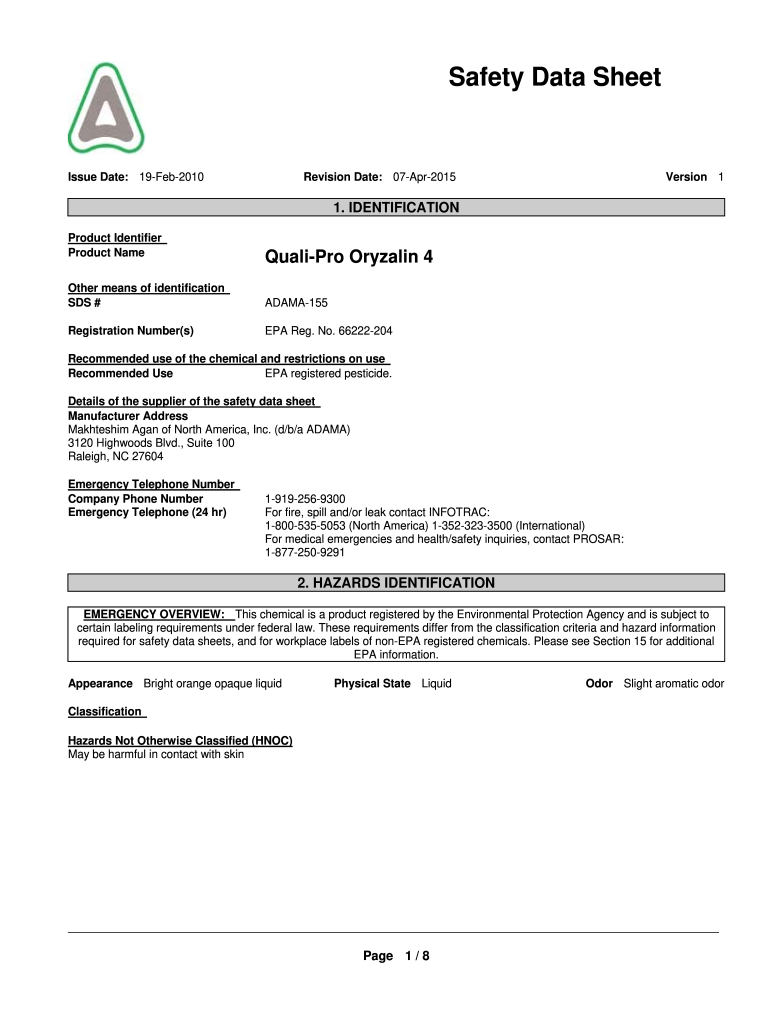
- Begin by filling out the 'IDENTIFICATION' section. Enter the product name, Quali-Pro Oryzalin 4, and ensure you include the SDS number and EPA registration number.
- Proceed to the 'HAZARDS IDENTIFICATION' section. Review the emergency overview and note any hazards associated with skin contact or eye exposure.
- In the 'COMPOSITION/INFORMATION ON INGREDIENTS' section, confirm that you list Oryzalin along with its CAS number and weight percentage.
- Complete the 'FIRST-AID MEASURES' section by detailing appropriate responses for various types of exposure, ensuring clarity for emergency situations.
- Review and fill out sections on 'FIRE-FIGHTING MEASURES', 'ACCIDENTAL RELEASE MEASURES', and 'HANDLING AND STORAGE' to ensure comprehensive safety protocols are documented.
Start using our platform today to streamline your form completion process for free!
It's free
See more safety quali pro versions
| Versions | Form popularity | Fillable & printable |
|---|---|---|
| 2015 | 4.9 Satisfied (38 Votes) |
Got questions?
Can I sign my data sheet quali pro with my mobile phone?
Yes, it is possible with DocHub. This secure and compliant online editor features a phone-based signing option. Once you log in to your DocHub account and add your data sheet quali pro to our editor, complete all blank areas and utilize the Sign tool on the upper barf. Click on Create your signature and select Phone from the available options. Here, you scan a QR code using your smartphone and draw your signature on your phone display, as you usually do when approving hard copies. If you access DocHub right from your mobile device, you can electronically sign your document by drawing your electronic signature, adding its picture, or simply with a typed name.
How to complete quali pro oryzalin 4 online for free in 2024?
With a swift editing system like DocHub, you do not require anything but a web browser and connection to the internet to edit your quali pro oryzalin 4 on the internet swiftly. Upload your file or get the appropriate form in DocHub’s catalog, open our editor with one click, and finish it digitally. To revise your forms anytime, register a free profile with DocHub.
Is glyphosate harmful to humans?
What precautions should be taken when using propiconazole?
What is quali pro glyphosate?
Security and compliance
At DocHub, your data security is our priority. We follow HIPAA, SOC2, GDPR, and other standards, so you can work on your documents with confidence.
Learn more




