City Inside Outside 2025

Get Form
City Inside Outside Preview on Page 1

Here's how it works

01. Edit your form online
Type text, add images, blackout confidential details, add comments, highlights and more.
02. Sign it in a few clicks
Draw your signature, type it, upload its image, or use your mobile device as a signature pad.
03. Share your form with others
Send it via email, link, or fax. You can also download it, export it or print it out.

How to use or fill out City Inside Outside with our platform

Form edit decoration
9.5
Ease of Setup
DocHub User Ratings on G2
9.0
Ease of Use
DocHub User Ratings on G2
  1. Click ‘Get Form’ to open the City Inside Outside document in the editor.
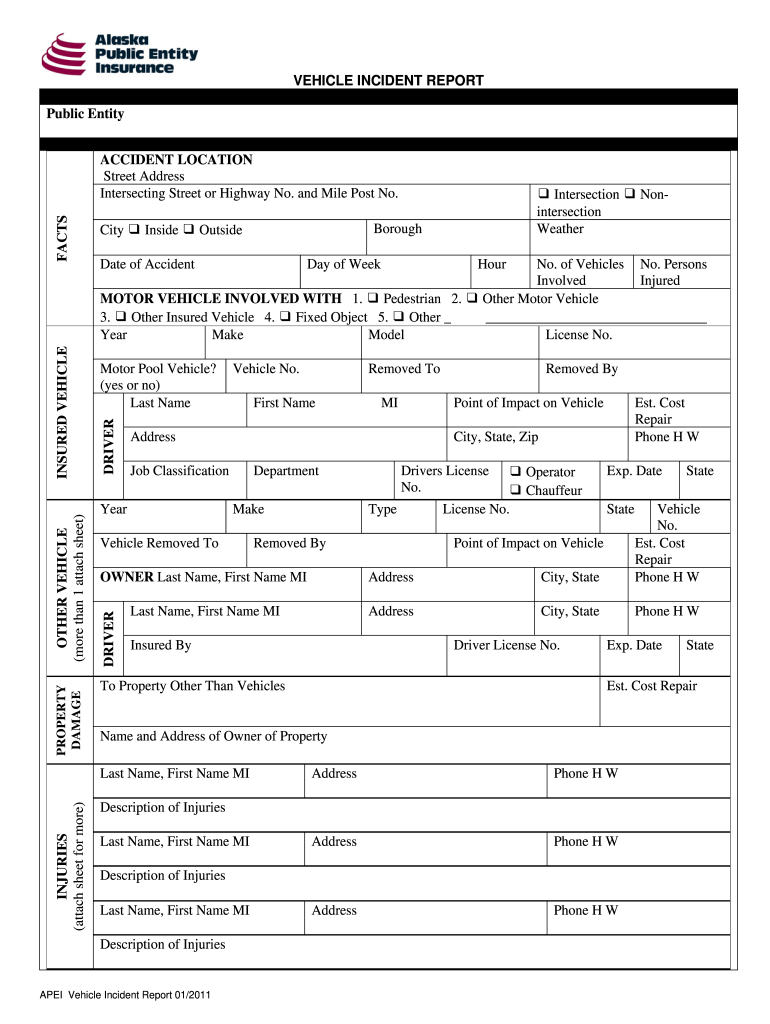
  2. Begin by filling out the 'PROPERTY DAMAGE' section. Indicate whether the incident occurred 'Inside' or 'Outside' and provide the number of vehicles and persons involved.
  3. In the 'MOTOR VEHICLE INVOLVED' section, select the appropriate options for the type of vehicle involved. Fill in details such as Year, Make, Model, and License Number.
  4. Complete the 'DRIVER' section with personal information including Last Name, First Name, MI, and contact details. Specify if it is a Motor Pool Vehicle.
  5. Proceed to fill out the 'OWNER' section with relevant details about the vehicle owner and their contact information.
  6. Document any injuries in the 'INJURIES' section. Provide descriptions for each individual involved.
  7. Finally, ensure all sections are completed accurately before submitting your form via email or fax as instructed at the end of the document.

Start using our platform today to streamline your form completion process for free!

See more City Inside Outside versions

We've got more versions of the City Inside Outside form. Select the right City Inside Outside version from the list and start editing it straight away!
Versions Form popularity Fillable & printable
2011 4.8 Satisfied (31 Votes)
be ready to get more

Complete this form in 5 minutes or less

Get form

Got questions?

We have answers to the most popular questions from our customers. If you can't find an answer to your question, please contact us.
Contact us

Sure, you’ll find many different apps for this on the web. Nonetheless, if you need to eSign your City Inside Outside without installing extra software, DocHub is the optimum choice you can make. This robust editor works on mobile devices just like on desktops. Open our editor in your preferred internet browser, register or log in to your account, and start processing your documents.

You need only an internet connection and a web browser to complete your City Inside Outside on an iOS phone. Open the DocHub website and authenticate. Then, add your document or choose it from the list in your dashboard. Then use our editing tools to complete your form and preserve all your adjustments. You may also send it to a dedicated recipient right away.

A city can only be reconstructed in the form of urban quarters. A large or a small city can only be reorganized as a large or a small number of urban quarters; as a federation of autonomous quarters. Each quarter must have its own center, periphery and limit. Each quarter must be A CITY WITHIN A CITY.
At age 11, Riley moves from Minnesota to San Francisco for her fathers new job.
Cloud Town is a section of Imagination Land located inside Riley Andersens mind in the 2015 Disney/Pixar film Inside Out.

People also ask

After young Riley is uprooted from her Midwest life and moved to San Francisco, her emotions, Joy, Fear, Anger, Disgust, and Sadness, conflict on how best to navigate a new city, house, and school.
After young Riley is uprooted from her Midwest life and moved to San Francisco, her emotions - Joy, Fear, Anger, Disgust and Sadness - conflict on how best to navigate a new city, house, and school.
Riley Andersen, the lead character in Inside Out 2, is a Minnesota native still adjusting to her familys move to San Francisco.

Related links