ARIZONA STATE TRAUMA REGISTRY DATA REQUEST FORM 2026

Get Form
arizona trauma registry Preview on Page 1

Here's how it works

01. Edit your arizona trauma registry online
Type text, add images, blackout confidential details, add comments, highlights and more.

02. Sign it in a few clicks
Draw your signature, type it, upload its image, or use your mobile device as a signature pad.

03. Share your form with others
Send it via email, link, or fax. You can also download it, export it or print it out.

How to use or fill out ARIZONA STATE TRAUMA REGISTRY DATA REQUEST FORM with our platform

Form edit decoration
9.5
Ease of Setup
DocHub User Ratings on G2
9.0
Ease of Use
DocHub User Ratings on G2
  1. Click ‘Get Form’ to open the ARIZONA STATE TRAUMA REGISTRY DATA REQUEST FORM in the editor.
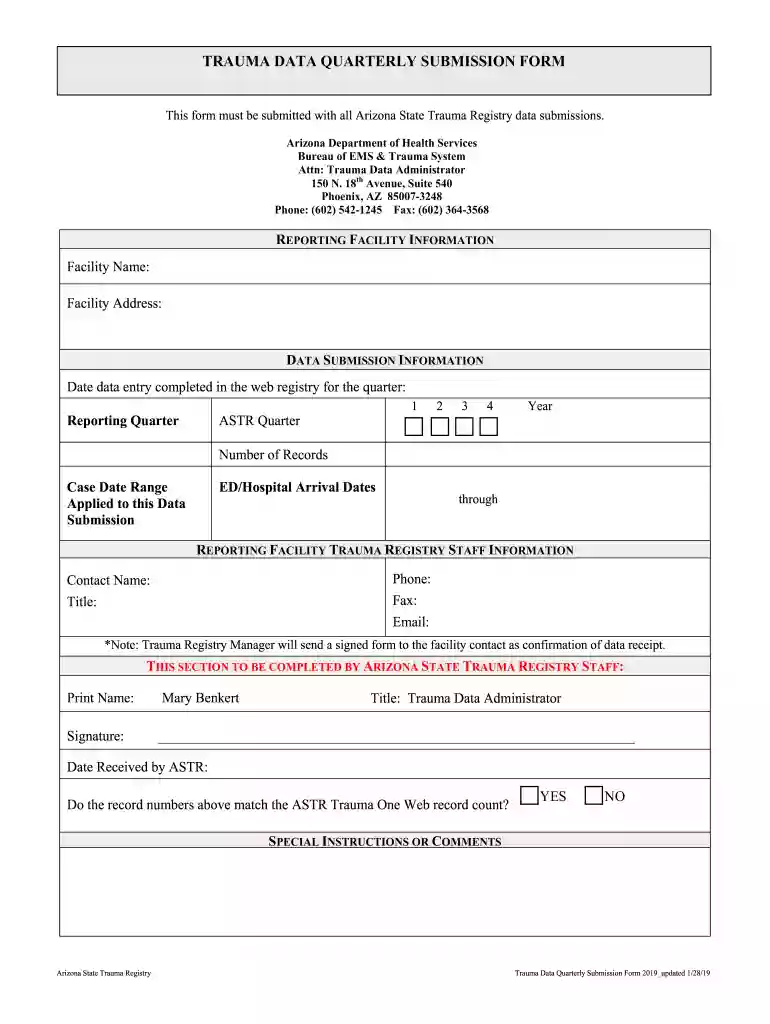
  2. Begin by filling out the 'REPORTING FACILITY INFORMATION' section. Enter your facility name and address accurately to ensure proper identification.
  3. Next, move to the 'DATA SUBMISSION INFORMATION' section. Here, specify the date when data entry was completed for the quarter, select the reporting quarter, and provide the year. Additionally, indicate the number of records and case date range applicable to this submission.
  4. In the 'REPORTING FACILITY TRAUMA REGISTRY STAFF INFORMATION' section, fill in your contact name, phone number, title, fax number, and email address. This information is crucial for communication regarding your submission.
  5. Finally, review any special instructions or comments that may be necessary before submitting. Ensure all fields are completed accurately before saving or exporting your form.

Start using our platform today to streamline your form completion process for free!

See more ARIZONA STATE TRAUMA REGISTRY DATA REQUEST FORM versions

We've got more versions of the ARIZONA STATE TRAUMA REGISTRY DATA REQUEST FORM form. Select the right ARIZONA STATE TRAUMA REGISTRY DATA REQUEST FORM version from the list and start editing it straight away!
Versions Form popularity Fillable & printable
2019 4.8 Satisfied (50 Votes)
be ready to get more

Complete this form in 5 minutes or less

Get form

Got questions?

We have answers to the most popular questions from our customers. If you can't find an answer to your question, please contact us.
Contact us
However, Arizona is a one-party consent state, which means it is legal to record a conversation under certain circumstances. To legally record a conversation in Arizona: You must be one of the parties involved in the conversation. You must present during the entire conversation.
In ance with A.R.S. 39-121 through 39-128 and Arizona case law, all work-related records of this Office, regardless of format, are presumed to be public records. However, various confidentiality laws and privileges may apply to certain records or parts of records.
To review the record, the subject may begin the process by going to or by contacting the Central State Repository Section at (602) 223-2000, selecting Option #2 (Records and Reports), and then Option #3 (Statewide Criminal Records).
Obtaining a criminal record is free in Arizona.
With the exception of some records involving adoptions or juveniles, these court records are open to the public. Cases filed more than 15 years ago may be held by Arizona State Archives. Cases filed within 10 years may be held by Court of Appeals Division Two .

Security and compliance

At DocHub, your data security is our priority. We follow HIPAA, SOC2, GDPR, and other standards, so you can work on your documents with confidence.

Learn more
ccpa2
pci-dss
gdpr-compliance
hipaa
soc-compliance
be ready to get more

Complete this form in 5 minutes or less

Get form

People also ask

The trauma registry is a complex database of the demographics, injuries, care, and outcomes of trauma patients. The primary reason the trauma care system was established was to effect improvement in the prevention of trauma and to increase the survival rate of victims when trauma occurs.

Related links