Sra maryland gov 2026

Get Form
mysrpsusers sra maryland gov Preview on Page 1

Here's how it works

01. Edit your mysrpsusers sra maryland gov online
Type text, add images, blackout confidential details, add comments, highlights and more.

02. Sign it in a few clicks
Draw your signature, type it, upload its image, or use your mobile device as a signature pad.

03. Share your form with others
Send mysrpsusers sra maryland via email, link, or fax. You can also download it, export it or print it out.

How to use or fill out sra maryland gov with our platform

Form edit decoration
9.5
Ease of Setup
DocHub User Ratings on G2
9.0
Ease of Use
DocHub User Ratings on G2
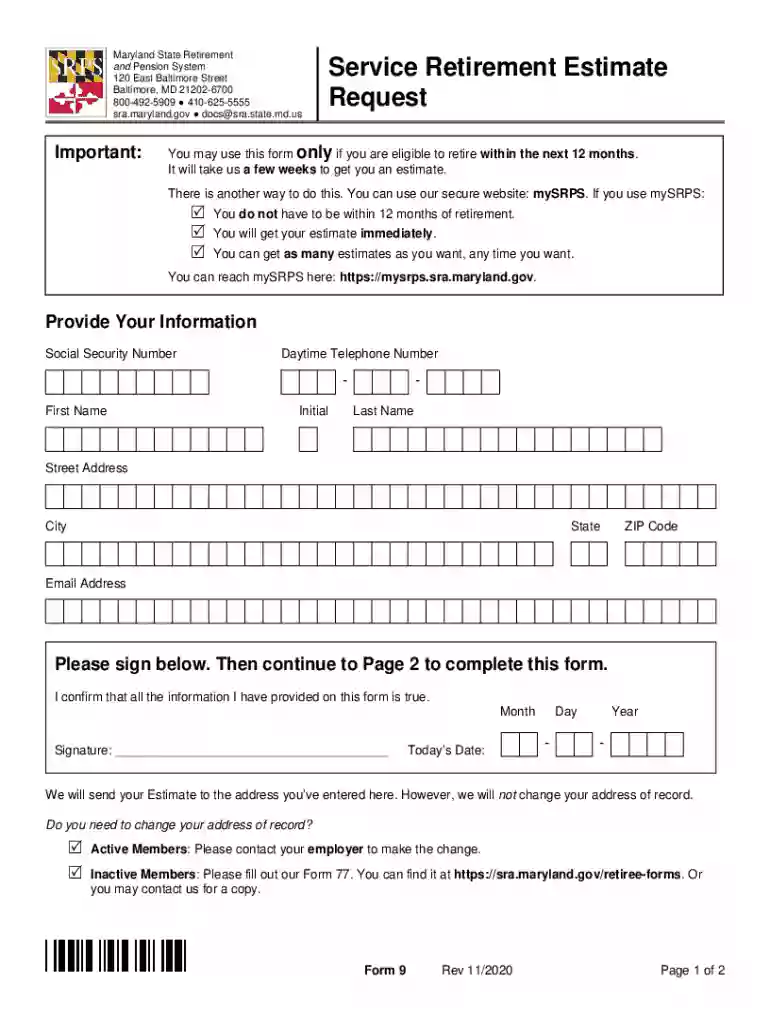
  1. Click ‘Get Form’ to open the Service Retirement Estimate Request in the editor.
  2. Begin by providing your personal information. Fill in your Social Security Number, Daytime Telephone Number, First Name, Initial, Last Name, Street Address, City, State, ZIP Code, and Email Address.
  3. Sign the form to confirm that all provided information is accurate. Then proceed to Page 2.
  4. On Page 2, select a retirement date within the next 12 months for your estimate. This date is crucial for calculating your retirement benefits.
  5. Choose one beneficiary if you wish to explore payment options that allow leaving a monthly benefit. Fill in their relation to you and their date of birth.
  6. Review your completed form carefully before submitting it via US Mail or email as instructed on the form.

Start using our platform today for free to streamline your document editing and submission process!

See more sra maryland gov versions

We've got more versions of the sra maryland gov form. Select the right sra maryland gov version from the list and start editing it straight away!
Versions Form popularity Fillable & printable
2020 4.8 Satisfied (100 Votes)
2016 4.3 Satisfied (45 Votes)
be ready to get more

Complete this form in 5 minutes or less

Get form

Got questions?

We have answers to the most popular questions from our customers. If you can't find an answer to your question, please contact us.
Contact us

Yes, you can utilize DocHub for signing any business and personal paperwork, including your sra maryland gov. All electronic signatures you generate with our service are legally binding and court-admissible, as DocHub complies with standards required by ESIGN and UETA. Save your accomplished paperwork with a detailed Audit Trail if necessary.

You can find the latest and most relevant version of the sra maryland gov in our DocHub forms library. Browse it by categories or use the search field to get the exact template that suits your case. You can open this form for editing after you find it.

Upon retirement, the Pension System provides the member with a monthly benefit (pension check). The amount of the monthly benefit is determined by a formula: years of service + average final salary.
Full vesting after 10 years of service. Retirement eligibility at age 65 with at least 10 years of service, or age 60 with at least 15 years of service at a reduced benefit.
You must work at least 5 years with the Federal Government before you are eligible for a FERS Federal Pension, and for every year you work, you will be eligible for at least 1% of your High-3 Average Salary History. Automatic deductions that can range from .

Security and compliance

At DocHub, your data security is our priority. We follow HIPAA, SOC2, GDPR, and other standards, so you can work on your documents with confidence.

Learn more
ccpa2
pci-dss
gdpr-compliance
hipaa
soc-compliance

People also ask

Retirement eligibility at age 65 with at least 10 years of service, or age 60 with at least 15 years of service at a reduced benefit. Receive service credit for unused sick leave (visit the MSRPS website for more information)
The Maryland Retirement Tax Elimination Act of 2022 represents a landmark victory for retirees across the state. Signed into law by Governor Larry Hogan, this legislation delivers the largest tax cut package in Marylands history specifically designed to benefit seniors and make Maryland more retirement-friendly.
By completing the Form 5, you are terminating your membership in the Maryland State Retirement and Pension System and are forfeiting any right to a future benefit including disability benefits. It is important that you acknowledge this forfeiture in the presence of a notary.
Normal Retirement You may retire with unreduced benefits: Rule of 90 age and service must equal 90.

Related links