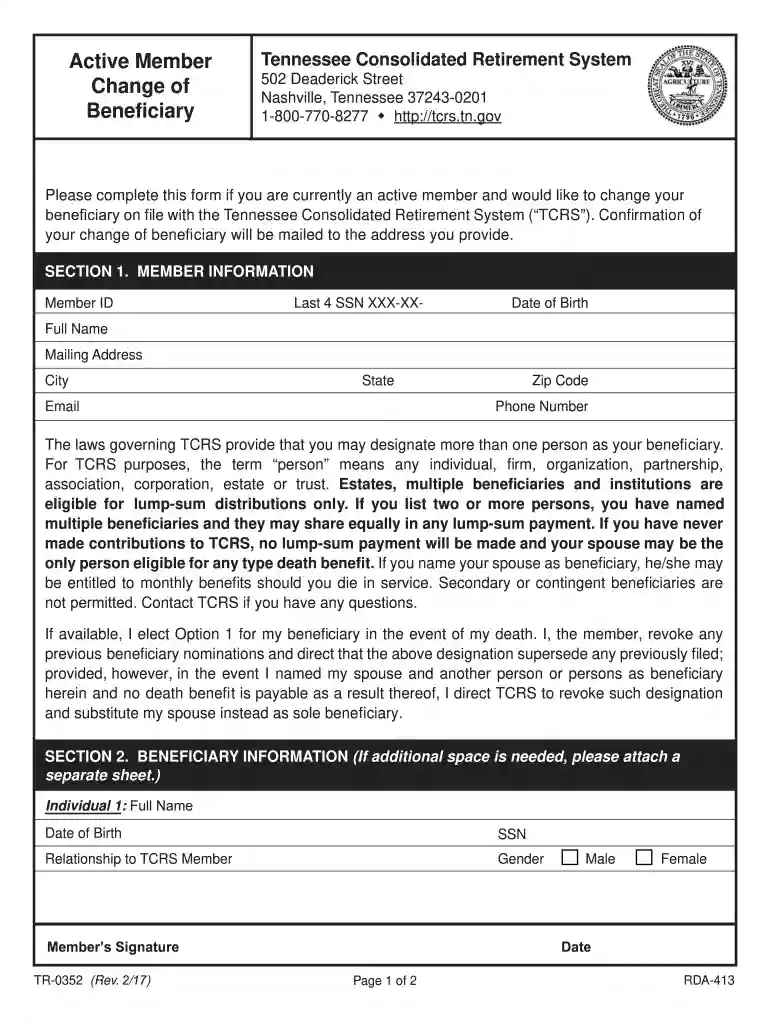
tn tr beneficiary form Preview on Page 1

Tennessee tr 0352 active beneficiary form trial-2026

Here's how it works

  • 01. Edit your tn tr beneficiary form online

    Type text, add images, blackout confidential details, add comments, highlights and more.

  • 02. Sign it in a few clicks

    Draw your signature, type it, upload its image, or use your mobile device as a signature pad.

  • 03. Share your form with others

    Send tennessee tr 0352 active beneficiary form trial via email, link, or fax. You can also download it, export it or print it out.

How to use or fill out tennessee tr 0352 active beneficiary form trial with DocHub

Form edit decoration
9.5
Ease of Setup
DocHub User Ratings on G2
9.0
Ease of Use
DocHub User Ratings on G2
  1. Click ‘Get Form’ to open the tennessee tr 0352 active beneficiary form trial in our editor.
  2. Begin with Part I: Member Information. Fill in your Social Security Number, Birthdate, and contact numbers. Ensure accuracy as this information is crucial for TCRS communications.
  3. Complete your Name and Address fields. This is where TCRS will send confirmation of your beneficiary change, so double-check for any typos.
  4. In Part II: Beneficiary Information, list individuals or institutions you wish to designate as beneficiaries. Include their names, relationships, and other required details like Social Security numbers or Taxpayer IDs.
  5. Review the section regarding multiple beneficiaries carefully. If applicable, ensure you understand how benefits will be distributed among them.
  6. Sign and date the form at the bottom of Part I. Remember that a notary public must witness your signature for it to be valid.

Start using our platform today to fill out your tennessee tr 0352 active beneficiary form trial for free!

See more tn tr beneficiary form versions

We've got more versions of the tn tr beneficiary form form. Select the right tn tr beneficiary form version from the list and start editing it straight away!

VersionsForm popularityFillable & printable
20174.8 Satisfied (121 Votes)

be ready to get more

Complete this form in 5 minutes or less

Security and compliance

At DocHub, your data security is our priority. We follow HIPAA, SOC2, GDPR, and other standards, so you can work on your documents with confidence.

tennessee active change beneficiary

Appendix for SEER-Medicare 11/2016 Claims Files

May 31, 2017 A = Primary claimant. B = Aged wife, age 62 or over (1st claimant). B1 = Aged husband, age 62 or over (1st claimant).Read more

Learn more
Tennessee Consolidated Retirement System Employer

Any time an active member wishes to change his/her beneficiary, a Change of Beneficiary form must be used. All blanks must be completed and the form executed

Learn more
If you believe that this page should be taken down, please follow our DMCA take down process here