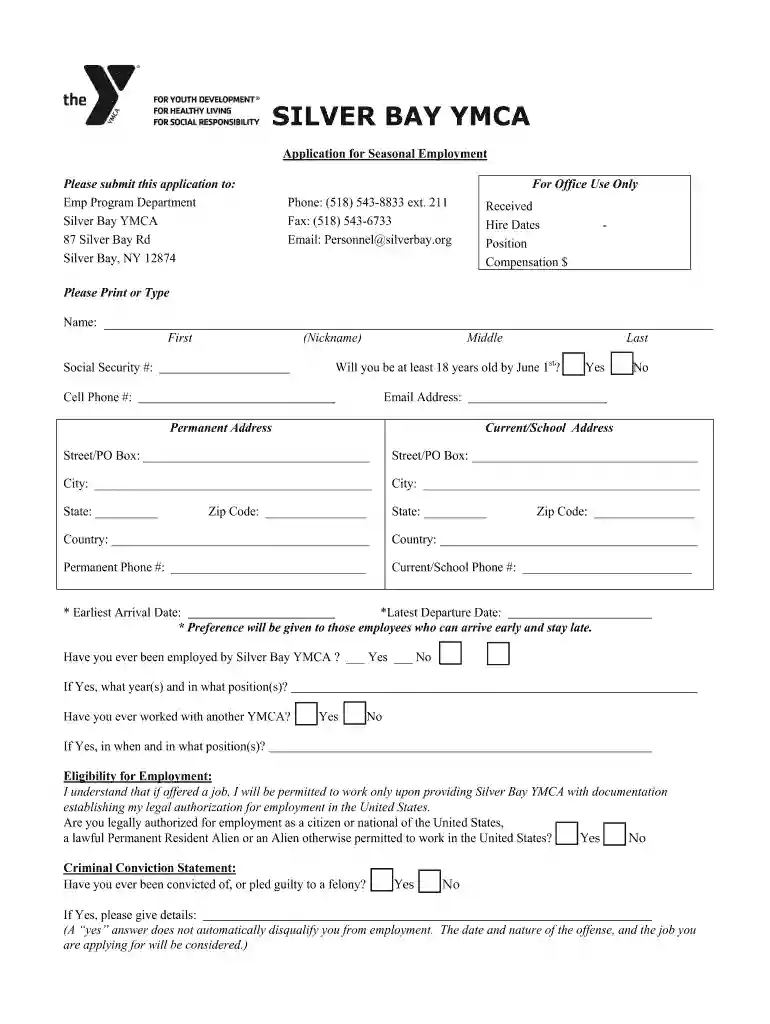
Emp Program Application Instructions for - Silver Bay YMCA 2026

Get Form
Emp Program Application Instructions for - Silver Bay YMCA Preview on Page 1

Here's how it works

01. Edit your form online
Type text, add images, blackout confidential details, add comments, highlights and more.

02. Sign it in a few clicks
Draw your signature, type it, upload its image, or use your mobile device as a signature pad.

03. Share your form with others
Send it via email, link, or fax. You can also download it, export it or print it out.

How to use or fill out Emp Program Application Instructions for - Silver Bay YMCA with our platform

Form edit decoration
9.5
Ease of Setup
DocHub User Ratings on G2
9.0
Ease of Use
DocHub User Ratings on G2
  1. Click ‘Get Form’ to open the Emp Program Application in our editor.
  2. Begin by entering your personal information in the 'Name' section. Ensure you include your first name, nickname, middle name, and last name.
  3. Indicate your age by selecting 'Yes' or 'No' regarding whether you will be at least 18 years old by June 1st.
  4. Fill in your Social Security number, cell phone number, and email address accurately.
  5. Complete both your permanent and current/school addresses, ensuring all fields are filled out correctly.
  6. Answer the eligibility questions regarding previous employment with Silver Bay YMCA and legal authorization for employment.
  7. List your educational background and work experience, detailing each employer's information as requested.
  8. Rank the positions you are applying for in order of preference and answer any additional questions about housing or job flexibility.
  9. Complete the skills section by indicating your proficiency levels in various areas relevant to the position.
  10. Finally, respond to the essay questions on a separate sheet as instructed before submitting your application.

Start filling out your application today using our platform for free!

See more Emp Program Application Instructions for - Silver Bay YMCA versions

We've got more versions of the Emp Program Application Instructions for - Silver Bay YMCA form. Select the right Emp Program Application Instructions for - Silver Bay YMCA version from the list and start editing it straight away!
Versions Form popularity Fillable & printable
2020 4.8 Satisfied (94 Votes)
2019 4.4 Satisfied (46 Votes)
be ready to get more

Complete this form in 5 minutes or less

Get form

Got questions?

We have answers to the most popular questions from our customers. If you can't find an answer to your question, please contact us.
Contact us

Yes, electronically drawing your signature is acceptable, but only if you use a tool that complies with industry laws and regulations. Consider DocHub, which guarantees eSignature validity under ESIGN and UETA requirements. All you need to eSign your Emp Program Application Instructions for - Silver Bay YMCA is an account with DocHub and an internet connection. After you open your paperwork in our editor, click Sign and choose the Draw tool.

If you are using Chrome, there are two easy ways to edit your Emp Program Application Instructions for - Silver Bay YMCA online. First, go to the DocHub site, add your file, and edit it using our toolbar. You can also set up our Chrome extension and edit any document by dragging and dropping it in your web browser tab.

The Silver Bay YMCA is perfect for recreational activities like boating, kayaking, archery, swimming, paddle-boarding, gym and yoga actives, arts and crafts, and tennis (among other things too).
Contact the Reservations Staff by phone at 518.543. 8415. They will assist you in making your reservation. To view our individual reservation deposit and cancellation policies, click HERE.
Silver Bay YMCA allows non-aggressive, well-behaved dogs on the grounds. All dogs must be leashed and picked up after.

Security and compliance

At DocHub, your data security is our priority. We follow HIPAA, SOC2, GDPR, and other standards, so you can work on your documents with confidence.

Learn more
ccpa2
pci-dss
gdpr-compliance
hipaa
soc-compliance
be ready to get more

Complete this form in 5 minutes or less

Get form