
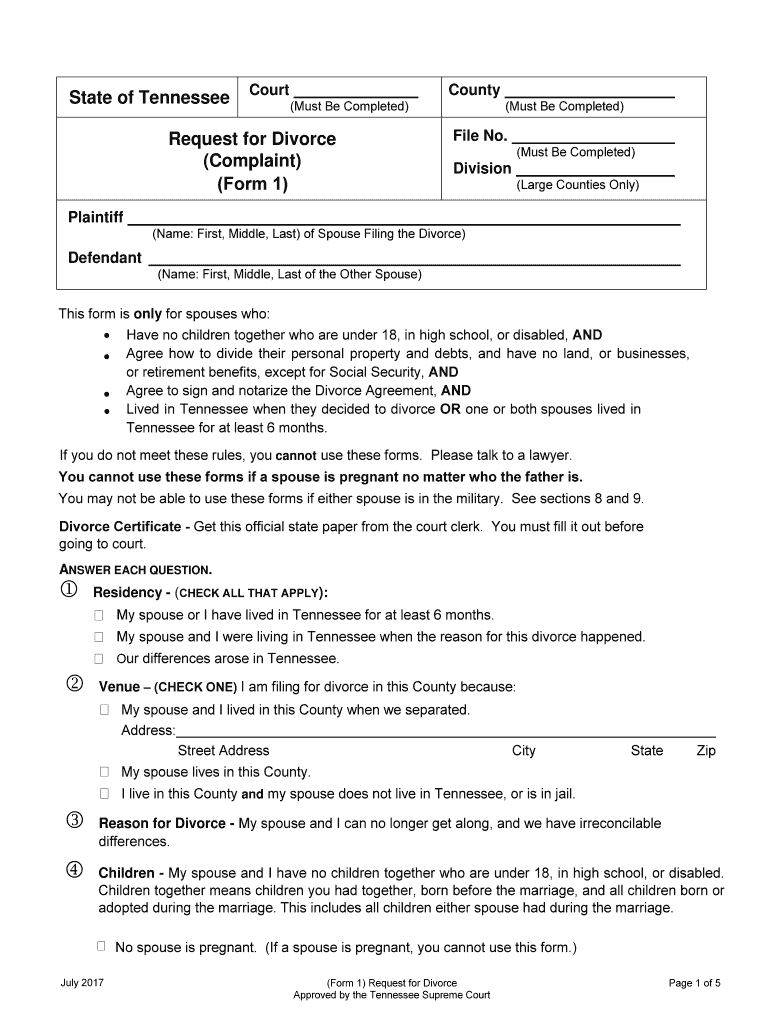





2017 tennessee form complaint-2026

Get Form
tennessee form 1 divorce complaint Preview on Page 1

Here's how it works

01. Edit your tennessee form 1 divorce complaint online
Type text, add images, blackout confidential details, add comments, highlights and more.
02. Sign it in a few clicks
Draw your signature, type it, upload its image, or use your mobile device as a signature pad.
03. Share your form with others
Send 2017 tennessee form complaint via email, link, or fax. You can also download it, export it or print it out.

How to use or fill out 2017 Tennessee Form Complaint with DocHub

Form edit decoration
9.5
Ease of Setup
DocHub User Ratings on G2
9.0
Ease of Use
DocHub User Ratings on G2
  1. Click ‘Get Form’ to open the 2017 Tennessee form complaint in our editor.
  2. Begin by filling in the 'File No.' and 'Division' fields if applicable. Ensure you complete the 'Plaintiff' and 'Defendant' sections with full names.
  3. In the 'Residency' section, check all applicable boxes that confirm your residency status in Tennessee.
  4. For the 'Venue' section, select one option that accurately describes your filing location based on your living situation.
  5. Indicate the reason for divorce by selecting the appropriate checkbox under 'Reason for Divorce'.
  6. Complete the sections regarding children, marriage details, orders of protection, and financial information as required.
  7. Finally, review all entries for accuracy before signing in front of a notary. Use our platform to easily save and share your completed document.

Start using our editor today to fill out your 2017 Tennessee form complaint quickly and efficiently!

See more 2017 tennessee form complaint versions

We've got more versions of the 2017 tennessee form complaint form. Select the right 2017 tennessee form complaint version from the list and start editing it straight away!
Versions Form popularity Fillable & printable
2017 4.8 Satisfied (84 Votes)
2011 4.1 Satisfied (23 Votes)
be ready to get more

Complete this form in 5 minutes or less

Get form

Got questions?

We have answers to the most popular questions from our customers. If you can't find an answer to your question, please contact us.
Contact us

According to eSignature regulations, documents approved electronically have the same validity as those approved with pen and paper. You can eSign almost any business and personal documentation. Four types of documents still call for handwritten signatures only - wills and testamentary trusts, court orders and other court forms, state statutes governing divorce, adoption, or other family law, and notice of cancellation of utility services. If you adhere to the regulations and utilize a safe and compliant software solution, like DocHub, you can eSign your 2017 tn form complaint without printing it.

You can easily edit and complete your 2017 tn form complaint on any iOS gadget. Open an internet browser of your liking, go to the DocHub website, authorize or create a new account, add your file for editing, and make your desired adjustments. Our service is mobile-friendly, so using its functions on your smartphone will be a no-brainer, even on the first try.

Remember, retaliation is by far the number-one complaint that the EEOC receives.
Department of Human Services, Office of General Counsel, Compliance Officer, Citizens Plaza Building, 400 Deaderick Street, Nashville, TN 37243, or call at 615-313-4700.
The complaint must be submitted on the Ethics Commissions official Sworn Complaint form; The complainant must provide identifying information. Anonymous complaints will not be accepted. The allegations must present potential violations of 1 or more of the laws that are within the Ethics Commissions jurisdiction.

Security and compliance

At DocHub, your data security is our priority. We follow HIPAA, SOC2, GDPR, and other standards, so you can work on your documents with confidence.

Learn more
ccpa2
pci-dss
gdpr-compliance
hipaa
soc-compliance
be ready to get more

Complete this form in 5 minutes or less

Get form

People also ask

You may file an employment discrimination complaint with EEOC office by calling (800) 669-4000 or visiting the EEOC website for more information. Generally, you may file a complaint with EEOC up to 300 days after the alleged discriminatory act occurred, but it depends on the specific circumstances of your allegations.
FAQs. Q: What Are the Chances of Winning an EEOC Case? A: The EEOC has a very high success rate when it comes to court decisions, docHubing favorable outcomes in nearly 96% of all district court cases stemming from EEOC complaints.
To file a complaint online: Access the online complaint form. Fill in the requested information and submit the complaint. Please allow several days for processing. You will be notified when your complaint is assigned to a consumer specialist and sent to the business.
In severe cases, the EEOC will sue on the employees behalf; in other cases, the EEOC will issue a right to sue order to the employee. The employee will then have 90 days to file a lawsuit with the federal court. Regardless of the suing party, a lawsuit will cause bad publicity and legal expense.
For many claims in Tennessee you have as little as 300 days to file a complaint with the EEOC (mandatory) or 180 days to file with the THRC (optional, but claims are subject to a one-year filing deadline).

Related links

