




Here's how it works

01. Edit your addendum maryland online
Type text, add images, blackout confidential details, add comments, highlights and more.

02. Sign it in a few clicks
Draw your signature, type it, upload its image, or use your mobile device as a signature pad.

03. Share your form with others
Send cc dc dv 001a via email, link, or fax. You can also download it, export it or print it out.
How to use or fill out the Maryland Addendum with our platform

- Click ‘Get Form’ to open the Maryland Addendum in the editor.
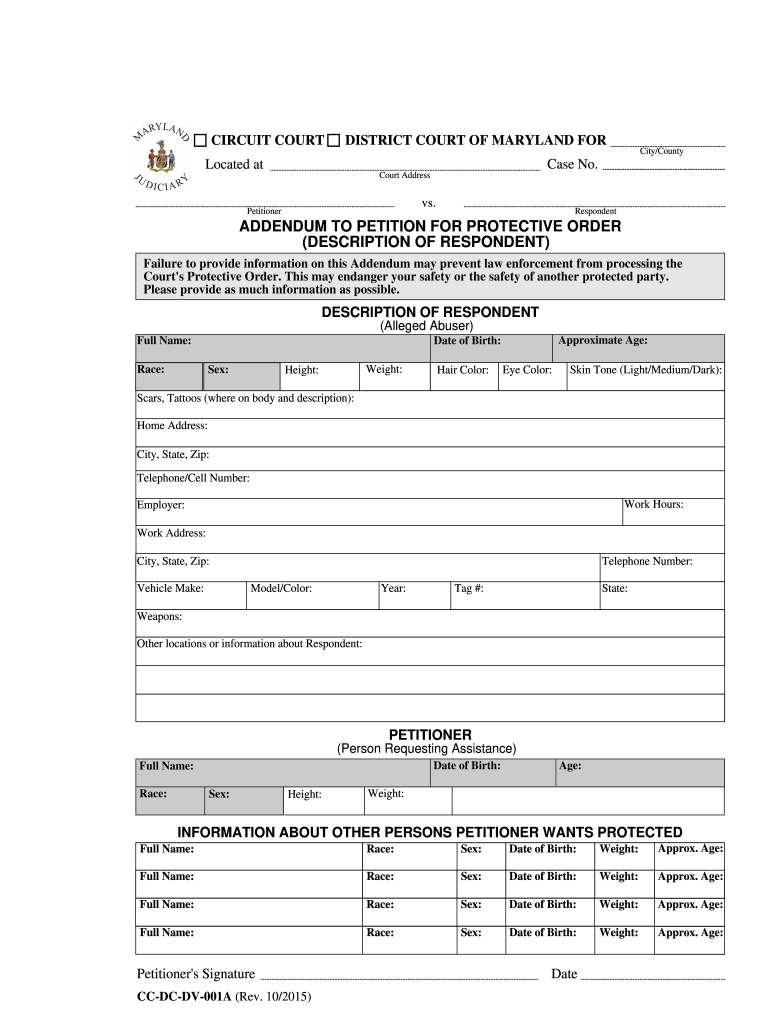
- Begin by filling out the 'Description of Respondent' section. Provide the full name, race, approximate age, date of birth, sex, weight, height, hair color, eye color, and skin tone of the alleged abuser. Include any scars or tattoos with descriptions and their locations.
- Next, enter the home address and contact information for the respondent. This includes city, state, zip code, telephone/cell number, work hours, employer details including work address and phone number.
- Complete vehicle information by specifying make, model/color, year, tag number, and state. If applicable, indicate any weapons associated with the respondent.
- Fill in your details as the petitioner: date of birth, full name, race, sex, height, age, and weight.
- If there are other individuals you wish to protect under this order, provide their full names along with their race, sex, date of birth, weight and approximate age.
- Finally, sign and date the form to complete your submission.
Start using our platform today for free to ensure your Maryland Addendum is filled out accurately and efficiently!
Fill out maryland addendum online
It's free
It's free
Security and compliance
At DocHub, your data security is our priority. We follow HIPAA, SOC2, GDPR, and other standards, so you can work on your documents with confidence.
Learn more




