AUTHORIZATION FOR INFORMATION - SPANISH - Connecticut - jud ct 2026

Get Form
AUTHORIZATION FOR INFORMATION - SPANISH - Connecticut - jud ct Preview on Page 1

Here's how it works

01. Edit your form online
Type text, add images, blackout confidential details, add comments, highlights and more.

02. Sign it in a few clicks
Draw your signature, type it, upload its image, or use your mobile device as a signature pad.

03. Share your form with others
Send it via email, link, or fax. You can also download it, export it or print it out.

How to use or fill out AUTHORIZATION FOR INFORMATION - SPANISH - Connecticut - jud ct

Form edit decoration
9.5
Ease of Setup
DocHub User Ratings on G2
9.0
Ease of Use
DocHub User Ratings on G2
  1. Click ‘Get Form’ to open it in the editor.
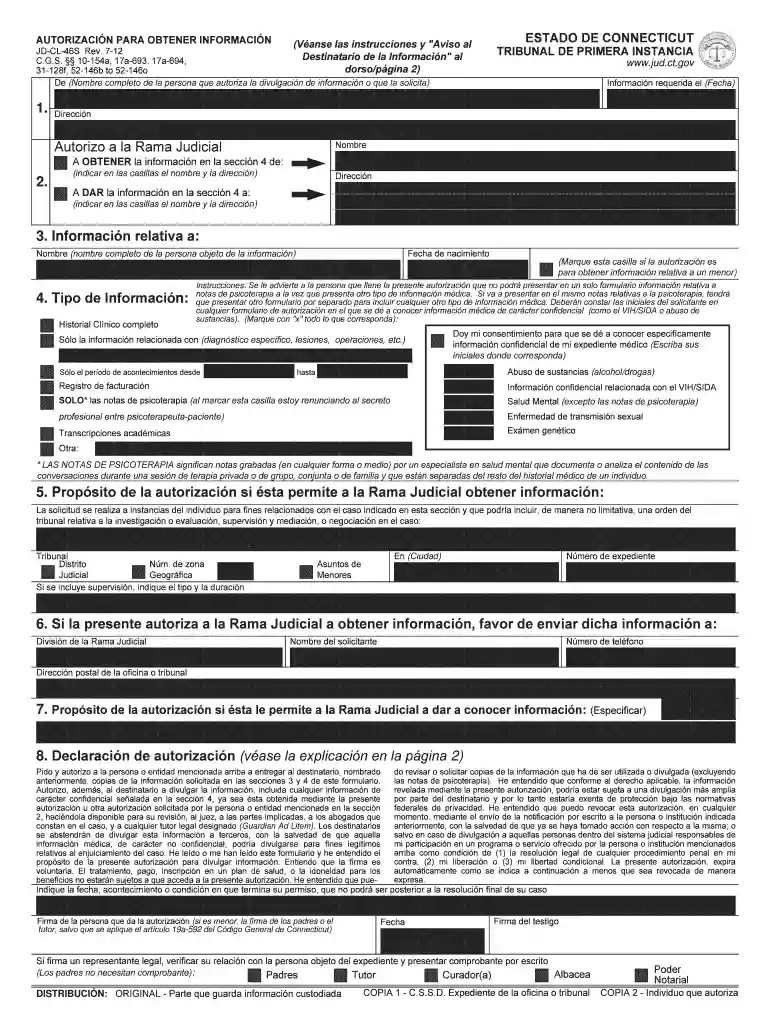
  2. In Section 1, enter the full name of the person authorizing the information disclosure. Ensure accuracy for proper identification.
  3. In Section 2, select 'OBTENER' to indicate you are requesting information. Fill in the name and address of the entity holding the information.
  4. Section 3 requires you to provide the date of birth and full name of the individual whose information is being requested.
  5. In Section 4, specify the type of information needed by checking appropriate boxes. If applicable, include details about any specific conditions or timeframes.
  6. Complete Sections 5 and 6 with relevant case details and ensure that your contact information is accurate for receiving responses.
  7. Finally, have the individual sign Section 8 in front of a witness to validate the authorization.

Start using our platform today to easily fill out your AUTHORIZATION FOR INFORMATION form online for free!

See more AUTHORIZATION FOR INFORMATION - SPANISH - Connecticut - jud ct versions

We've got more versions of the AUTHORIZATION FOR INFORMATION - SPANISH - Connecticut - jud ct form. Select the right AUTHORIZATION FOR INFORMATION - SPANISH - Connecticut - jud ct version from the list and start editing it straight away!
Versions Form popularity Fillable & printable
2012 4.8 Satisfied (205 Votes)
be ready to get more

Complete this form in 5 minutes or less

Get form

Got questions?

We have answers to the most popular questions from our customers. If you can't find an answer to your question, please contact us.
Contact us
Divisions of Superior Court - CT Judicial Branch. The Superior Court hears civil, criminal, family and juvenile matters. Civil Division hears cases in which someone is being sued to protect civil, personal or property rights.
Other ways of conducting arrest warrant lookups in Connecticut include: Searching the Most Wanted lists or arrest logs maintained by local police departments. Contact the Office of Policy and Management (OPM) by phone at (877)312-7807 or by email. Visiting local police departments or superior courts in person.
You may also call the Centralized Services Unit at 860-263-2750. All requests for files must include the name of the case and docket number. Docket numbers may be available on-line at .jud.ct.gov by utilizing the case look-up function. Files should be available within one or two business days.
Connecticut Judicial Branch: Case Look-Up. Supreme and Appellate Court. Civil, Family, Housing, Small Claims. Requesting Divorce Records. Criminal (Convictions) Criminal (Pending) Housing Court Cases Filed Before 3/1/16. Small Claims Cases Filed Before 9/1/17. Violation of Probation (Arrest Warrants)
Arrest Warrant Lookup in Connecticut Searching the Most Wanted lists or arrest logs maintained by local police departments. Contact the Office of Policy and Management (OPM) by phone at (877)312-7807 or by email. Visiting local police departments or superior courts in person.

Security and compliance

At DocHub, your data security is our priority. We follow HIPAA, SOC2, GDPR, and other standards, so you can work on your documents with confidence.

Learn more
ccpa2
pci-dss
gdpr-compliance
hipaa
soc-compliance

People also ask

Case Look-up CT Judicial Branch. This section of the website provides users with information about Supreme and Appellate, civil, family, criminal, motor vehicle, housing, and small claims cases.
The State of Connecticut Centralized Infractions Bureau now allows you to pay infractions online. The link below will take you to the State of Connecticut Judicial Branch to pay your infraction.

Related links