Ks host power attorney 2026

Get Form
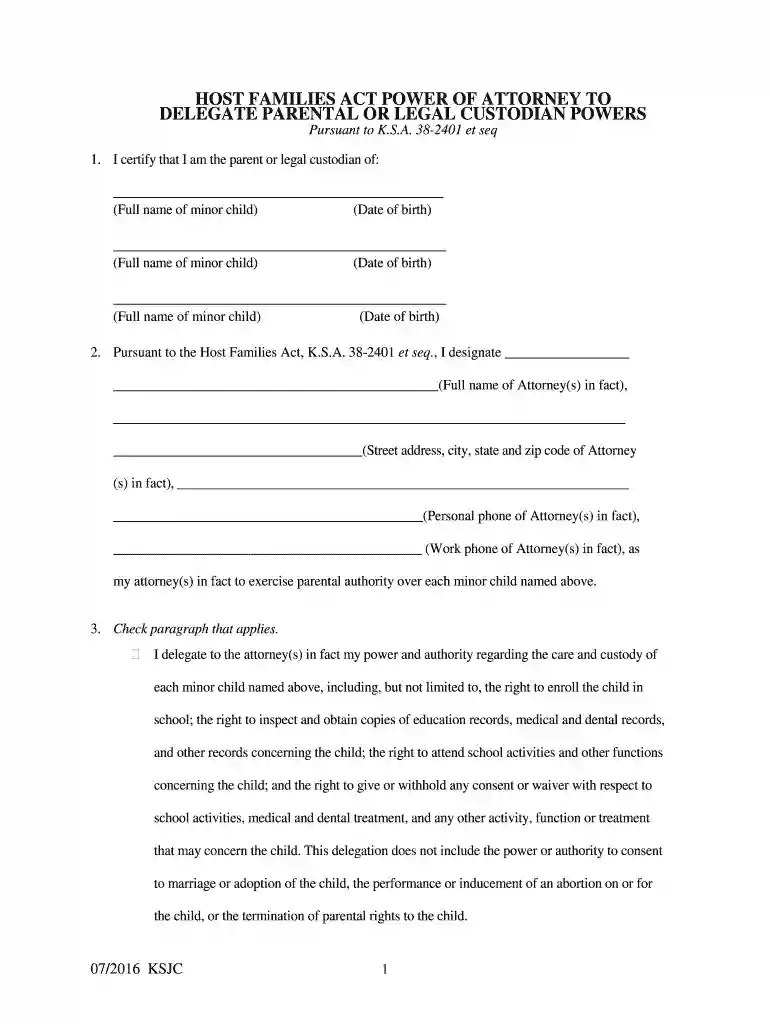
kansas families power powers Preview on Page 1

Here's how it works

01. Edit your kansas families power powers online
Type text, add images, blackout confidential details, add comments, highlights and more.

02. Sign it in a few clicks
Draw your signature, type it, upload its image, or use your mobile device as a signature pad.

03. Share your form with others
Send kansas power attorney delegate via email, link, or fax. You can also download it, export it or print it out.

How to use or fill out ks host power attorney with our platform

Form edit decoration
9.5
Ease of Setup
DocHub User Ratings on G2
9.0
Ease of Use
DocHub User Ratings on G2
  1. Click ‘Get Form’ to open the ks host power attorney in the editor.
  2. Begin by certifying that you are the parent or legal custodian of the minor child. Fill in the full name and date of birth for each child in the designated fields.
  3. Designate your attorney(s) in fact by entering their full name, address, and contact information. Ensure all details are accurate for effective communication.
  4. Select the appropriate delegation paragraph. You can either delegate general powers regarding care and custody or specify particular responsibilities by writing them in.
  5. Indicate the duration of this power of attorney by filling in the start and end dates, or select the military service option if applicable.
  6. Sign and print your name as the parent/legal custodian at the bottom of the form. Ensure that a notarial officer acknowledges your signature.
  7. If multiple attorneys in fact are appointed, repeat the signature process for each individual, ensuring their acknowledgment is also completed.

Start using our platform today to easily complete your ks host power attorney form online for free!

See more ks host power attorney versions

We've got more versions of the ks host power attorney form. Select the right ks host power attorney version from the list and start editing it straight away!
Versions Form popularity Fillable & printable
2016 4.8 Satisfied (192 Votes)
be ready to get more

Complete this form in 5 minutes or less

Get form

Got questions?

We have answers to the most popular questions from our customers. If you can't find an answer to your question, please contact us.
Contact us

Most eSignature services require users to have a paid subscription. With DocHub, there are two ways for you to add an electronic signature to your kansas power attorney delegate form without being charged:

  • You can do it during a 7-day trial period;
  • You can sign up for a free plan.

The second option, though, has limitations on the number of signatures, sign requests, emails, and forms for editing available per month. You can check for full information here.

As a comprehensive document modifying service, DocHub is accessible on mobile phones. Open DocHub in your choice of mobile internet browser and use our smart mobile-friendly toolset to complete your kansas power attorney delegate form.

Kansas Power of Attorney Requirements The power of attorney document must be in writing. You must sign the document in the presence of a notary public or two witnesses who are not related to you and do not stand to benefit from the power of attorney.
Steps for Making a Financial Power of Attorney in Kansas Create the POA Using a Form, Software, or an Attorney. Sign the POA in the Presence of a Notary Public. Store the Original POA in a Safe Place. Give a Copy to Your Agent or Attorney-in-Fact. File a Copy With the Register of Deeds.
For a durable power of attorneywhich remains in effect even if the principal becomes incapacitatedCalifornia law requires the document be signed by the principal and either docHubd or signed by two witnesses for it to be valid.

Security and compliance

At DocHub, your data security is our priority. We follow HIPAA, SOC2, GDPR, and other standards, so you can work on your documents with confidence.

Learn more