Ct transcript monitor get 2026

Get Form
transcript monitor Preview on Page 1

Here's how it works

01. Edit your transcript monitor online
Type text, add images, blackout confidential details, add comments, highlights and more.

02. Sign it in a few clicks
Draw your signature, type it, upload its image, or use your mobile device as a signature pad.

03. Share your form with others
Send ct transcript monitor via email, link, or fax. You can also download it, export it or print it out.

How to use or fill out ct transcript monitor get with our platform

Form edit decoration
9.5
Ease of Setup
DocHub User Ratings on G2
9.0
Ease of Use
DocHub User Ratings on G2
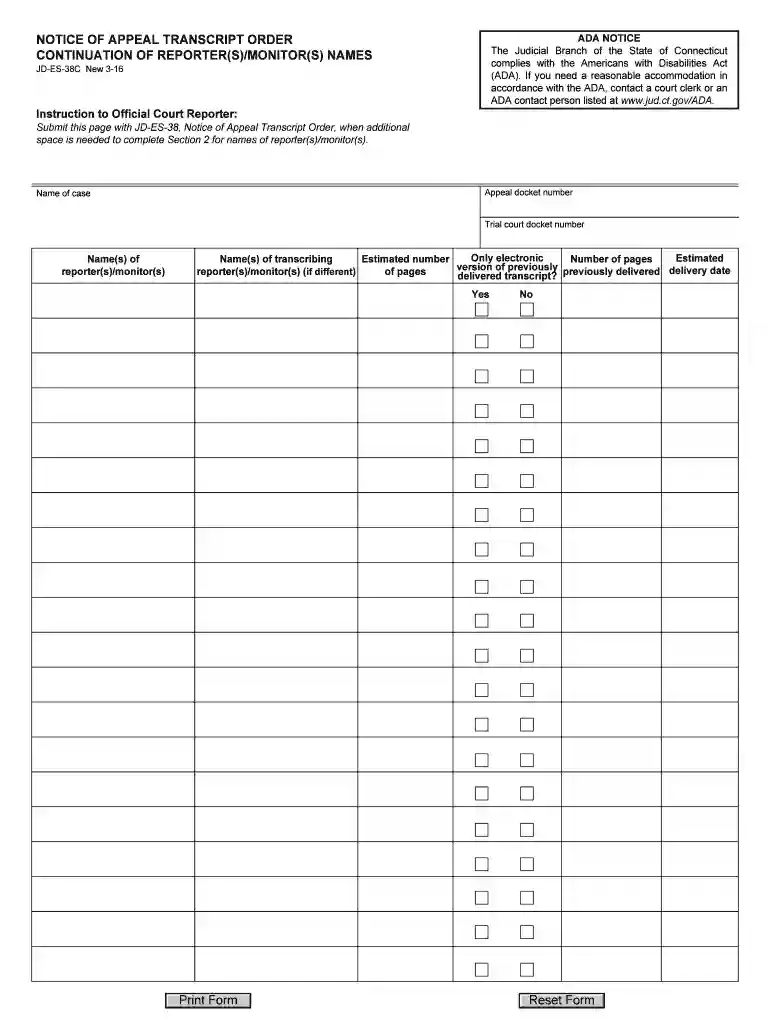
  1. Click ‘Get Form’ to open the ct transcript monitor get in the editor.
  2. Begin by entering the 'Appeal docket number' at the top of the form. This is crucial for identifying your case.
  3. Next, fill in the 'Name of case' field. Ensure that this matches the official title of your appeal.
  4. Proceed to input the 'Trial court docket number.' This number is essential for tracking your case within the court system.
  5. In the section for 'Name(s) of reporter(s)/monitor(s),' list all relevant names. If you have more than one, ensure they are clearly separated.
  6. Indicate whether you require an electronic version of previously delivered transcripts by selecting 'Yes' or 'No.'
  7. If applicable, provide details about any transcribing reporter(s)/monitor(s) in the designated fields, including their estimated delivery date and number of pages.

Start using our platform today to streamline your document editing and form completion process for free!

See more ct transcript monitor get versions

We've got more versions of the ct transcript monitor get form. Select the right ct transcript monitor get version from the list and start editing it straight away!
Versions Form popularity Fillable & printable
2016 4.8 Satisfied (300 Votes)
be ready to get more

Complete this form in 5 minutes or less

Get form

Got questions?

We have answers to the most popular questions from our customers. If you can't find an answer to your question, please contact us.
Contact us
Members of the public have the right to see any document in any court file, unless a court has sealed the file, or statute has rendered the contents of the file confidential.
Case Look-up CT Judicial Branch. This section of the website provides users with information about Supreme and Appellate, civil, family, criminal, motor vehicle, housing, and small claims cases.
Sealed criminal court records in the state of Connecticut can generally only be accessed by authorized parties. These parties include, but are not limited to, officers of the court and certain law enforcement officials.
Are police reports/records public information? Police reports, calls for service, and arrest information are, for the most part, public information, with specific exceptions as outlined in the Freedom of Information Act, C.G.S. section 1-210.

Security and compliance

At DocHub, your data security is our priority. We follow HIPAA, SOC2, GDPR, and other standards, so you can work on your documents with confidence.

Learn more