DR-358 Response to Motion 612 pdf fill in Domestic Relations Forms 2026

Get Form
DR-358 Response to Motion 612 pdf fill in Domestic Relations Forms Preview on Page 1

Here's how it works

01. Edit your form online
Type text, add images, blackout confidential details, add comments, highlights and more.
02. Sign it in a few clicks
Draw your signature, type it, upload its image, or use your mobile device as a signature pad.
03. Share your form with others
Send it via email, link, or fax. You can also download it, export it or print it out.

How to use or fill out DR-358 Response to Motion 612 pdf fill in Domestic Relations Forms with DocHub

Form edit decoration
9.5
Ease of Setup
DocHub User Ratings on G2
9.0
Ease of Use
DocHub User Ratings on G2
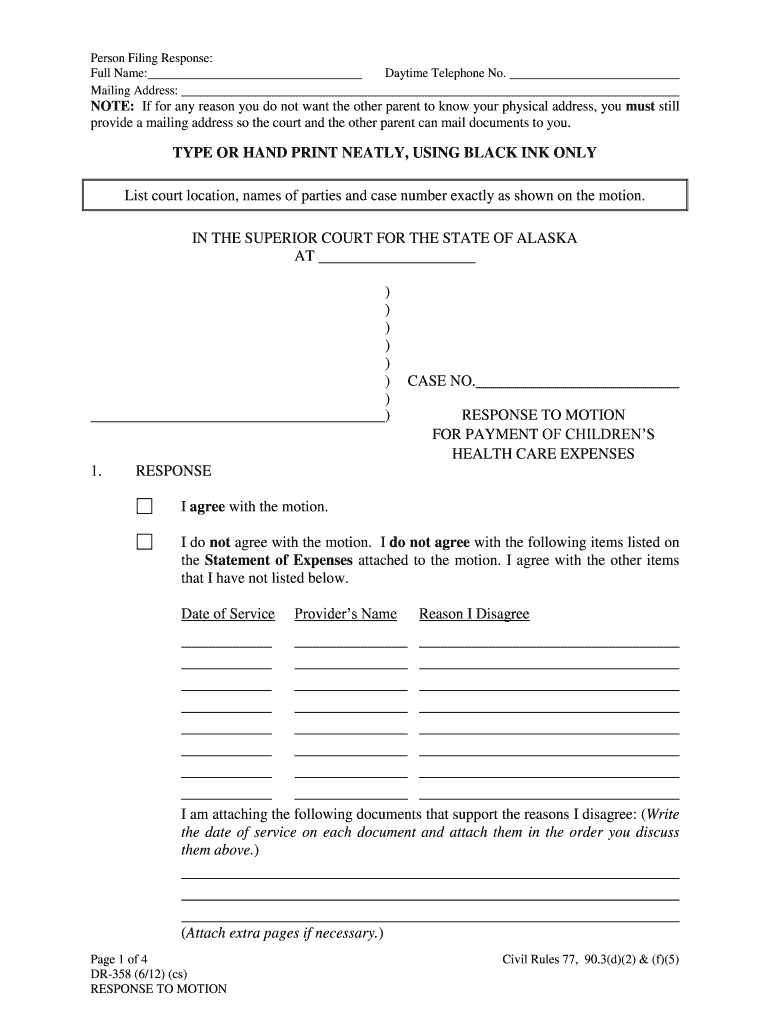
  1. Click ‘Get Form’ to open the DR-358 Response to Motion 612 in our editor.
  2. Begin by entering your full name and mailing address in the designated fields. If privacy is a concern, ensure you provide a mailing address for court correspondence.
  3. List the court location, names of parties involved, and case number exactly as shown on the motion. This ensures accuracy and prevents delays.
  4. In the 'RESPONSE' section, indicate whether you agree or disagree with the motion. If you disagree, specify which items from the Statement of Expenses you contest and provide reasons.
  5. Attach any supporting documents that validate your disagreement. Make sure to write the date of service on each document.
  6. Complete additional sections regarding health care expenses, including payments made and requests for reimbursement sent to the other parent.
  7. Check all required attachments listed in section 3 to ensure completeness before finalizing your response.
  8. Sign the form in front of a notary public and complete the Certificate of Service section to confirm delivery of your response.

Start using our platform today for free to streamline your document editing and form completion!

See more DR-358 Response to Motion 612 pdf fill in Domestic Relations Forms versions

We've got more versions of the DR-358 Response to Motion 612 pdf fill in Domestic Relations Forms form. Select the right DR-358 Response to Motion 612 pdf fill in Domestic Relations Forms version from the list and start editing it straight away!
Versions Form popularity Fillable & printable
2012 4.9 Satisfied (322 Votes)
be ready to get more

Complete this form in 5 minutes or less

Get form

Got questions?

We have answers to the most popular questions from our customers. If you can't find an answer to your question, please contact us.
Contact us
At the courthouse, give your motion to the court clerk and pay the filing fee. Depending on your court, you might have to choose the motion hearing date yourself. The court clerk can usually help. The nonmovant will have time to file a written response before the hearing.
How to Write a Motion for Court? Step-by-Step Guide Step 1: Understand the Purpose of Your Motion. Step 2: Research Court Rules and Requirements. Step 3: Start with a Clear and Concise Title. Step 4: Draft the Introduction. Step 5: Present the Relevant Facts. Step 6: Provide Legal Arguments.
Custody Battle Blunders: Top 10 Mistakes To Avoid Negative Speech About The Other Parent. Seeking Sympathy From The Child. Poor Communication With The Other Parent. Unjustifiably Withholding Access With The Other Parent. Misrepresenting Substance Abuse. Separating Siblings In Blended Families.
Disrespectful Language: Avoid insults, sarcasm, or any derogatory remarks. Personal Attacks: Never make personal comments about the judges character or past decisions, such as ``You always rule against people like me. Interrupting: Speaking over the judge or interrupting them can be seen as disrespectful.
If you want to file a motion, the process is generally something like this: You write your motion. You file your motion with the court clerk. The court clerk inserts the date and time your motion will be heard by the judge. You serve (mail) your motion to the other side.

Security and compliance

At DocHub, your data security is our priority. We follow HIPAA, SOC2, GDPR, and other standards, so you can work on your documents with confidence.

Learn more