Publication welfare section online 2026

Get Form
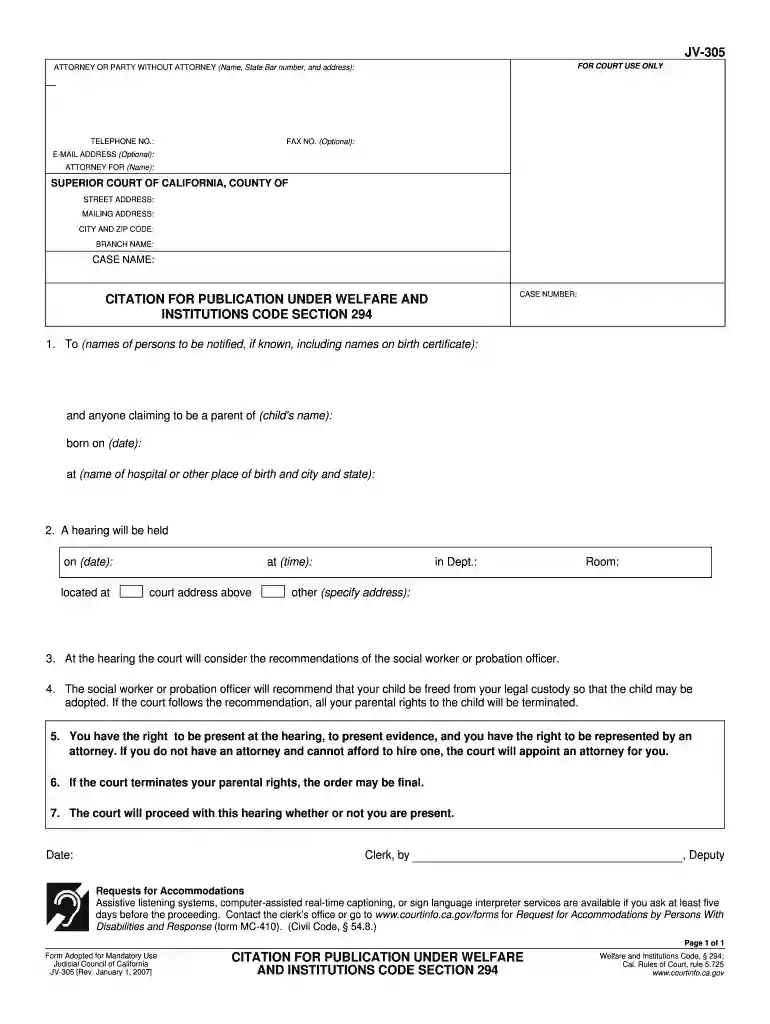
jv 305 Preview on Page 1

Here's how it works

01. Edit your jv 305 online
Type text, add images, blackout confidential details, add comments, highlights and more.

02. Sign it in a few clicks
Draw your signature, type it, upload its image, or use your mobile device as a signature pad.

03. Share your form with others
Send citation of publication via email, link, or fax. You can also download it, export it or print it out.

How to use or fill out publication welfare section online

Form edit decoration
9.5
Ease of Setup
DocHub User Ratings on G2
9.0
Ease of Use
DocHub User Ratings on G2
  1. Click ‘Get Form’ to open it in the editor.
  2. Begin by entering your contact information in the designated fields, including your name, address, and optional email and fax numbers.
  3. Fill in the case details such as the case name and number, ensuring accuracy for proper identification.
  4. In the citation section, list the names of individuals to be notified regarding the hearing, including any known parents of the child.
  5. Specify the child's name, date of birth, and place of birth accurately to avoid any discrepancies.
  6. Indicate the date and time of the hearing along with its location as provided in the form.
  7. Review all entered information for completeness and correctness before submitting or printing your form.

Start using our platform today to complete your publication welfare section online for free!

See more publication welfare section online versions

We've got more versions of the publication welfare section online form. Select the right publication welfare section online version from the list and start editing it straight away!
Versions Form popularity Fillable & printable
2007 4.9 Satisfied (232 Votes)
be ready to get more

Complete this form in 5 minutes or less

Get form

Got questions?

We have answers to the most popular questions from our customers. If you can't find an answer to your question, please contact us.
Contact us
Contact the journal publisher and find out if they allow retrospective Open Access. You will likely need to provide the DOI of the article you wish to make open. For more information on DOIs, see DOIs for research . If the publisher allows retrospective Open Access, ask what the process is and how much it will cost.
Google Scholar In Google Scholar, click on the three stacked lines in the top left corner of your screen to reveal the side menu, and click on Settings. Return to the search window and search by your name and publication title.
Find out what support you can get. Write a cover letter. Introduce your work in a 1-page letter, explaining the research you did, and why its relevant. Submit your manuscript. Go to the journal homepage to start the process. Technical check. Editor and peer review. Final decision. Payment. Publish.
Steps to Journal publication Research your options. Discover more about choosing the right journal. Make your submission. Get prepared to submit your paper. Your article is accepted. Find out what happens when your article is in production.

Security and compliance

At DocHub, your data security is our priority. We follow HIPAA, SOC2, GDPR, and other standards, so you can work on your documents with confidence.

Learn more
ccpa2
pci-dss
gdpr-compliance
hipaa
soc-compliance
be ready to get more

Complete this form in 5 minutes or less

Get form