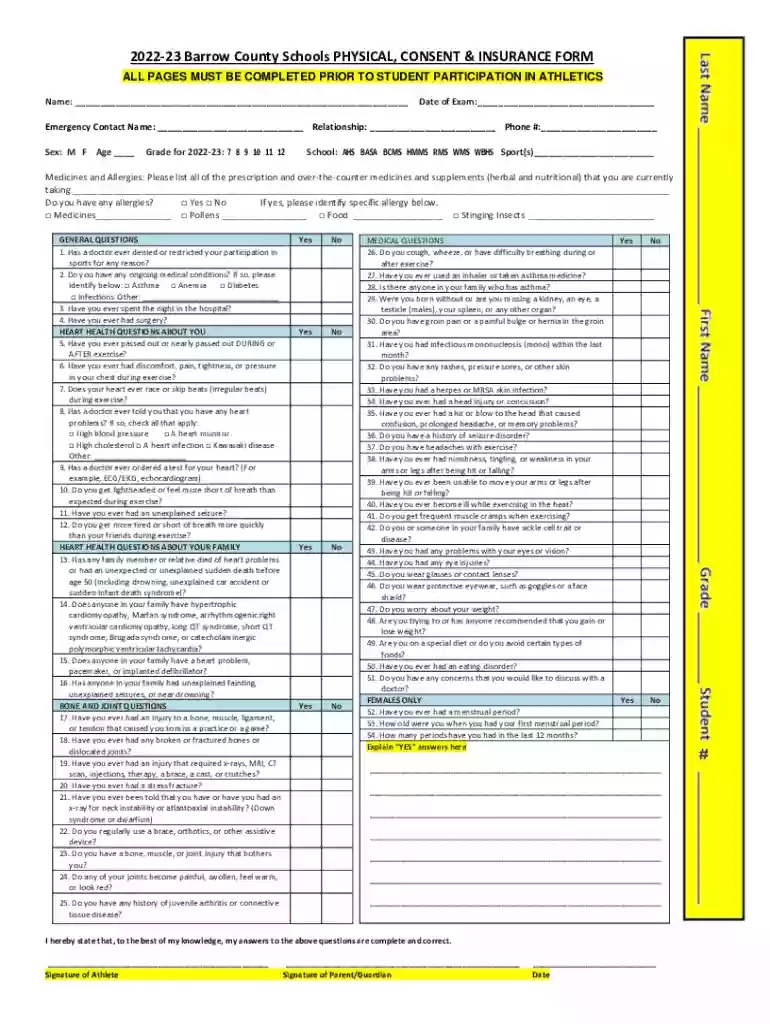
DocHub form-library510019Physical Form - Barrow County Schools - Fill and Sign Preview on Page 1

DocHub form-library510019Physical Form - Barrow County Schools - Fill and Sign 2026

Here's how it works

  • 01. Edit your form online

    Type text, add images, blackout confidential details, add comments, highlights and more.

  • 02. Sign it in a few clicks

    Draw your signature, type it, upload its image, or use your mobile device as a signature pad.

  • 03. Share your form with others

    Send it via email, link, or fax. You can also download it, export it or print it out.

How to use or fill out DocHub form-library510019Physical Form - Barrow County Schools - Fill and Sign

Form edit decoration
9.5
Ease of Setup
DocHub User Ratings on G2
9.0
Ease of Use
DocHub User Ratings on G2
  1. Click ‘Get Form’ to open it in the editor.
  2. Begin by entering the student's name and date of exam at the top of the form. Ensure all personal information is accurate.
  3. Fill in the emergency contact details, including name, relationship, and phone number. This section is crucial for safety during athletic participation.
  4. Indicate the student's sex, age, grade for the 2022-23 school year, and select their school from the provided options.
  5. List any medications and allergies in the designated fields. Be thorough to ensure proper medical care if needed.
  6. Answer all general questions regarding medical history honestly. This includes past injuries, surgeries, and ongoing conditions.
  7. Complete the heart health questions carefully. These are vital for assessing fitness for sports participation.
  8. Review all sections before signing at the bottom of the form. Both athlete and parent/guardian must provide signatures.

Start filling out your physical form today using our platform for free!

See more DocHub form-library510019Physical Form - Barrow County Schools - Fill and Sign versions

We've got more versions of the DocHub form-library510019Physical Form - Barrow County Schools - Fill and Sign form. Select the right DocHub form-library510019Physical Form - Barrow County Schools - Fill and Sign version from the list and start editing it straight away!

VersionsForm popularityFillable & printable
20224.6 Satisfied (58 Votes)
20154.5 Satisfied (70 Votes)
20124 Satisfied (43 Votes)

be ready to get more

Complete this form in 5 minutes or less

Got questions?

We have answers to the most popular questions from our customers. If you can't find an answer to your question, please contact us.

Sure, a typed name is recognized as a legitimate electronic signature when you create it on your form using a compliant solution like DocHub. Simply add your DocHub form-library510019Physical Form - Barrow County Schools - Fill and Sign to our editor, click Sign in the top tool pane → Create your signature → Type your name in the appropriate tab, and select how it will look on your document.

If you edit your DocHub form-library510019Physical Form - Barrow County Schools - Fill and Sign with DocHub, you only require a steady internet connection and virtually any browser installed on your device. No need to install any third-party applications or study tutorials. Just open a tab with DocHub, drag and drop your file, and modify it on the spot.

Security and compliance

At DocHub, your data security is our priority. We follow HIPAA, SOC2, GDPR, and other standards, so you can work on your documents with confidence.

If you believe that this page should be taken down, please follow our DMCA take down process here