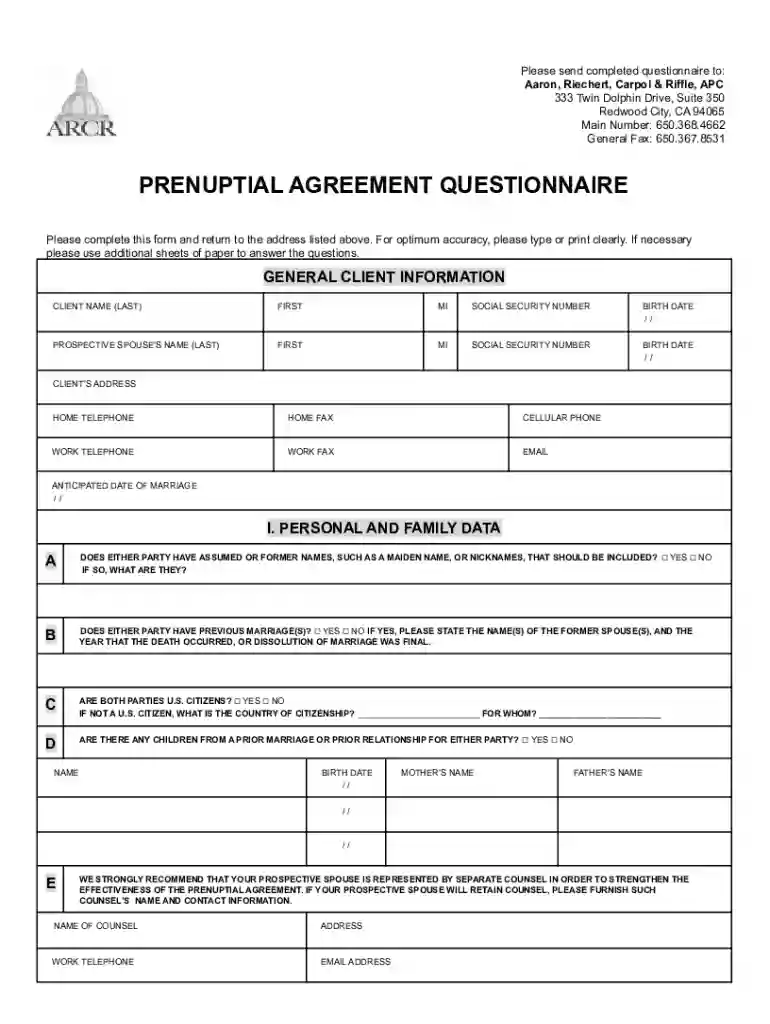
Prenuptial Agreement Questionnaire 2026

Get Form
california prenuptial agreement questionnaire Preview on Page 1

Here's how it works

01. Edit your california prenuptial agreement questionnaire online
Type text, add images, blackout confidential details, add comments, highlights and more.

02. Sign it in a few clicks
Draw your signature, type it, upload its image, or use your mobile device as a signature pad.

03. Share your form with others
Send it via email, link, or fax. You can also download it, export it or print it out.

How to use or fill out the Prenuptial Agreement Questionnaire online

Form edit decoration
9.5
Ease of Setup
DocHub User Ratings on G2
9.0
Ease of Use
DocHub User Ratings on G2
  1. Click ‘Get Form’ to open the Prenuptial Agreement Questionnaire in our editor.
  2. Begin with the 'General Client Information' section. Fill in your name, social security number, and birth date clearly. Ensure all fields are completed accurately.
  3. Proceed to 'Personal and Family Data'. Answer questions regarding previous marriages, citizenship status, and any children from prior relationships. Use checkboxes for yes/no responses.
  4. In the 'Client’s Assets & Other Financial Information' section, provide details about real estate, retirement accounts, and other assets. Be sure to include fair market values and account numbers where applicable.
  5. Complete the 'Property' section by indicating which properties you wish to remain separate or community property. Make selections based on your preferences.
  6. Review all sections for accuracy before submitting. If needed, utilize additional sheets for comprehensive answers.

Start filling out your Prenuptial Agreement Questionnaire today for free using our platform!

See more Prenuptial Agreement Questionnaire versions

We've got more versions of the Prenuptial Agreement Questionnaire form. Select the right Prenuptial Agreement Questionnaire version from the list and start editing it straight away!
Versions Form popularity Fillable & printable
2021 4.4 Satisfied (37 Votes)
2007 4.6 Satisfied (24 Votes)
be ready to get more

Complete this form in 5 minutes or less

Get form

Got questions?

We have answers to the most popular questions from our customers. If you can't find an answer to your question, please contact us.
Contact us
Best free online form builder for quickly creating powerful forms Google Forms pros: Google Forms cons: Google Forms price: 100% free. Jotform pros: Jotform cons: Jotform price: Free plan available; paid plans start at $39/month. Feathery pros: Feathery cons:
Its easy to create fillable PDF form in Adobe Acrobat. Open Acrobat. Select a file or scan a document. Add new form fields. To change existing text boxes or images, click Edit in the toolbar. Save your fillable PDF.
Google Forms is totally free to use. As long as you have a Google account, you can access Google Forms in its entiretycompletely free.
Use eSignature to fill out a PDF form and sign it Flat forms are non-interactive forms that require extra effort and extra steps to be completed. An interactive form contains fields that you can select or fill in, eliminating the need to print the form and complete it by hand.
Zoho Forms is a powerful, free form builder like Google Forms that offers a wide range of features to help you create and manage forms for any purpose. With 30+ field types, an intuitive form builder, powerful features, and seamless integrations, you can collect actionable data for your business.

Security and compliance

At DocHub, your data security is our priority. We follow HIPAA, SOC2, GDPR, and other standards, so you can work on your documents with confidence.

Learn more
ccpa2
pci-dss
gdpr-compliance
hipaa
soc-compliance
be ready to get more

Complete this form in 5 minutes or less

Get form

People also ask

Google Forms is free online software that allows you to create surveys, quizzes, and more. Google Forms is part of Googles web-based apps suite, which also includes Google Docs, Google Sheets, Google Slides, and more.
Is Google Forms free to use? Yes, Google Forms is free for most users.
Google Forms Pricing Google Forms is free for anyone with a Google account. It is included with all paid G Suite licenses, which start at $6 per user per month for Business plans. Volume discounts are available.

Related links