




Here's how it works



How to use or fill out Contact UsOld Fort Gun Club with our platform

- Click ‘Get Form’ to open the Contact UsOld Fort Gun Club application in the editor.
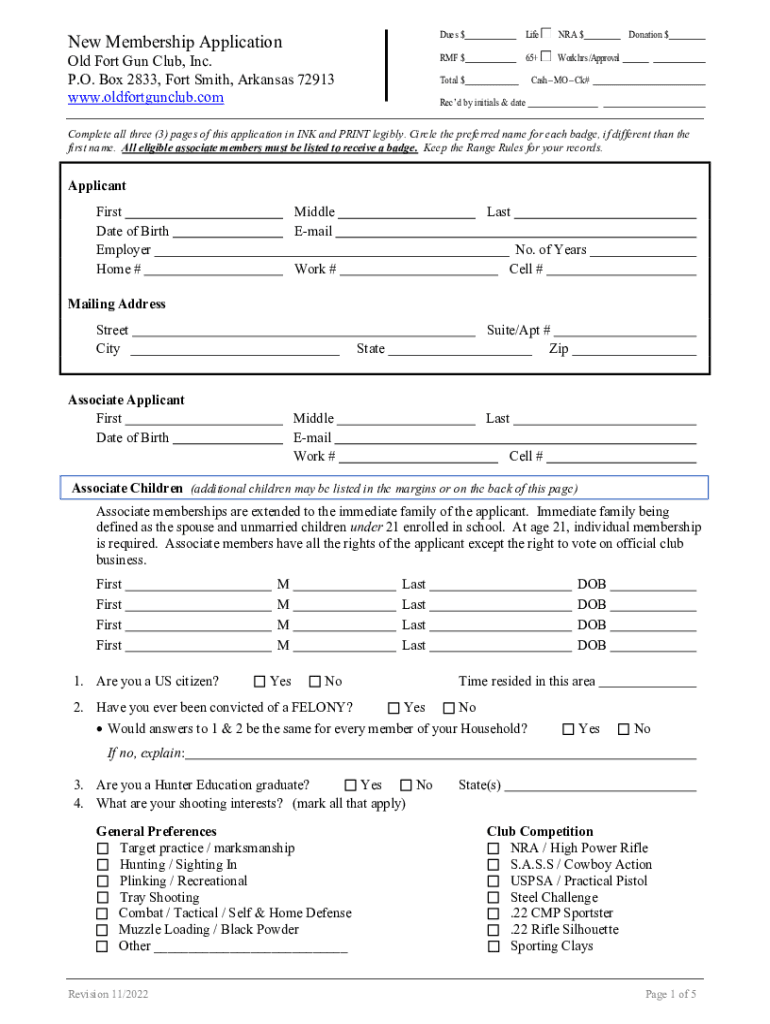
- Begin by filling out the Applicant section. Enter your first, middle, and last name, date of birth, email address, and employer details. Ensure all information is printed legibly.
- Complete the Mailing Address section with your street address, suite/apartment number (if applicable), city, state, and zip code.
- In the Associate Applicant section, list any immediate family members who will be applying for membership. Include their names, dates of birth, and email addresses.
- Answer the citizenship and felony conviction questions honestly. If there are discrepancies among household members' answers, provide explanations as needed.
- Indicate your shooting interests by marking all applicable options in the preferences section.
- Review the application submission process outlined in the document. Decide whether to attend a meeting or submit your application via mail.
- Finally, read through the safety rules and sign where indicated to confirm your understanding and agreement.
Start using our platform today to complete your membership application easily and for free!
It's free
See more Contact UsOld Fort Gun Club versions
Got questions?
How do I sign my Contact UsOld Fort Gun Club without printing?
Electronic signatures are an excellent alternative to traditional signing, as they save time, effort, and money people spend on printing, scanning, and paper delivery. You can eSign your Contact UsOld Fort Gun Club using a reliable and powerful online document management tool like DocHub. It complies with major eSignature policies (ESIGN and UETA), so all documents approved there are legally binding and have the same validity as physically signed ones.
How do you get Contact UsOld Fort Gun Club for my state?
If you are looking for a state-specific Contact UsOld Fort Gun Club sample, you will find it in our DocHub Forms & Templates catalog. Use the search field, enter your form’s name, and search through the results for your state. You can also filter out irrelevant results while browsing our catalog by categories.
Security and compliance
At DocHub, your data security is our priority. We follow HIPAA, SOC2, GDPR, and other standards, so you can work on your documents with confidence.
Learn more




