
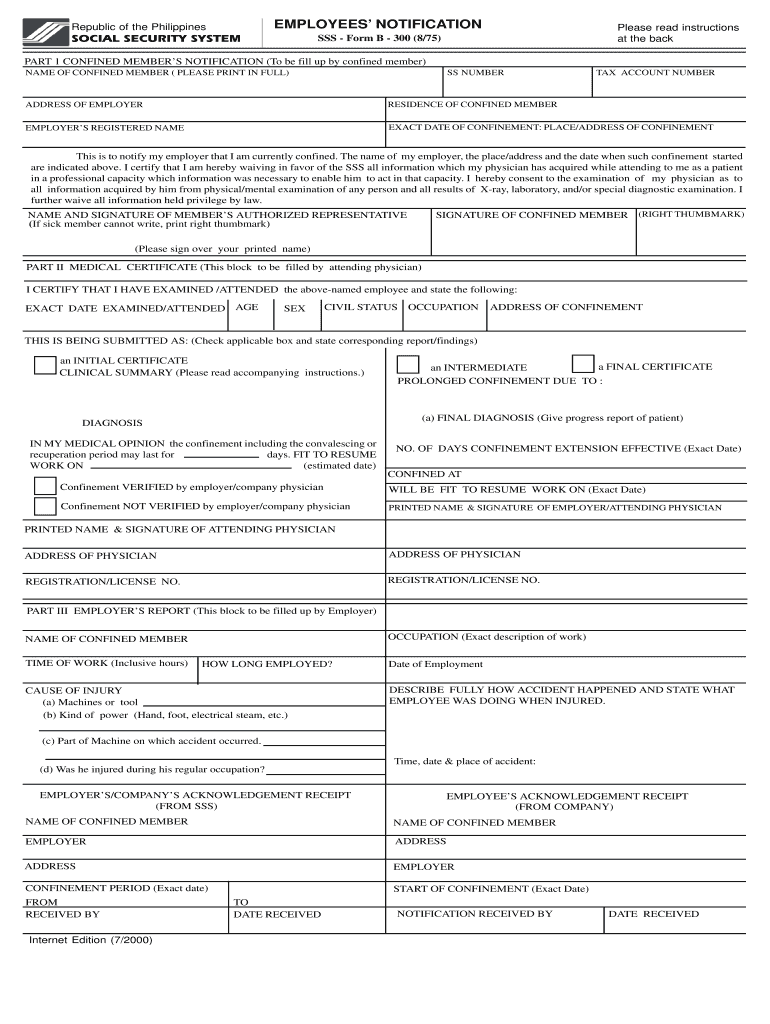



Sss form b300 2026

Get Form
sss form b300 Preview on Page 1

Here's how it works

01. Edit your sss form b300 online
Type text, add images, blackout confidential details, add comments, highlights and more.

02. Sign it in a few clicks
Draw your signature, type it, upload its image, or use your mobile device as a signature pad.

03. Share your form with others
Send ec form b 300 via email, link, or fax. You can also download it, export it or print it out.

How to use or fill out SSS Form B300 with our platform

Form edit decoration
9.5
Ease of Setup
DocHub User Ratings on G2
9.0
Ease of Use
DocHub User Ratings on G2
  1. Click ‘Get Form’ to open SSS Form B300 in the editor.
  2. Begin with Part 1, where the confined member must fill in their full name, SSS number, tax account number, and address. Ensure all information is accurate and clearly printed.
  3. Next, indicate the exact date of confinement and the place/address of confinement. This section is crucial for notifying your employer.
  4. In Part II, the attending physician will need to complete their section. They should provide details such as examination date, age, sex, civil status, and diagnosis.
  5. Finally, in Part III, the employer must fill out their report regarding the employee's occupation and details surrounding the injury or sickness. Make sure all fields are completed accurately.

Start using our platform today to easily fill out your SSS Form B300 online for free!

See more sss form b300 versions

We've got more versions of the sss form b300 form. Select the right sss form b300 version from the list and start editing it straight away!
Versions Form popularity Fillable & printable
2000 4 Satisfied (50 Votes)
be ready to get more

Complete this form in 5 minutes or less

Get form

Got questions?

We have answers to the most popular questions from our customers. If you can't find an answer to your question, please contact us.
Contact us
Selective Service will send you a Registration Acknowledgement in the mail. If you do not receive a Registration Acknowledgement within 90 days, it is your responsibility to contact the Selective Service at 847-688-6888.
SSS report form used for accident or sickness. Showing the Text Content of the PDF Instead: REPUBLIC OF THE PHILIPPINES. SOCIAL SECURITY SYSTEM.
Social Security System of the Philippines: The SSS E-1 form can be obtained through the official website of the Social Security System (SSS) of the Philippines.
THIS CAN ALSO BE DOWNLOADED THRU THE SSS WEBSITE AT .sss.gov.ph. PLEASE READ THE INSTRUCTIONS AND REMINDER AT THE BACK OF THE FORM AND THE ATTACHED TERMS AND CONDITIONS BEFORE ACCOMPLISHING THIS FORM. PRINT ALL INFORMATION IN CAPITAL LETTERS AND USE BLACK INK ONLY.
THIS FORM MAY BE REPRODUCED AND IS NOT FOR SALE. THIS CAN ALSO BE DOWNLOADED THRU THE SSS WEBSITE AT .sss.gov.ph. FILL OUT THIS FORM IN TWO (2) COPIES. PRINT ALL INFORMATION IN CAPITAL LETTERS AND USE BLACK INK ONLY.

Security and compliance

At DocHub, your data security is our priority. We follow HIPAA, SOC2, GDPR, and other standards, so you can work on your documents with confidence.

Learn more
ccpa2
pci-dss
gdpr-compliance
hipaa
soc-compliance

People also ask

The sss homepage is .sss.gov.ph. Select the Personal Data Record E1 form in the list. On the new page, you will be able to see the sss downloadable forms. Download and Print the SSS E-1 Form.
If due to accident: Accident Report/Report of Death (Form BPN 105) Statement of Duties and Responsibilities duly signed by the ER. Mission/Job or Travel Order duly signed by the ER, when applicable. Photocopy of page in the company logbook/record of accident signed by the ER.
⦁ The Sickness Benefit is granted up to a maximum of 120 days in one (1) calendar year. (Ibid.)

form b 300