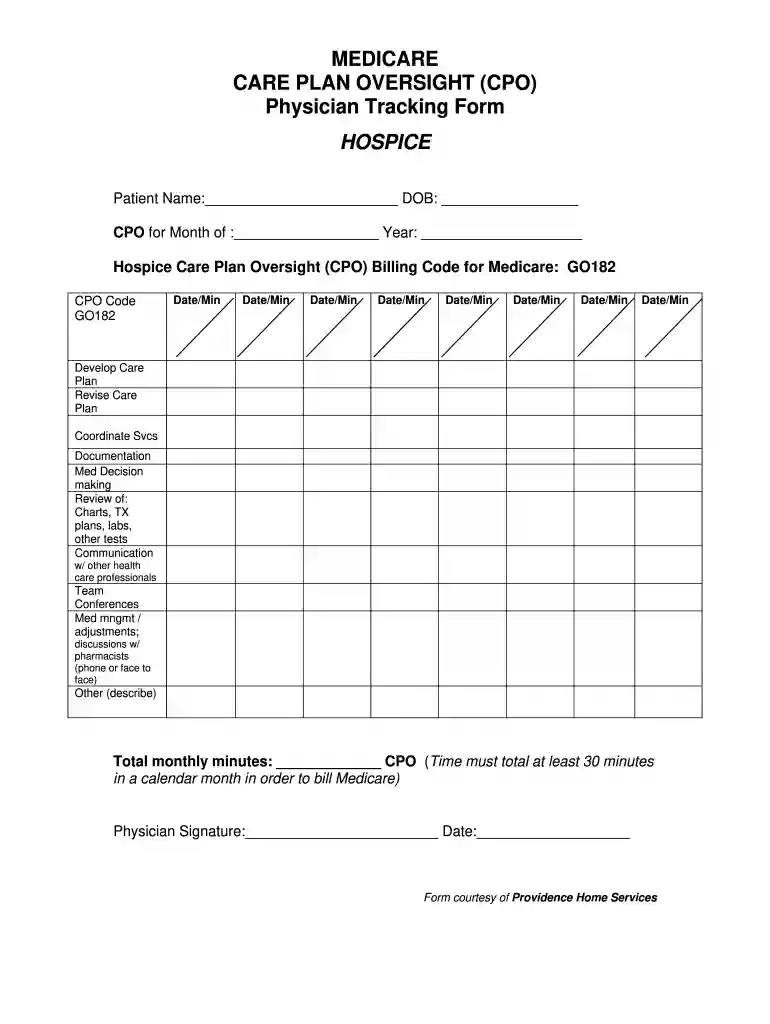
care plan oversight log sheet Preview on Page 1

Home health care plan template 2026

Here's how it works

  • 01. Edit your care plan oversight log sheet online

    Type text, add images, blackout confidential details, add comments, highlights and more.

  • 02. Sign it in a few clicks

    Draw your signature, type it, upload its image, or use your mobile device as a signature pad.

  • 03. Share your form with others

    Send care plan oversight via email, link, or fax. You can also download it, export it or print it out.

How to use or fill out home health care plan template with our platform

Form edit decoration
9.5
Ease of Setup
DocHub User Ratings on G2
9.0
Ease of Use
DocHub User Ratings on G2
  1. Click ‘Get Form’ to open the home health care plan template in the editor.
  2. Begin by entering the patient’s name and date of birth in the designated fields at the top of the form.
  3. Fill in the month and year for which you are completing the Care Plan Oversight (CPO). This is crucial for accurate billing.
  4. Document each date and corresponding minutes spent on various activities such as developing or revising care plans, coordinating services, and making medical decisions. Ensure that your total monthly minutes meet the minimum requirement of 30 minutes for Medicare billing.
  5. In the 'Other' section, describe any additional activities performed that contribute to patient care.
  6. Finally, ensure that you sign and date the form at the bottom to validate your oversight.

Start using our platform today to streamline your home health care documentation process for free!

See more care plan oversight log sheet versions

We've got more versions of the care plan oversight log sheet form. Select the right care plan oversight log sheet version from the list and start editing it straight away!

VersionsForm popularityFillable & printable
20115 Satisfied (52 Votes)

be ready to get more

Complete this form in 5 minutes or less

Got questions?

We have answers to the most popular questions from our customers. If you can't find an answer to your question, please contact us.

With DocHub, you can quickly sign your home health care plan template or any other document on iOS, even without setting up additional applications. You can access your DocHub account from any internet-connected browser and fill out and sign your document in any way you like with just a couple of clicks.

You can quickly complete, modify, and even eSign your home health care plan template using DocHub. Create a new account and begin your free trial. After that, you can add the document with the form and easily make all the needed edits. No need to print on paper or use a third-party application to sign it, as you can place your electronic signature on your document faster through DocHub.

Here are the steps involved in using and filling out a care plan template: Step 1: Assessment. Step 2: Identify Needs and Goals. Step 3: Develop Interventions and Treatments. Step 4: Schedule Monitoring and Evaluation. Step 5: Communication and Collaboration.
Research by the Picker Institute has delineated 8 dimensions of patient-centered care, including: 1) respect for the patients values, preferences, and expressed needs; 2) information and education; 3) access to care; 4) emotional support to relieve fear and anxiety; 5) involvement of family and friends; 6) continuity
Things to Know Before Building a Medical Startup Choose a side of healthcare you enjoy most. Make changes in the industry for the better. Spot lucrative market opportunities. Learn how to pitch to stakeholders. Respect industry regulations and procedures. Create a monetization model. Build an operational team (CTO, COO, CMO)

Security and compliance

At DocHub, your data security is our priority. We follow HIPAA, SOC2, GDPR, and other standards, so you can work on your documents with confidence.

People also ask

What should I include in the care plan? Personal Information (name, date of birth, contact information) Health conditions. Medicines, dosages, and when/how given. Health care providers with contact information. Health insurance information. Emergency Contacts.
8 Steps To Create a Care Plan 1) Defining the Patients Goals. 2) Listing Barriers to a Patients Goals. 3) Identify Symptoms the Patient Experiences. 4) List Interventions Youd Like to Make. 5) Documenting All Support the Patient is Receiving. 6) Identify Patient Allergies and Medications. 7) Decide Which Metrics to Track.
The nursing process functions as a systematic guide to client-centered care with 5 sequential steps. These are assessment, diagnosis, planning, implementation, and evaluation.
How to create a home care business plan Your mission and the populations your business will serve. A list of your primary services. The demand for these services in your community. What sets your home care business apart from competitors. Your vision. A summary of funding needs.
Effective Care Planning Emphasize an individuals strengths and abilities. Record service users preferences. Utilize a positive narrative. Demonstrate the involvement of the service user. Contextualize behaviors rather than using labels.

Related links

Nursing Care Plan: Guide with Examples Writing Tips

Dec 12, 2025 Learn how to create a nursing care plan with our ultimate guide. Discover essential steps, examples, and tips for success in writing your

Learn more
If you believe that this page should be taken down, please follow our DMCA take down process here