Type text, add images, blackout confidential details, add comments, highlights and more.

02. Sign it in a few clicks
Draw your signature, type it, upload its image, or use your mobile device as a signature pad.

03. Share your form with others
Send pff2 via email, link, or fax. You can also download it, export it or print it out.

How to use or fill out pff2 form with our platform
Ease of Setup
DocHub User Ratings on G2
Ease of Use
DocHub User Ratings on G2
Click ‘Get Form’ to open the pff2 form in the editor.
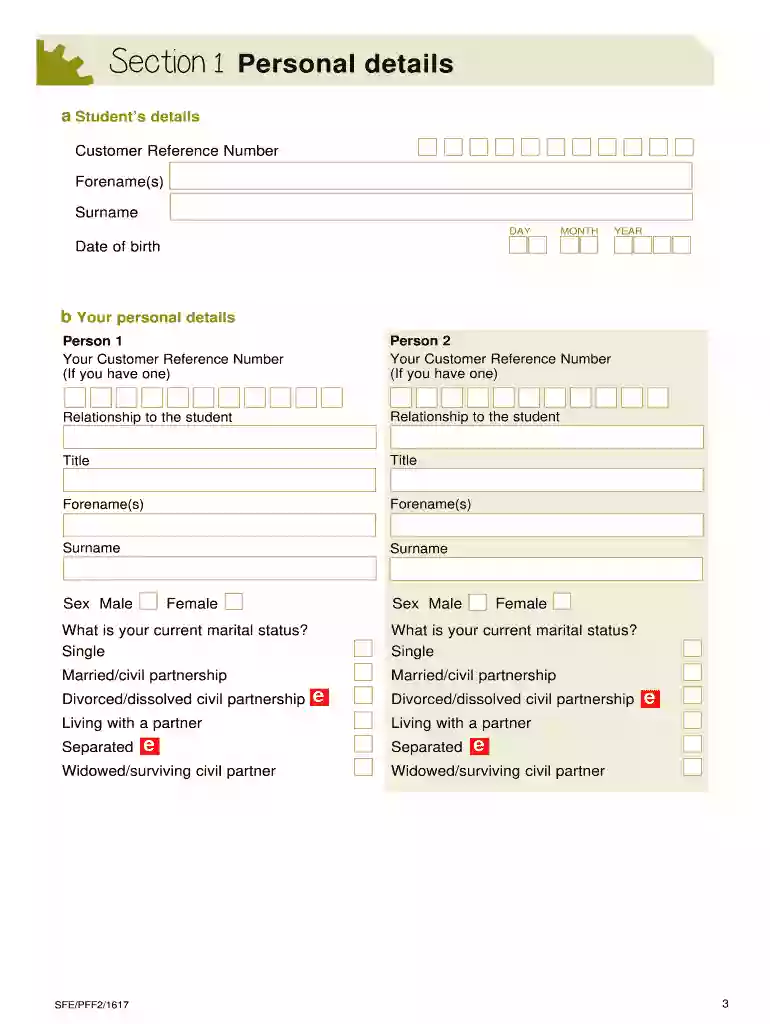
Begin with Section 1, where you will enter personal details. Ensure that all fields are filled accurately, including the student’s and your own information.
Move to Section 2 to provide your National Insurance number. This is essential for data sharing with HM Revenue & Customs.
In Section 3, detail your financial information for the tax year 2014-15. Answer each question with 'Yes' or 'No', and provide income amounts where applicable.
Proceed to Section 4 for any additional income sources. Follow the same format as in Section 3, ensuring all relevant income types are reported.
Complete Section 5 by listing any allowable deductions you have claimed during the same tax year.
Finally, fill out Section 6 regarding your dependants, providing necessary details about their financial dependency on you.
Review all sections for accuracy before signing the declaration at the end of the form.
Start using our platform today to easily complete your pff2 form online for free!
PFF2 form 25 26PFF2 form student financePFF2 form 24 25Pff2 form onlinePff2 form pdfPFF2 form student finance 2026Pff2 form 2026 2027Sfe pff2 form 26 27
Security and compliance
At DocHub, your data security is our priority. We follow HIPAA, SOC2, GDPR, and other standards, so you can work on your documents with confidence.
May 30, 2019 TCEQ UNDERGROUND STORAGE TANK REGISTRATION SELF-CERTIFICATION FORM. (Use this form for filing registration and self-certification information!Read more
Cookie consent notice
This site uses cookies to enhance site navigation and personalize your experience.
By using this site you agree to our use of cookies as described in our Privacy Notice.
You can modify your selections by visiting our Cookie and Advertising Notice.