Proof service response from 2026

Get Form
sv250 from Preview on Page 1

Here's how it works

01. Edit your sv250 from online
Type text, add images, blackout confidential details, add comments, highlights and more.

02. Sign it in a few clicks
Draw your signature, type it, upload its image, or use your mobile device as a signature pad.

03. Share your form with others
Send sv250 mail violence search via email, link, or fax. You can also download it, export it or print it out.

How to use or fill out proof service response from with DocHub

Form edit decoration
9.5
Ease of Setup
DocHub User Ratings on G2
9.0
Ease of Use
DocHub User Ratings on G2
  1. Click ‘Get Form’ to open the proof service response form in our editor.
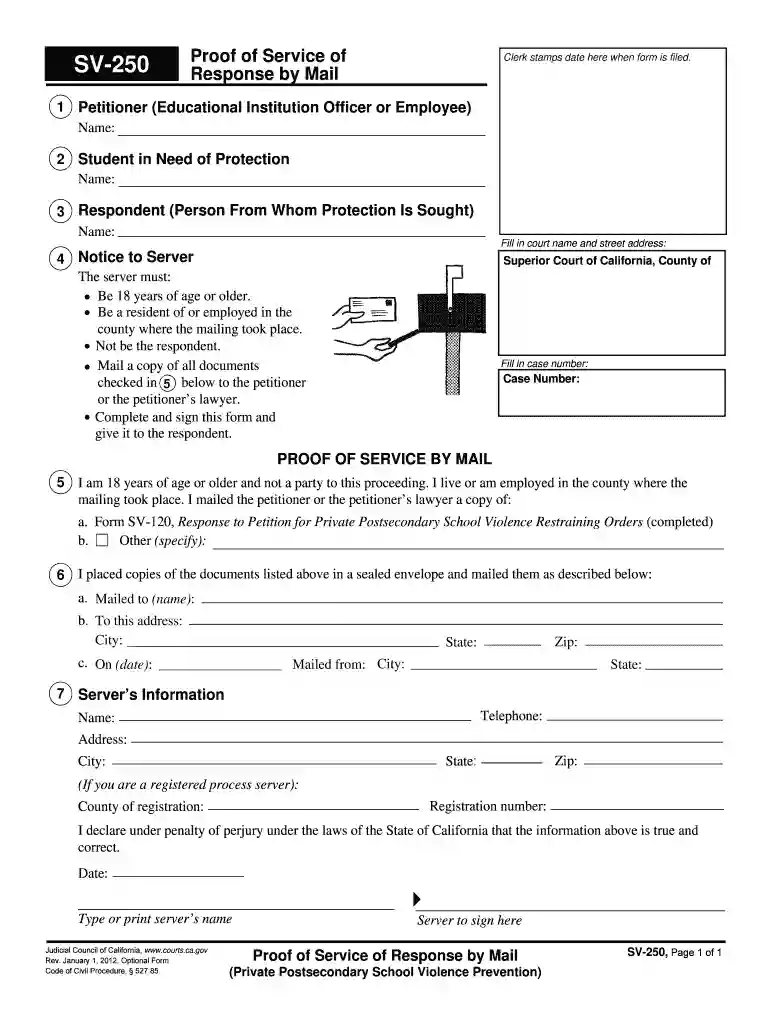
  2. Begin by filling in the Petitioner section with the name of the Educational Institution Officer or Employee. This is crucial for identifying who is initiating the process.
  3. Next, enter the name of the Student in Need of Protection and the Respondent, ensuring accuracy as these details are vital for legal clarity.
  4. Fill in the court name and street address where you will be filing this document. This information helps direct your submission correctly.
  5. In the Notice to Server section, confirm that your server meets all requirements: they must be over 18, a resident or employed in the mailing county, and not a party to this proceeding.
  6. Complete Section 5 by indicating what documents were mailed to the petitioner or their lawyer. Specify if it includes Form SV-120 or any other documents.
  7. Provide details about how and when you mailed these documents, including recipient's name, address, and date of mailing.
  8. Finally, fill out your information as the server, including your name, address, and registration number if applicable. Don’t forget to sign and date the form before submission.

Start using our platform today for free to streamline your document editing and ensure a smooth completion of your proof service response!

See more proof service response from versions

We've got more versions of the proof service response from form. Select the right proof service response from version from the list and start editing it straight away!
Versions Form popularity Fillable & printable
2012 4.8 Satisfied (82 Votes)
be ready to get more

Complete this form in 5 minutes or less

Get form

Got questions?

We have answers to the most popular questions from our customers. If you can't find an answer to your question, please contact us.
Contact us
A Proof of Service is a document filed with the Court to show that the summons and complaint were successfully served on the defendant in a lawsuit. After the U.S. Marshal Service serves the summons and complaint, a return receipt, green card (PS Form 3811), will be mailed to the plaintiff, to show proof of service.
If using a custom form, be sure to cover essential information, such as: Case name and number. Description of documents served. The servers full name, contact details, and signature. Name of the person served. Time, date, and location of service. Confirmation that the server is over 18 and not a party to the case.
Essentially, a proof of service is a written record that attests to the completion of your service of process. This document serves as verification that legal documents have been delivered to an intended recipient within the regulated deadline and that the recipient has time to respond.
The server fills out a form called a proof of service to show when and where they gave the papers. They give the form back to you so you can file it in court.

Security and compliance

At DocHub, your data security is our priority. We follow HIPAA, SOC2, GDPR, and other standards, so you can work on your documents with confidence.

Learn more
ccpa2
pci-dss
gdpr-compliance
hipaa
soc-compliance
be ready to get more

Complete this form in 5 minutes or less

Get form