Dv400 info 2026

Get Form
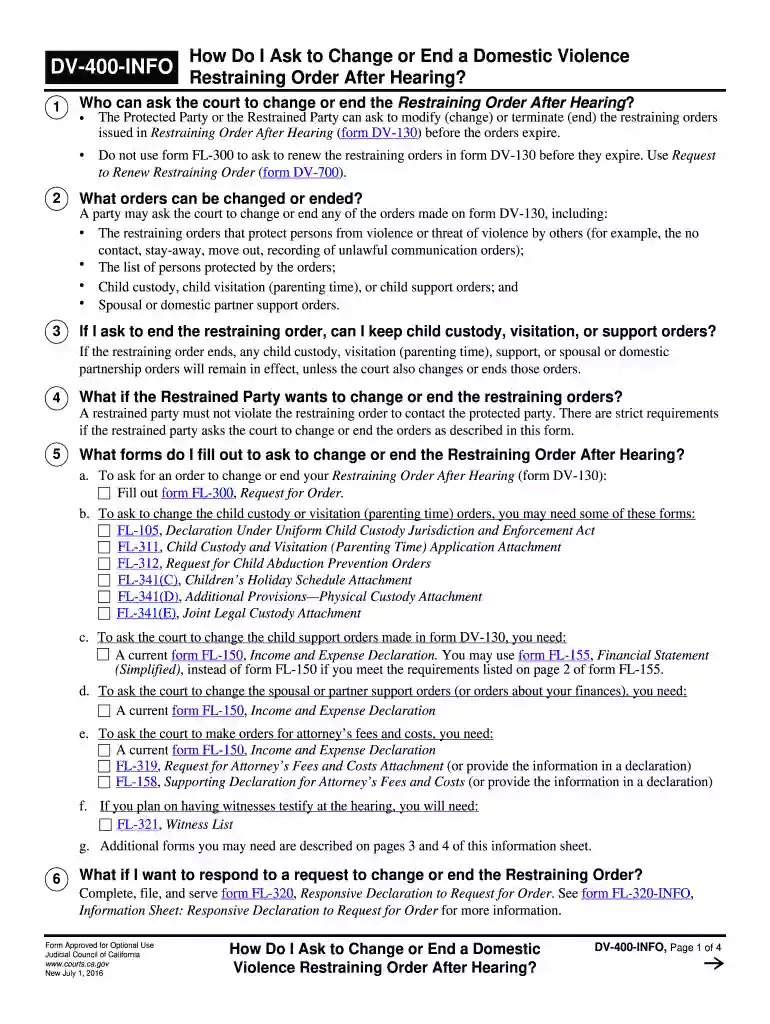
dv 400 info Preview on Page 1

Here's how it works

01. Edit your dv 400 info online
Type text, add images, blackout confidential details, add comments, highlights and more.

02. Sign it in a few clicks
Draw your signature, type it, upload its image, or use your mobile device as a signature pad.

03. Share your form with others
Send it via email, link, or fax. You can also download it, export it or print it out.

How to use or fill out dv400 info with our platform

Form edit decoration
9.5
Ease of Setup
DocHub User Ratings on G2
9.0
Ease of Use
DocHub User Ratings on G2
  1. Click ‘Get Form’ to open the DV-400 info document in the editor.
  2. Begin by completing form FL-300. Fill in your name, address, and contact information at the top, ensuring you accurately list the parties involved.
  3. Indicate whether you wish to change or end any orders by checking the appropriate boxes. Specify which orders you want to modify, such as child custody or support.
  4. Leave certain items blank for the court clerk to fill in later, including hearing details and mediation appointments.
  5. Make copies of all completed forms and file them with the court clerk either in person or via e-filing if available.
  6. Ensure that all parties are served with copies of your request and any temporary orders granted before the hearing date.

Start using our platform today for free to streamline your document editing and form completion!

See more dv400 info versions

We've got more versions of the dv400 info form. Select the right dv400 info version from the list and start editing it straight away!
Versions Form popularity Fillable & printable
2016 4.9 Satisfied (252 Votes)
be ready to get more

Complete this form in 5 minutes or less

Get form

Got questions?

We have answers to the most popular questions from our customers. If you can't find an answer to your question, please contact us.
Contact us

Yes, you can use DocHub for signing any business and personal paperwork, including your dv400 info. All electronic signatures you generate with our service are legally binding and court-admissible, as DocHub complies with criteria required by ESIGN and UETA. Save your completed form with a detailed Audit Trail if necessary.

It is a no-brainer on a computer or via a mobile phone to complete a dv400 info with DocHub. All you need to do is open any installed web browser on your smartphone and proceed to the DocHub website. Once authenticated, add your file and open it in editing mode. Use our toolbar to make your edits and save modifications. Optionally, keep your file in your files or send it to a recipient on the spot.

Restraining Order After Hearing (Order of Protection) (CLETSOAH) (DV-130) Tells you that a judge has made a long-term restraining order in your case. Get form DV-130.
Form D-400, also known as the North Carolina Individual Income Tax Return, is an official document used by residents of North Carolina to report their annual taxable income and calculate their state income tax liability for the preceding year.
DV-400 Findings and Order to Terminate Restraining Order After Hearing. Page 1. The Protected Party and the Restrained Party submitted a written stipulation (agreement) to terminate the restraining orders in Restraining Order After Hearing (form DV-130).

Security and compliance

At DocHub, your data security is our priority. We follow HIPAA, SOC2, GDPR, and other standards, so you can work on your documents with confidence.

Learn more

People also ask

What Is Form 1040-V? Its a statement you send with your check or money order for any balance due on the Amount you owe line of your 2024 Form 1040, 1040-SR, or 1040-NR. You can make electronic payments online, by phone, or from a mobile device.
D-400V, Individual Income Payment Voucher. Form D-400V is the payment voucher that you must use if you owe tax when you file your individual income tax form (Form D-400). This payment voucher allows the Department to process your payment accurately and efficiently with fewer errors.
Form D-40 is the individual income tax return used by residents of the District of Columbia (DC) to report their income and pay taxes to the District. Its similar to the federal Form 1040, but specific to DC tax laws.

Related links