Nwsfamilydocs 2025

Get Form
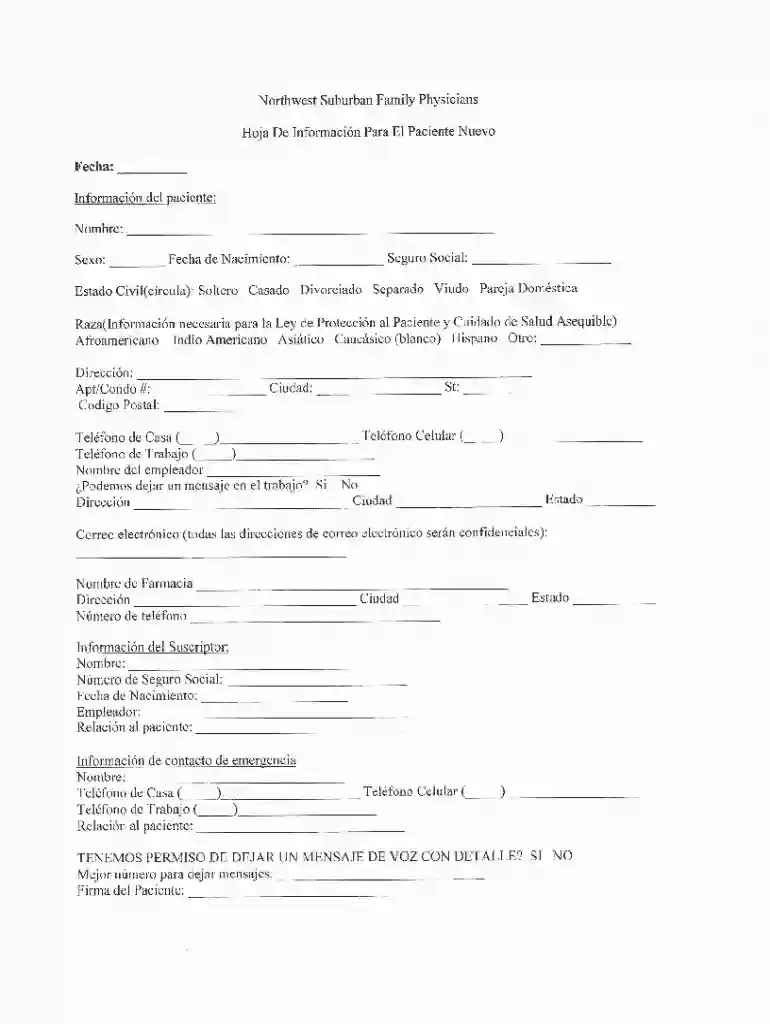
nwsfamilydocs Preview on Page 1

Here's how it works

01. Edit your form online
Type text, add images, blackout confidential details, add comments, highlights and more.

02. Sign it in a few clicks
Draw your signature, type it, upload its image, or use your mobile device as a signature pad.

03. Share your form with others
Send it via email, link, or fax. You can also download it, export it or print it out.

How to use or fill out nwsfamilydocs with our platform

Form edit decoration
9.5
Ease of Setup
DocHub User Ratings on G2
9.0
Ease of Use
DocHub User Ratings on G2
  1. Click ‘Get Form’ to open the nwsfamilydocs in the editor.
  2. Begin by reviewing the introductory section of the form, which outlines the purpose and necessary information required. Ensure you have all relevant documents at hand.
  3. Proceed to fill out personal information fields such as name, address, and contact details. Make sure to double-check for accuracy as this information is crucial for processing.
  4. Next, navigate to any specific sections that require additional documentation or signatures. Use our platform’s tools to easily insert your signature or upload supporting files directly from your device.
  5. Finally, review all entries for completeness and correctness before submitting. Utilize the preview feature to ensure everything appears as intended.

Start using our platform today for free and streamline your document completion process!

See more nwsfamilydocs versions

We've got more versions of the nwsfamilydocs form. Select the right nwsfamilydocs version from the list and start editing it straight away!
Versions Form popularity Fillable & printable
2017 4.8 Satisfied (62 Votes)
be ready to get more

Complete this form in 5 minutes or less

Get form

Got questions?

We have answers to the most popular questions from our customers. If you can't find an answer to your question, please contact us.
Contact us

Managing your documentation with DocHub this way is very simple after you have downloaded its extension for Google Chrome. Navigate to the Chrome Web Store and install DocHub - Sign PDF from Gmail to obtain it. Give our tool access to your Google account, and then open an email with the nwsfamilydocs attached and point to the file with your cursor - the DocHub extension button will automatically appear there. Click on it to open your file in our editor. Make any necessary adjustments, complete the blanks, and click Sign to create your legally-binding electronic signature.

In case your go-to email service is Gmail, it is simple to incorporate your DocHub editor into your work. Modify your nwsfamilydocs with DocHub tools and connect it to your drafts in Gmail. See how effortless it can be to exchange files and collaborate with a swift PDF editing solution at hand.

Your doctor cant tell you which treatment you should want or even whether you should want any treatment at all. Those choices depend on you and your own personal values. Once informed of your medical options, you can then exercise your right to accept or refuse the test or treatment.
No, family medicine and primary care differ in their scope and patient demographics. Family medicine physicians treat patients of all ages, encompassing a wide range of health issues, while primary care often focuses on adult patients and may include internal medicine specialties.
Surgery and Advanced Procedures Family doctors learn basic medical procedures in training, but they cannot do major surgeries or complex procedures.

People also ask

Family medicine provided by a family doctor is beneficial for those who want to cure small or chronic illnesses. On the other hand, general medicine is a preferable option for those seeking a wide range of health-related services.
Shortage of Providers : Many areas face a shortage of primary care physicians, particularly in rural or underserved urban areas. High Demand : With an aging population and an increasing focus on preventive care, the demand for primary care services is rising. Insurance Networks Variability in Quality
Family medicine offers many benefits, including comprehensive care, long-term relationships, and convenient access to healthcare. However, it also has challenges like limited specialization, heavy workloads, and lower income potential.
The distinct difference between a family medicine doctor and an internal medicine doctor (internist) is that a family doctor treats patients of all ages, while an internist specializes in the care and treatment of only adults. Choose a Providence Medical Group primary care physician that best meets your needs.