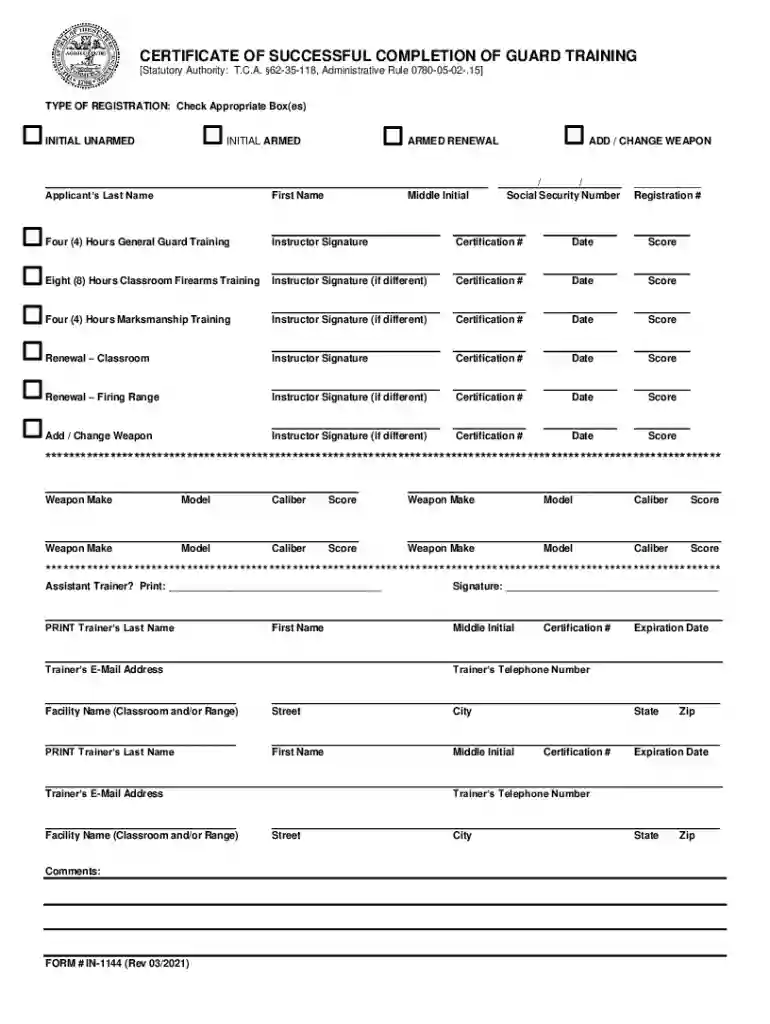
form in 1144 Preview on Page 1

Certificate of Successful Completion of Guard Training 2026

Here's how it works

  • 01. Edit your form in 1144 online

    Type text, add images, blackout confidential details, add comments, highlights and more.

  • 02. Sign it in a few clicks

    Draw your signature, type it, upload its image, or use your mobile device as a signature pad.

  • 03. Share your form with others

    Send it via email, link, or fax. You can also download it, export it or print it out.

How to use or fill out Certificate of Successful Completion of Guard Training with our platform

Form edit decoration
9.5
Ease of Setup
DocHub User Ratings on G2
9.0
Ease of Use
DocHub User Ratings on G2
  1. Click ‘Get Form’ to open the Certificate of Successful Completion of Guard Training in the editor.
  2. Begin by selecting the appropriate registration type at the top of the form. Check the box for 'Initial Unarmed', 'Initial Armed', or 'Armed Renewal' as applicable.
  3. Fill in your personal details, including your last name, first name, middle initial, and social security number. Ensure accuracy as this information is crucial for your certification.
  4. For each training section (General Guard Training, Classroom Firearms Training, Marksmanship Training), enter the instructor's signature, certification number, date, and score. Make sure to complete all relevant sections based on your training.
  5. If you are adding or changing a weapon, provide details such as weapon make, model, caliber, and score in the designated areas. Repeat for each weapon as necessary.
  6. Complete trainer information at the bottom of the form by printing their name, certification number, expiration date, email address, and telephone number.

Start using our platform today to easily fill out your Certificate of Successful Completion of Guard Training for free!

See more form in 1144 versions

We've got more versions of the form in 1144 form. Select the right form in 1144 version from the list and start editing it straight away!

VersionsForm popularityFillable & printable
20214.8 Satisfied (110 Votes)
20064.1 Satisfied (47 Votes)

be ready to get more

Complete this form in 5 minutes or less

Security and compliance

At DocHub, your data security is our priority. We follow HIPAA, SOC2, GDPR, and other standards, so you can work on your documents with confidence.

Related links

FAA Form 8710-1, Airman Certificate and/or Rating

Completion of Air Carriers Training Program. 1. Name of air carrier. 2. Date program was started. 3. Identify the training program accomplished.Read more

Learn more
If you believe that this page should be taken down, please follow our DMCA take down process here