Citizenship refugee 2026

Get Form
louisiana critical incident Preview on Page 1

Here's how it works

01. Edit your louisiana critical incident online
Type text, add images, blackout confidential details, add comments, highlights and more.
02. Sign it in a few clicks
Draw your signature, type it, upload its image, or use your mobile device as a signature pad.
03. Share your form with others
Send form critical incident via email, link, or fax. You can also download it, export it or print it out.

How to use or fill out citizenship refugee with our platform

Form edit decoration
9.5
Ease of Setup
DocHub User Ratings on G2
9.0
Ease of Use
DocHub User Ratings on G2
  1. Click ‘Get Form’ to open the citizenship refugee form in the editor.
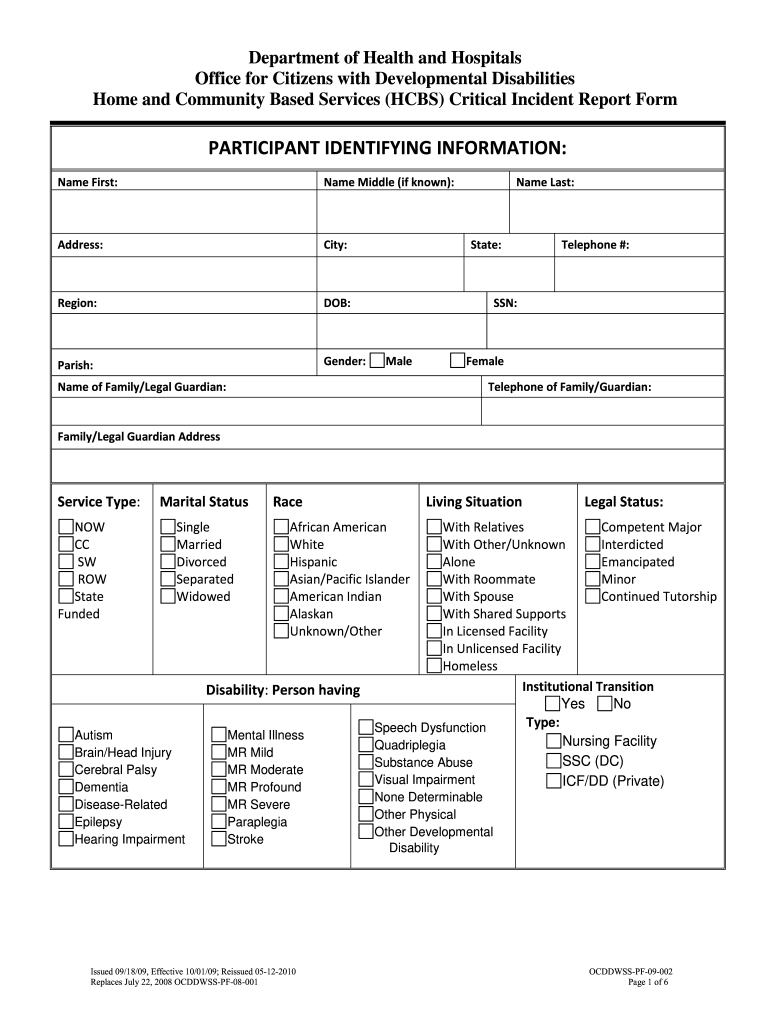
  2. Begin by filling out the 'Participant Identifying Information' section. Enter the participant's first, middle (if known), and last name, along with their address, city, region, date of birth (DOB), parish, gender, and telephone number.
  3. Next, provide the Social Security Number (SSN) and details about the family or legal guardian. Include their name and contact information.
  4. Indicate the service type by selecting from options such as NOW, CC, SW, ROW, State Funded. Then specify marital status and race from the provided categories.
  5. In the 'Disability' section, check all applicable disabilities that apply to the participant. This includes options like Autism or Epilepsy.
  6. Complete the 'Incident Categories' section by checking all relevant incidents that apply to the situation being reported.
  7. Fill in detailed event information including location and time of incident. Ensure to document any notifications made to relevant parties.
  8. Finally, review all entries for accuracy before saving or submitting your completed form through our platform.

Start using our platform today for free to streamline your citizenship refugee form completion!

See more citizenship refugee versions

We've got more versions of the citizenship refugee form. Select the right citizenship refugee version from the list and start editing it straight away!
Versions Form popularity Fillable & printable
2010 4.8 Satisfied (43 Votes)
be ready to get more

Complete this form in 5 minutes or less

Get form

Got questions?

We have answers to the most popular questions from our customers. If you can't find an answer to your question, please contact us.
Contact us

A lot of software solutions are available out there for document editing and signing. DocHub is one of the most widely used online solutions that comply with all data protection and compliance standards and guarantees your electronically signed documentation is legally enforceable. All you need to give it a try is to create an account, upload your critical incident form, fill out the required details, and click Sign. Generate your eSignature by typing, drawing it, uploading its image to your form, or scanning a unique QR code.

If you edit your citizenship refugee with DocHub, you simply will not need to look for other applications or services to eSign it. An electronic signature is part of DocHub’s comprehensive editing toolset, which allows you to apply changes in your form without jumping between platforms. Just complete your form, double-check the correctness of your data and place your electronic signature at the end to make it submission-ready within a few minutes.

In general, after a certain number of years as a lawful permanent resident, you can apply for naturalization. Refugees and asylees may apply for naturalization 5 years after the date of their admission to lawful permanent residence.
Naturalized refugees refers to those refugees that have naturalized in their country of asylum. Naturalization is the legal act or process by which a non-citizen in a country may acquire citizenship or nationality of that country.
After one year of physical presence in the United States as a refugee, you must apply to adjust your status to a lawful permanent resident (seek a green card). (See 8 C.F.R. 209.1.) The one-year period is calculated from the date that your I-94, Arrival-Departure Record, was issued.

Security and compliance

At DocHub, your data security is our priority. We follow HIPAA, SOC2, GDPR, and other standards, so you can work on your documents with confidence.

Learn more

People also ask

What is naturalization? Naturalization is the process through which an immigrant to the United States of America can become a U.S. citizen. Only certain immigrants are eligible: those who either have been green card holders (permanent residents) for 35 years or meet various military service requirements.
The key difference is that an immigrant chooses to leave his/her country of origin. A refugee, on the other hand, is compelled to seek asylum in another country.
Asylum seekers must navigate a difficult and complex process that can involve multiple government agencies. Those granted asylum can apply to live in the United States permanently and gain a path to citizenship and can also apply for their spouse and children to join them in the United States.
While both documents serve as proof of U.S. citizenship, the Certificate of Naturalization is issued to those who have become U.S. citizens through the naturalization process, while the Certificate of Citizenship is issued to those who acquired U.S. citizenship at birth or through other means.
To seek refugee status, you must be outside the U.S. and believe you will be persecuted in your country. Find out if you and your family can qualify as refugees and how to apply. Able to demonstrate that you were persecuted or have a fear of persecution in your home country due to your: Race.

Related links