




Here's how it works



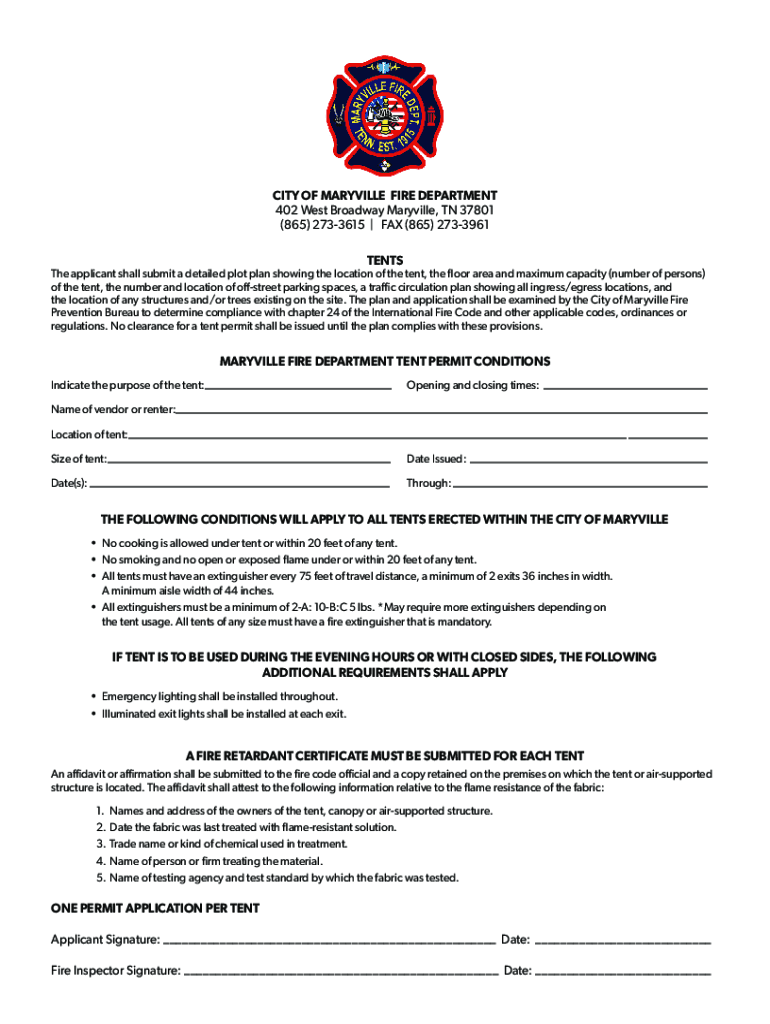
How to use or fill out Maryville Fire Department 402 W Broadway Ave - YP

- Click ‘Get Form’ to open it in the editor.
- Begin by filling out the purpose of the tent in the designated field. This helps clarify the intended use for safety assessments.
- Next, enter the opening and closing times for your event. Accurate timing is crucial for compliance with fire regulations.
- Provide the name of the vendor or renter responsible for the tent. This information is essential for accountability.
- Indicate the location of the tent on your plot plan, ensuring it meets all spacing requirements from structures and trees.
- Specify the size of the tent, as this will affect capacity limits and safety measures required.
- Fill in the date issued and date(s) of use, ensuring all details are accurate for permit processing.
- Finally, sign and date both applicant and fire inspector signature fields to complete your application.
Start using our platform today to streamline your form completion process!
It's free
See more Maryville Fire Department 402 W Broadway Ave - YP versions
| Versions | Form popularity | Fillable & printable |
|---|---|---|
| 2019 | 4.8 Satisfied (65 Votes) |
Got questions?
What do I need to sign my Maryville Fire Department 402 W Broadway Ave - YP electronically?
Electronic document signing requires a software solution that works in compliance with data protection and eSignature laws. DocHub is an excellent tool for that, since it fulfills all the previously mentioned requirements. Whatever method you like to sign your Maryville Fire Department 402 W Broadway Ave - YP in DocHub, your eSignature will be legally binding and court-admissible.
Can I sign my Maryville Fire Department 402 W Broadway Ave - YP while I edit it?
If you edit your Maryville Fire Department 402 W Broadway Ave - YP with DocHub, you will not need to look for other applications or services to sign it. An electronic signature is part of DocHub’s comprehensive editing toolset, which enables you to apply changes in your form without jumping between platforms. Simply complete your form, double-check the correctness of your information and put your electronic signature at the end to make it submission-ready in minutes.
Security and compliance
At DocHub, your data security is our priority. We follow HIPAA, SOC2, GDPR, and other standards, so you can work on your documents with confidence.
Learn more


