Employers request 2026

Get Form
employers request Preview on Page 1

Here's how it works

01. Edit your employers request online
Type text, add images, blackout confidential details, add comments, highlights and more.
02. Sign it in a few clicks
Draw your signature, type it, upload its image, or use your mobile device as a signature pad.
03. Share your form with others
Send it via email, link, or fax. You can also download it, export it or print it out.

How to use or fill out employers request with our platform

Form edit decoration
9.5
Ease of Setup
DocHub User Ratings on G2
9.0
Ease of Use
DocHub User Ratings on G2
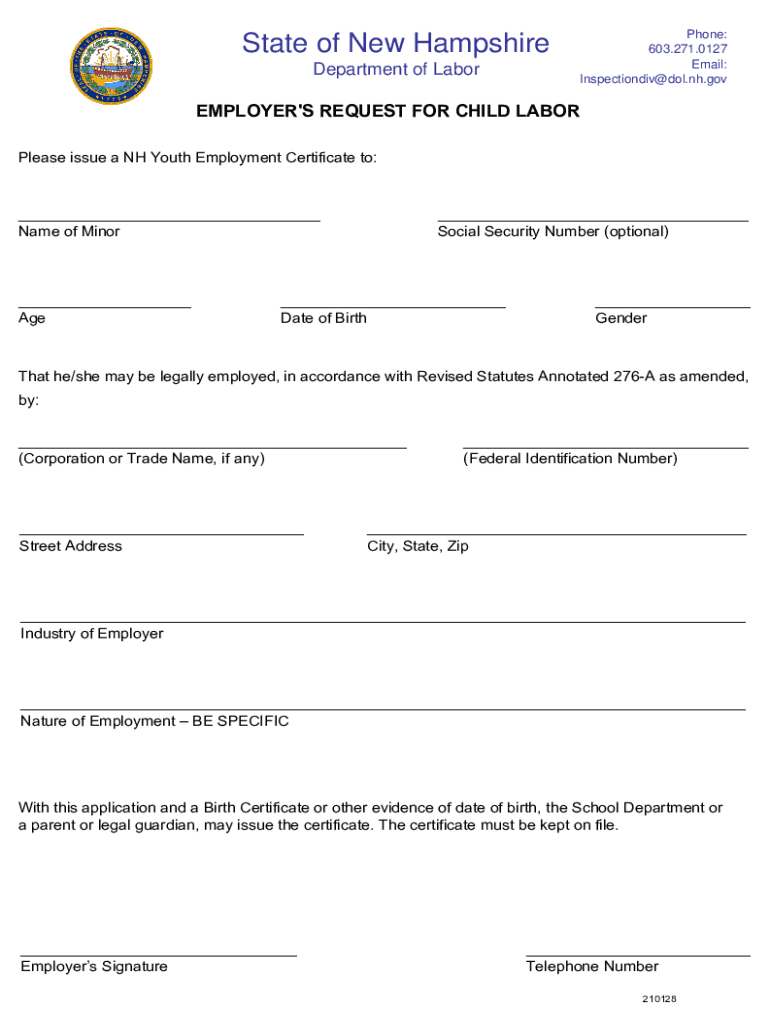
  1. Click ‘Get Form’ to open the employer's request in the editor.
  2. Begin by entering the name of the minor in the designated field. Ensure accuracy as this information is crucial for the Youth Employment Certificate.
  3. Next, input the age of the minor. This helps verify eligibility for employment under child labor laws.
  4. If desired, provide the Social Security Number; however, this is optional. Follow up with the date of birth to confirm age.
  5. Indicate the gender of the minor in the specified section.
  6. Fill in the corporation or trade name where applicable, followed by the street address and federal identification number of your business.
  7. Complete the city, state, and zip code fields accurately to ensure proper processing.
  8. Describe your industry and specify the nature of employment clearly to comply with legal requirements.
  9. Finally, sign and provide your telephone number at the bottom of the form before submitting it for processing.

Start using our platform today to streamline your document editing and form completion process for free!

See more employers request versions

We've got more versions of the employers request form. Select the right employers request version from the list and start editing it straight away!
Versions Form popularity Fillable & printable
2021 4.8 Satisfied (87 Votes)
be ready to get more

Complete this form in 5 minutes or less

Get form

Got questions?

We have answers to the most popular questions from our customers. If you can't find an answer to your question, please contact us.
Contact us
Difference Between Employees and Employers An employee is an individual who works for an employer in return for compensation, while an employer is a person or company that hires an employee to perform tasks. Employers compensate employees for their work. They may also get benefits like insurance and paid time off.
Employment verification is a request to prove your present or past employment status to a third party. A government agency, for example, may ask for employment verification to confirm a range of details such as your salary information, current employment status, job role, training or achievements and employment dates.
10 Most Common Employee Requests and Needs in Medium-Sized Businesses Vacation Request or Employee Time Off (HR) Question about benefits or employee information. Requests for work equipment or workspace adjustments. IT support requests, like fixing a broken computer or resetting a password.
Here are eight tips for how to say no to employee requests without sacrificing morale. Set yourself up for success. Acknowledge and clarify. Give a legitimate reason. Offer a plan B. Dont leave employees hanging. Express empathy without wavering. Provide feedback and express gratitude. Keep the bigger picture in mind.
The Employee Action Request (EAR) document is a State of California form (Std. 686) used in lieu of Internal Revenue Service (IRS) form W-4.

Security and compliance

At DocHub, your data security is our priority. We follow HIPAA, SOC2, GDPR, and other standards, so you can work on your documents with confidence.

Learn more
ccpa2
pci-dss
gdpr-compliance
hipaa
soc-compliance
be ready to get more

Complete this form in 5 minutes or less

Get form

People also ask

An employee request form is a document used by organizations to facilitate work-related requests either by employees to HR managers or by the HR managers to their required reporting channels.
An employer is an individual (a person, company, or organization) that hires another individual (an employee), pays the employee a salary or wage, and has the power to control the employees work duties; an individual who employs and supervises an employee.
What are Employee Requests? During their employment, employees raise various types of inquiries, needs, requests, and submissions. These encompass a broad range of requests directed to HR, IT, facilities, or managers, including service requests, incident reports, leave requests, and more.

Related links