




Here's how it works



How to use or fill out mv523 with our platform

- Click ‘Get Form’ to open the mv523 application in the editor.
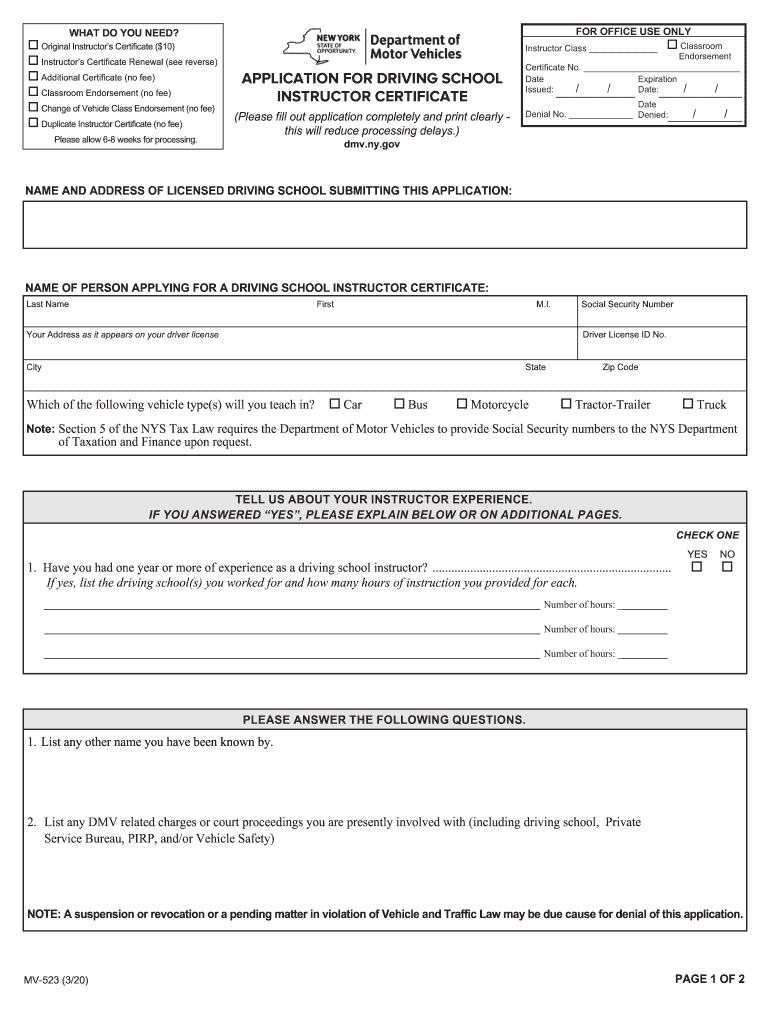
- Begin by filling in your personal information, including your name, address, and Social Security number. Ensure that all details match your driver license to avoid processing delays.
- Indicate the type of vehicle you will teach by checking the appropriate boxes for Car, Bus, Motorcycle, Tractor-Trailer, or Truck.
- Provide details about your instructor experience. If you have more than one year of experience, check 'YES' and list the driving schools where you worked along with the number of hours taught.
- Complete any additional questions regarding previous names or DMV-related charges. Be thorough as this information is crucial for your application.
- Review the agreement section carefully before signing. Your signature confirms that you understand and agree to the terms outlined in the application.
- Finally, ensure all required documents are attached before submitting your application to the NYS Department of Motor Vehicles.
Start using our platform today to fill out your mv523 form easily and for free!
It's free
Got questions?
How can I send my mv 523 for eSignature?
Upload your mv 523 to DocHub (after you’ve created an account for this). If you need to fill out fields in it, use proper tools from the upper pane. For instance, add Signature Fields, assign each to a particular party, and click on Sign → Request signatures from others. Customize your message for your recipients and click Send Request. You can also send your document by fax or as a Signing link instead of using email (you’ll locate these options by navigating to the Menu → Send)
How do you edit mv523 form from Google Drive?
If you store your files in Google Drive, there is no need to download your mv523 form on the computer and upload it back to our editor. A significantly easier way is to install a browser extension developed by DocHub to simplify this flow. The extension allows editing PDFs in your web browser. Alternatively, you can integrate your DocHub and Gmail accounts for more efficient editing.
How to become a driving instructor in NYS?
Is it hard to be a driving instructor?
Is it stressful being a driving instructor?
Security and compliance
At DocHub, your data security is our priority. We follow HIPAA, SOC2, GDPR, and other standards, so you can work on your documents with confidence.
Learn more




