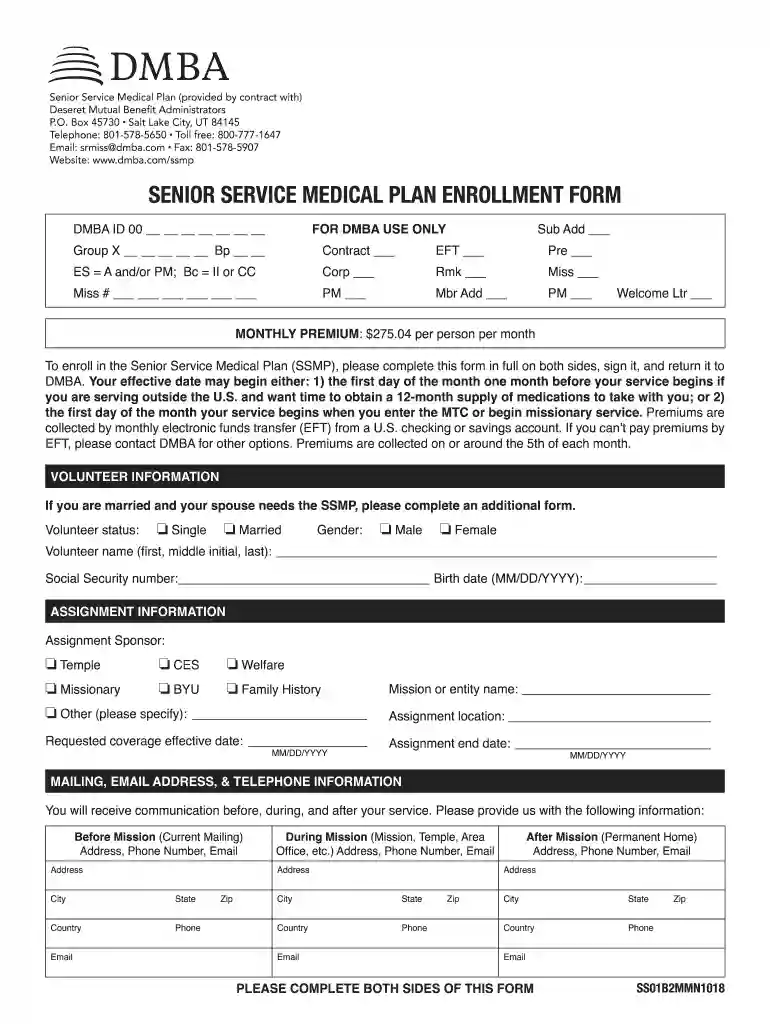
Senior Service Medical Plan (provided by contract with) 2026

Get Form
dmba com Preview on Page 1

Here's how it works

01. Edit your dmba com online
Type text, add images, blackout confidential details, add comments, highlights and more.

02. Sign it in a few clicks
Draw your signature, type it, upload its image, or use your mobile device as a signature pad.

03. Share your form with others
Send it via email, link, or fax. You can also download it, export it or print it out.

How to use or fill out Senior Service Medical Plan (provided by contract with) with our platform

Form edit decoration
9.5
Ease of Setup
DocHub User Ratings on G2
9.0
Ease of Use
DocHub User Ratings on G2
  1. Click ‘Get Form’ to open the Senior Service Medical Plan enrollment form in the editor.
  2. Begin by filling out your personal information in the Volunteer Information section. Include your name, Social Security number, and birth date. Make sure to select your marital status and gender.
  3. Next, move to the Assignment Information section. Indicate your assignment sponsor and provide details about your mission or entity name, assignment location, and effective dates for coverage.
  4. In the Mailing, Email Address, & Telephone Information section, enter your current mailing address along with contact details for during and after your mission.
  5. Complete the Contact Person Information section by providing a trustworthy individual’s contact details who can be reached during your service.
  6. Review the Post-Mission Transitional Coverage Information and mark your choice regarding this coverage option. Initial where indicated.
  7. Finally, read through the Terms & Conditions carefully. Sign and date at the bottom of the form to acknowledge your agreement before submitting it back to DMBA.

Start using our platform today to easily complete your Senior Service Medical Plan form online for free!

See more Senior Service Medical Plan (provided by contract with) versions

We've got more versions of the Senior Service Medical Plan (provided by contract with) form. Select the right Senior Service Medical Plan (provided by contract with) version from the list and start editing it straight away!
Versions Form popularity Fillable & printable
2018 4.8 Satisfied (142 Votes)
2016 4 Satisfied (29 Votes)
be ready to get more

Complete this form in 5 minutes or less

Get form

Got questions?

We have answers to the most popular questions from our customers. If you can't find an answer to your question, please contact us.
Contact us
Are senior members prohibited from serving any kind of mission (including away from home) if they are over age 70? Senior members of any age can serve as missionaries or service missionaries.
Theyre known as network providers or in-network providers. A provider that isnt contracted with the plan is called an out-of-network provider.
Yes. Senior couples or single seniors (age 40 and older) can serve as full-time missionaries (away from home). Additionally, any members age 26 or older with a current temple recommend may serve as senior service missionaries (living at home) regardless of whether they are married or if their spouse is able to serve.
Single senior missionaries can choose to serve for 6, 12, 18 or 23 months. Along with now allowing single men over 40 with no dependents at home to serve missions, the roles of single sisters have been expanded to include serving in visitors centers, historic sites and employment centers.
Missionaries can be single men between the ages of 18 and 25, single women over the age of 19 or retired couples.

Security and compliance

At DocHub, your data security is our priority. We follow HIPAA, SOC2, GDPR, and other standards, so you can work on your documents with confidence.

Learn more
ccpa2
pci-dss
gdpr-compliance
hipaa
soc-compliance
be ready to get more

Complete this form in 5 minutes or less

Get form