Type text, add images, blackout confidential details, add comments, highlights and more.
02. Sign it in a few clicks
Draw your signature, type it, upload its image, or use your mobile device as a signature pad.
03. Share your form with others
Send alterations form template via email, link, or fax. You can also download it, export it or print it out.
How to Use or Fill Out the Alterations Form Online
Ease of Setup
DocHub User Ratings on G2
Ease of Use
DocHub User Ratings on G2
Click ‘Get Form’ to open it in the editor.
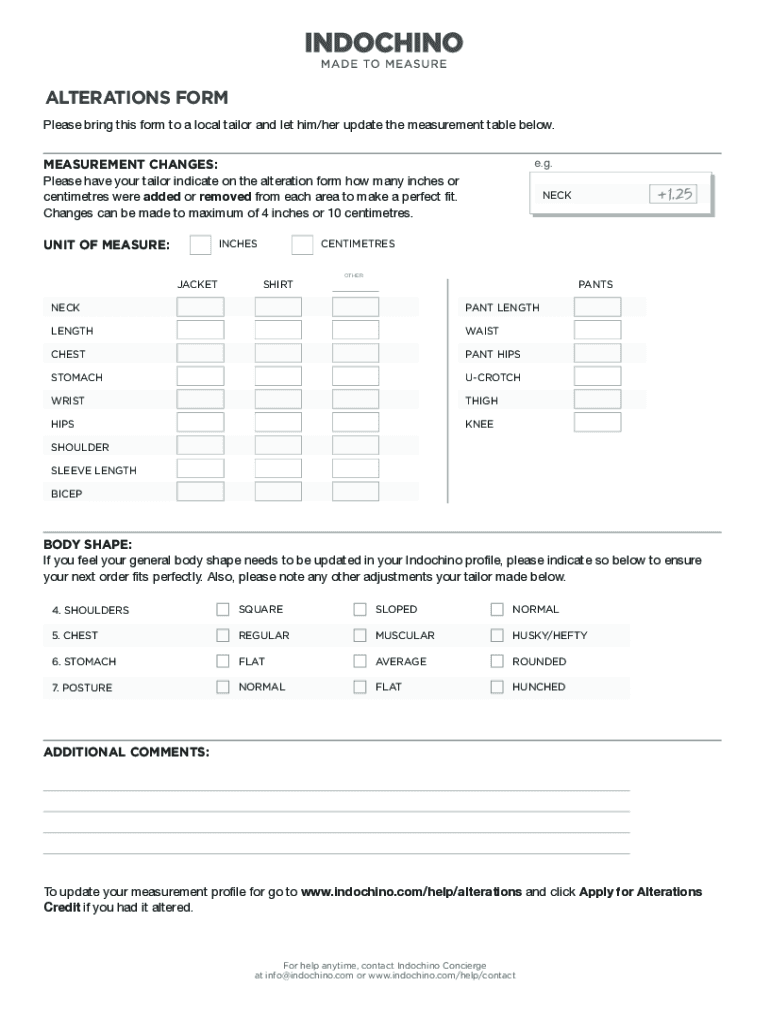
Begin by reviewing the measurement changes section. Have your tailor fill in how many inches or centimeters were added or removed for each area listed, such as neck, jacket, shirt, and pants.
Select the unit of measure (inches or centimeters) that your tailor used for the alterations.
In the body shape section, indicate any updates needed for your profile based on your tailor's recommendations. Choose from options like square, sloped, normal for shoulders and regular, muscular, husky/hefty for chest.
Provide any additional comments regarding adjustments made by your tailor in the designated field.
Once completed, save your form and follow instructions to apply for alterations credit if applicable.
Start filling out your alterations form online today for free and ensure a perfect fit!
Alteration form pdfAlteration form onlineArkansas affidavit of alteration formStatement of Correction formFree Affidavit of Correction FormVehicle correction FormDFA formsDealer correction form
Security and compliance
At DocHub, your data security is our priority. We follow HIPAA, SOC2, GDPR, and other standards, so you can work on your documents with confidence.
Use this form only to request an alteration to any of the requirements you are required to complete for graduation (core, major, concentration, minor orRead more
The applicant shall submit three copies of the plans with changes for review. If the changes are DocHub or beyond the scope of the original permit,Read more
Feb 19, 2023 Alteration essence allows a magic user to make temporary changes to their biology into either a template from a contracted monster, or a featureRead more
Cookie consent notice
This site uses cookies to enhance site navigation and personalize your experience.
By using this site you agree to our use of cookies as described in our Privacy Notice.
You can modify your selections by visiting our Cookie and Advertising Notice.