




Here's how it works



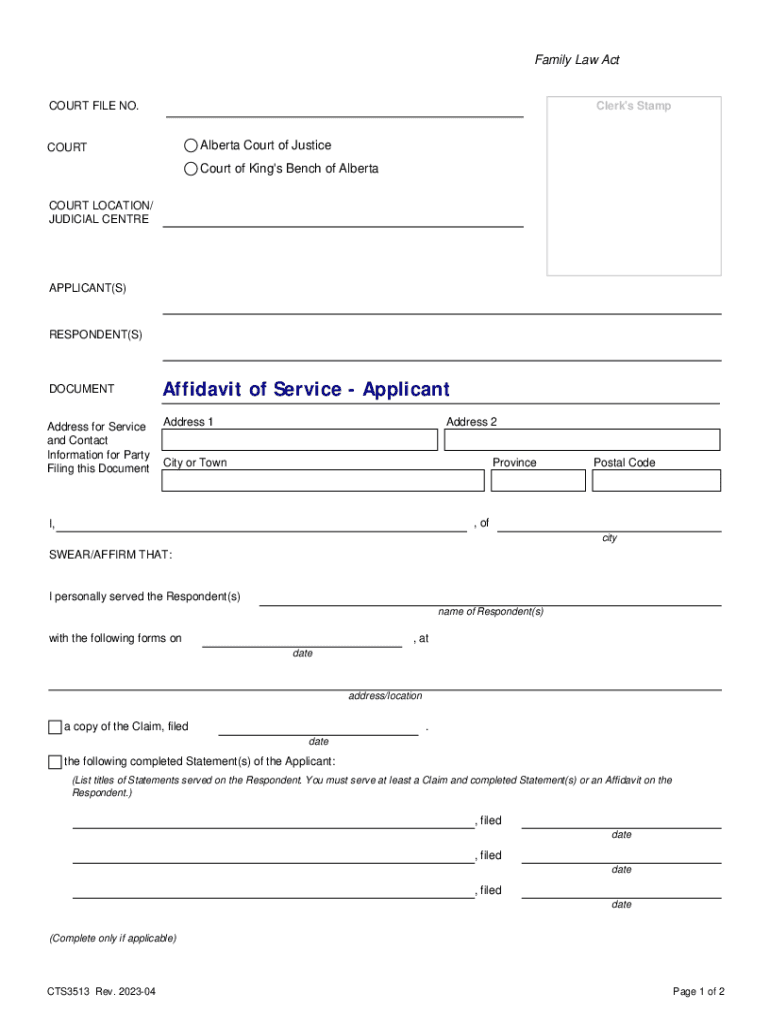
How to use or fill out Affidavit of Service - Applicant This document is used in the Provincial Court and Court of King's B

- Click ‘Get Form’ to open it in the editor.
- Begin by entering the COURT FILE NO. and Clerk's Stamp at the top of the form.
- Fill in the COURT LOCATION/JUDICIAL CENTRE where your case is being heard.
- Provide the names of the APPLICANT(S) and RESPONDENT(S) clearly.
- Complete your Address for Service and Contact Information, ensuring accuracy for effective communication.
- In the section stating 'I personally served the Respondent(s)', input the name(s) of the Respondent(s) and date of service.
- List all documents served, including Claims and Statements, along with their respective filing dates.
- If applicable, include any additional documents served on the Respondent with their filing dates.
- Finally, ensure you have a witness sign off on your affidavit before submitting it to court.
Start using our platform today to complete your Affidavit of Service efficiently and for free!
It's free
See more Affidavit of Service - Applicant This document is used in the Provincial Court and Court of King's B versions
Got questions?
What do I need to sign my Affidavit of Service - Applicant This document is used in the Provincial Court and Court of King's B electronically?
Electronic document approval requires a software solution that works in compliance with data protection and eSignature laws. DocHub is a great tool for that, because it fulfills all the aforementioned requirements. Whatever method you like to sign your Affidavit of Service - Applicant This document is used in the Provincial Court and Court of King's B in DocHub, your electronic signature will be legally binding and court-admissible.
Can I sign my Affidavit of Service - Applicant This document is used in the Provincial Court and Court of King's B while I edit it?
If you edit your Affidavit of Service - Applicant This document is used in the Provincial Court and Court of King's B with DocHub, you will not need to look for other software or solutions to sign it. An electronic signature is a component of DocHub’s extensive editing toolset, which allows you to apply changes in your form without switching between websites. Just complete your form, double-check the correctness of the information and place your electronic signature at the end to make it submission-ready in minutes.
What is an Affidavit in support of substitutional service in Alberta?
Who can serve legal papers in Alberta?
What is an order to show cause in family court NY?
Security and compliance
At DocHub, your data security is our priority. We follow HIPAA, SOC2, GDPR, and other standards, so you can work on your documents with confidence.
Learn more




