




Here's how it works



How to use or fill out The RCH Specialist Clinics are - The Royal Children's with our platform

- Click ‘Get Form’ to open it in the editor.
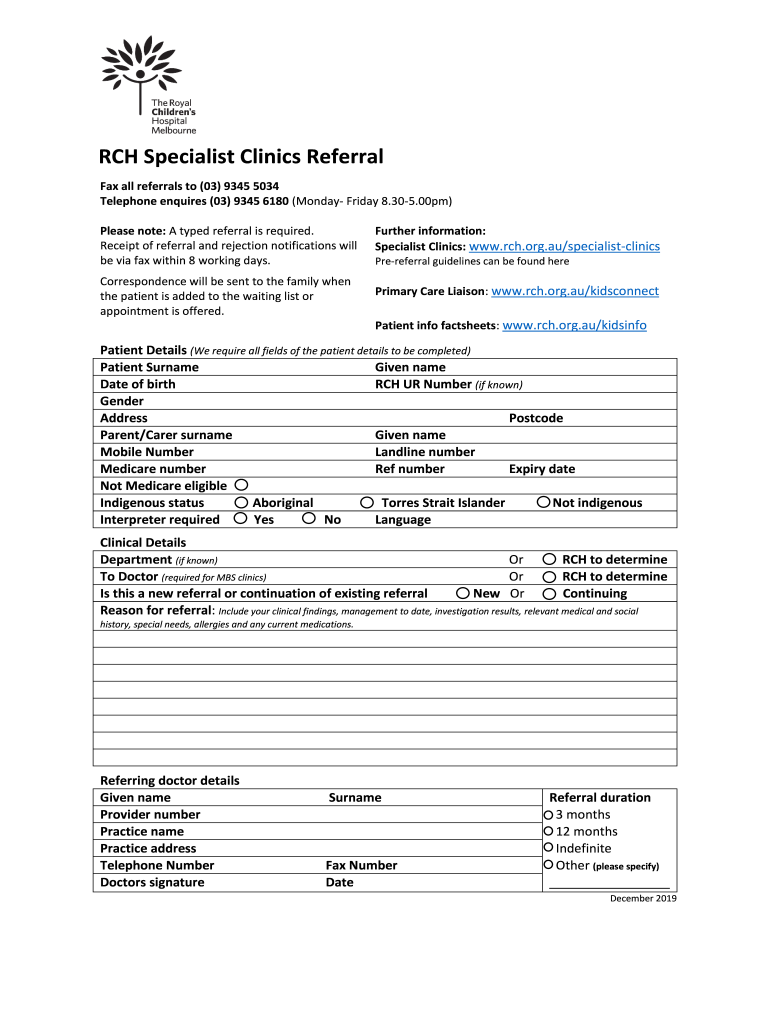
- Begin by filling out the 'Patient Details' section. Ensure all fields are completed, including Patient Surname, Given Name, Date of Birth, and Gender. If you have the RCH UR Number, include that as well.
- Next, provide the Parent/Carer details. Fill in their surname, given name, mobile number, landline number, and Medicare number if applicable.
- In the 'Clinical Details' section, specify whether this is a new referral or a continuation. Include comprehensive information regarding the reason for referral along with any clinical findings and relevant medical history.
- Complete the 'Referring Doctor Details' by entering your name, provider number, practice name and address, telephone number, and signature.
- Finally, indicate the referral duration by selecting one of the options provided: 3 months, 12 months, indefinite or specify another duration.
Start using our platform today to streamline your document editing and submission process for free!
It's free
See more The RCH Specialist Clinics are - The Royal Children's versions
Got questions?
Is it secure to sign my The RCH Specialist Clinics are - The Royal Children's electronically?
You need to use only trusted software solutions with strong data protection compliance to sign your paperwork electronically. DocHub is just the type of service you need! It stores data on Amazon Web Servers and complies with all essential security standards and eSignature regulations, so it’s a trusted way to electronically sign your The RCH Specialist Clinics are - The Royal Children's or other paperwork using this tool.
How do you modify The RCH Specialist Clinics are - The Royal Children's from Google Drive?
If you store your paperwork in Google Drive, there is no need to download your The RCH Specialist Clinics are - The Royal Children's on the computer and upload it back to our editor. A significantly easier way is to install a browser extension developed by DocHub to simplify this flow. The extension allows editing PDFs in your web browser. Alternatively, you may integrate your DocHub and Gmail accounts for more efficient modifying.
How many beds does Royal childrens hospital Melbourne have?
How many floors is the Royal Childrens hospital Melbourne?
How many beds does RCH Melbourne have?
Security and compliance
At DocHub, your data security is our priority. We follow HIPAA, SOC2, GDPR, and other standards, so you can work on your documents with confidence.
Learn more




