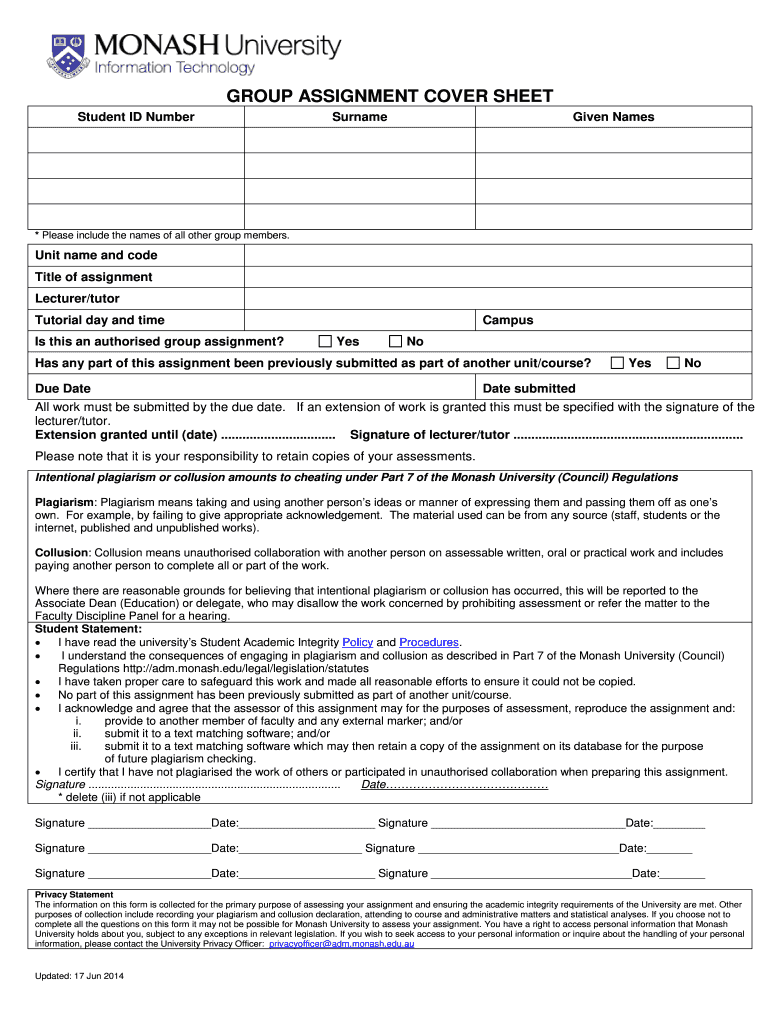
GROUP ASSIGNMENT COVER SHEET 2026

Get Form
wsu cover sheet Preview on Page 1

Here's how it works

01. Edit your wsu cover sheet online
Type text, add images, blackout confidential details, add comments, highlights and more.
02. Sign it in a few clicks
Draw your signature, type it, upload its image, or use your mobile device as a signature pad.
03. Share your form with others
Send wsu group cover sheet via email, link, or fax. You can also download it, export it or print it out.

How to use or fill out GROUP ASSIGNMENT COVER SHEET with our platform

Form edit decoration
9.5
Ease of Setup
DocHub User Ratings on G2
9.0
Ease of Use
DocHub User Ratings on G2
  1. Click ‘Get Form’ to open the GROUP ASSIGNMENT COVER SHEET in the editor.
  2. Begin by entering your Student ID Number, Surname, and Given Names. Ensure you include the names of all other group members for proper identification.
  3. Fill in the Unit name and code, along with the Title of assignment. This information is crucial for your lecturer/tutor to assess your submission accurately.
  4. Indicate the Lecturer/Tutor's name and select the Tutorial day and time. This helps in organizing submissions effectively.
  5. Answer whether this is an authorized group assignment by selecting 'Yes' or 'No'.
  6. Complete the Campus field and indicate if any part of this assignment has been previously submitted as part of another unit/course.
  7. Enter the Due Date and Date submitted. If an extension is granted, ensure to have it signed by your lecturer/tutor.
  8. Review the Student Statement section carefully, ensuring you understand academic integrity policies before signing and dating it.

Start using our platform today to streamline your document editing experience for free!

See more GROUP ASSIGNMENT COVER SHEET versions

We've got more versions of the GROUP ASSIGNMENT COVER SHEET form. Select the right GROUP ASSIGNMENT COVER SHEET version from the list and start editing it straight away!
Versions Form popularity Fillable & printable
2014 4.8 Satisfied (49 Votes)
2005 4.7 Satisfied (37 Votes)
be ready to get more

Complete this form in 5 minutes or less

Get form

Got questions?

We have answers to the most popular questions from our customers. If you can't find an answer to your question, please contact us.
Contact us

You need to use only trustworthy software solutions with strong security compliance to approve your documents electronically. DocHub is just the type of software you need! It stores data on Amazon Web Servers and complies with all necessary security standards and eSignature laws, so it’s a trusted way to eSign your wsu assignment cover sheet or other documents using this tool.

With DocHub, you have several convenient ways to edit your wsu cover sheet group online. You can drag and drop the form and modify it directly at the DocHub website or use our browser extension to fill out your form immediately. On top of that, you can modify your PDF on your smartphone, as DocHub works with all the accessible mobile platforms.

Title The name of the document. Author Name and any other relevant information about the person, people or organisation that produced the document. Date A date of creation or submission. Course or company information For academic cover pages, the name of the course, instructor and institution.
A cover page (also known as a title page) is the first page of a paper or report that lists basic information, such as the title, author(s), course name, instructor, date, and sometimes the name of the institution.
An assignment cover sheet is a paper used by students when completing assignments at university for their courses. These coversheets generally contain metadata about the assignment (such as the name of the student and the course number). This aids the efficient handling of assignments.